In short
What is a good technical support team OKR?
A good technical support team OKR pairs one clear objective with two to four measurable key results the team can score every week. It describes an outcome rather than a list of activities, sets targets that are ambitious but scoreable, and is reviewed weekly so blockers surface before the quarter gets away from the team.
These Technical Support Team OKR templates are meant to help teams move from ideas and projects to measurable business outcomes. Use them as a starting point, then tailor the metrics and initiatives to the reality of your company.
This page shows the top 8 of 8 templates for technical support team, with internal links to related categories and guidance for adapting the examples to your team.
Last template update in this category: 2024-11-12What this category is for
- Teams that need a clearer operating rhythm for technical support team work.
- Managers who want examples they can adapt into outcome-focused quarterly plans.
- Leaders comparing adjacent categories before choosing the best OKR direction.
Best outcomes to track
- Technical Support Team priorities tied to measurable business outcomes.
- Weekly check-ins that surface blockers before they become delivery issues.
- Better alignment between initiatives and the metrics that matter.
Related categories
Use these linked categories to explore adjacent planning areas and strengthen the internal topic cluster around technical support team.
Technical Support Team OKR examples and templates
Start with these top 8 examples from 8 total templates in this category, then adapt the metrics and initiatives to fit your team's constraints and operating cadence.
OKRs to enhance efficiency in outage response
 ObjectiveEnhance efficiency in outage response
 KRTrain 100% of service team on rapid problem-solving techniques
 Monitor progress and ensure completion of training
- Identify suitable rapid problem-solving training programs
- Schedule training sessions for all service team members
- KRImplement a streamlined communication system for outage reporting by end of quarter
- Research potential streamlined reporting solutions
- Identify current communication flaws in outage reporting
- Implement selected streamlined communication system
- KRDecrease the average outage resolution time by 15%
- Update or enhance existing outage resolution tools
- Implement improved troubleshooting training for technical support staff
- Streamline outage detection and reporting processes
OKRs to enhance the reliability and availability of end-user hardware
- ObjectiveEnhance the reliability and availability of end-user hardware
- KRImplement a robust hardware replacement process to reduce downtime to under 24 hours
- Develop clear hardware failure protocols for swift replacement
- Establish a solid partnership with hardware suppliers for rapid replacement parts
- Train staff on quick detection and resolution of hardware problems
- KRDecrease hardware failure rate by 30% through regular maintenance and updates
- Implement a regular schedule for hardware checks and maintenance
- Install latest software and firmware updates regularly
- Train staff on updates and basic hardware troubleshooting
- KRIncrease hardware uptime to 99.9% across all end-user devices
- Establish a rapid response technical support team
- Upgrade outdated hardware to minimize failures
- Implement regular maintenance schedules for all hardware devices
OKRs to successful migration of accounts to the new portal
- ObjectiveSuccessful migration of accounts to the new portal
- KRTrain 90% of customers on the new portal's usage and features by end of the quarter
- Follow up with customers post-webinar to assess learning and reinforce training
- Develop comprehensive training materials for the new portal's usage and features
- Schedule and conduct training webinars for customers on new portal
- KRAchieve 70% accounts migration within the first month of the quarter
- Monitor migration process, rectify any issues promptly
- Identify all transition-ready accounts for migration
- Develop and implement a comprehensive migration strategy
- KRMinimize migration-related customer complaints to less than 5%
- Provide detailed migration guide to customers
- Implement comprehensive pre-migration customer communication
- Enhance post-migration customer support services
OKRs to implement Cloud-Ready Applications
- ObjectiveImplement Cloud-Ready Applications
- KRAchieve 99% uptime in cloud environment across all migrated applications
- Conduct regular preventive maintenance and system audits
- Implement redundant systems to prevent a single point of failure
- Monitor and resolve issues promptly with a 24/7 technical support team
- KRComplete successful migration of 1 pilot application to cloud platform
- KRDevelop and document cloud-focused architecture for 3 current key applications
- Develop cloud-focused architecture for each application
- Identify three key applications for cloud-based transformation
- Document the newly developed architectures
OKRs to ensure successful implementation and utilization of the ticket system
- ObjectiveEnsure successful implementation and utilization of the ticket system
- KRComplete ticket system setup and integration by 25% of the quarter
- Identify necessary software and hardware for ticket system setup
- Initiate system integration procedures
- Monitor and evaluate progress towards completion
- KRTrain 75% of staff members on the use and benefits of the ticket system
- Develop comprehensive, easy-to-understand training materials
- Identify staff members not familiar with the ticket system
- Schedule and conduct training sessions regularly
- KRAchieve at least 60% user adoption rate of the ticket system within the quarter
- Train all employees on the benefits and use of the ticket system
- Implement incentives for consistent ticket system usage
- Regularly monitor and report on user adoption rates
OKRs to successfully transition all on-demand courses to the new LMS platform
- ObjectiveSuccessfully transition all on-demand courses to the new LMS platform
- KREnsure that all on-demand courses are fully functional and accessible on the new LMS
- Review all on-demand courses and identify any functionality or accessibility issues on the new LMS
- Conduct accessibility testing to ensure all on-demand courses are accessible to all users
- Provide necessary training and support to instructors to ensure smooth transition on the new LMS
- Update and fix any identified issues to ensure all on-demand courses are fully functional
- KRTrain and support instructors and course administrators to effectively use the new LMS
- Provide comprehensive training sessions on how to navigate and utilize the new LMS
- Offer ongoing technical support and troubleshooting assistance for instructors and course administrators
- Facilitate regular feedback sessions to gather insights and address any challenges faced by users
- Develop user-friendly documentation and guides to help instructors and course administrators optimize the LMS
- KRAchieve a satisfaction rate of at least 90% from users with the new LMS experience
- Conduct user feedback surveys to gather insights on satisfaction with the new LMS experience
- Analyze user feedback and identify key pain points to address for improvement
- Regularly monitor and track satisfaction rates to ensure continuous improvement of the LMS experience
- Implement necessary updates and enhancements based on user feedback to enhance satisfaction
- KRMigrate and validate content from existing courses onto the new LMS
OKRs to enhance Webhooks Experience and Address Technical Debt
- ObjectiveEnhance Webhooks Experience and Address Technical Debt
- KRIncrease webhook delivery success rate by 10% through optimized error handling
- Enhance webhook monitoring and alerting system to promptly identify and investigate delivery failures
- Improve error response messaging to provide clear instructions for troubleshooting and resolving issues
- Analyze webhook error logs to identify common errors and create specific error handling strategies
- Implement automated retry mechanism to resend failed webhook deliveries in case of temporary errors
- KRReduce webhook response time by 20% by streamlining and optimizing the underlying technology
- KRReduce technical debt by resolving 50% of identified issues through prioritized backlog refinements
- KRImplement automated testing for webhooks to ensure compatibility and reduce regression issues
- Integrate the automated testing framework with the existing webhook infrastructure
- Continuously monitor and analyze test results to identify and address any compatibility issues
- Research and select a suitable automated testing framework for webhooks
- Develop a comprehensive test suite for webhooks to cover all possible scenarios
OKRs to improve Stability of E-commerce Platform
- ObjectiveImprove Stability of E-commerce Platform
- KRAchieve a 95% uptime rate for payment processing services by collaborating with reliable payment service providers
- KRDecrease platform downtime by 20% through infrastructure upgrades and proactive monitoring
- Upgrade critical infrastructure components to ensure better performance and increased reliability
- Establish regular maintenance and testing schedules to minimize unexpected downtime occurrences
- Implement improved monitoring systems to detect potential issues and address them proactively
- Conduct infrastructure analysis to identify areas requiring upgrades for minimizing downtime
- KRIncrease average page load speed by 15% through performance optimization techniques
- Optimize and compress images to reduce their file sizes
- Enable cache settings to store static content and speed up page loading
- Reduce server response time by optimizing database queries and code efficiency
- Minimize the number of HTTP requests by combining CSS and JavaScript files
- KRReduce customer support tickets related to technical issues by 25% through bug fixes and system improvements
- Conduct thorough analysis of customer support tickets to identify common technical issues
- Collaborate with development team to prioritize and address identified bugs for resolution
- Implement regular system maintenance and updates to prevent potential technical issues
- Enhance user interface and provide clear instructions for self-help troubleshooting on customer portal
How to use Technical Support Team OKRs well
Strong OKRs keep the team focused on measurable outcomes instead of a long task list. That means picking a clear objective, limiting the number of competing priorities, and reviewing progress every week.
Use Technical Support Team OKRs to define what success looks like this quarter, then track them weekly so the team can quickly spot blockers, learn, and adjust execution.
Choosing software to run Technical Support Team OKRs?
Move from technical support team examples to execution with sourced comparisons from The OKR Software Benchmark.
- Best OKR software rankingSee the overall verdict and the criteria behind each platform score.
- OKR software pricing comparisonCompare verified prices, minimum commitments, and costs at different team sizes.
- Benchmark methodologyReview the published scoring model, source standards, and conflict-of-interest policy.
Related OKR template categories
If you are building a broader plan, these related categories can help you connect technical support team work to adjacent company priorities.
- leadership OKR templates
- strategic planning OKR templates
- operations OKR templates
- operations team OKR templates
- sales OKR templates
- sales team OKR templates
More OKR templates to explore
- OKRs to promote and cultivate a diverse and inclusive workplace culture
- OKRs to enhance team productivity with collaborative efforts
- OKRs to enhance teamwork across different departments
- OKRs to successfully migrate virtual machines from Linux 7 to Linux 8
- OKRs to become thin and improve physical appearance
- OKRs to increase number of signups through referral program
Not seeing what you need?
Use Tability AI to generate OKRs based on a prompt
Tability allows you to describe your goals in a prompt, and generate a fully editable OKR template in seconds.
Use Tability feedback to improve existing OKRs
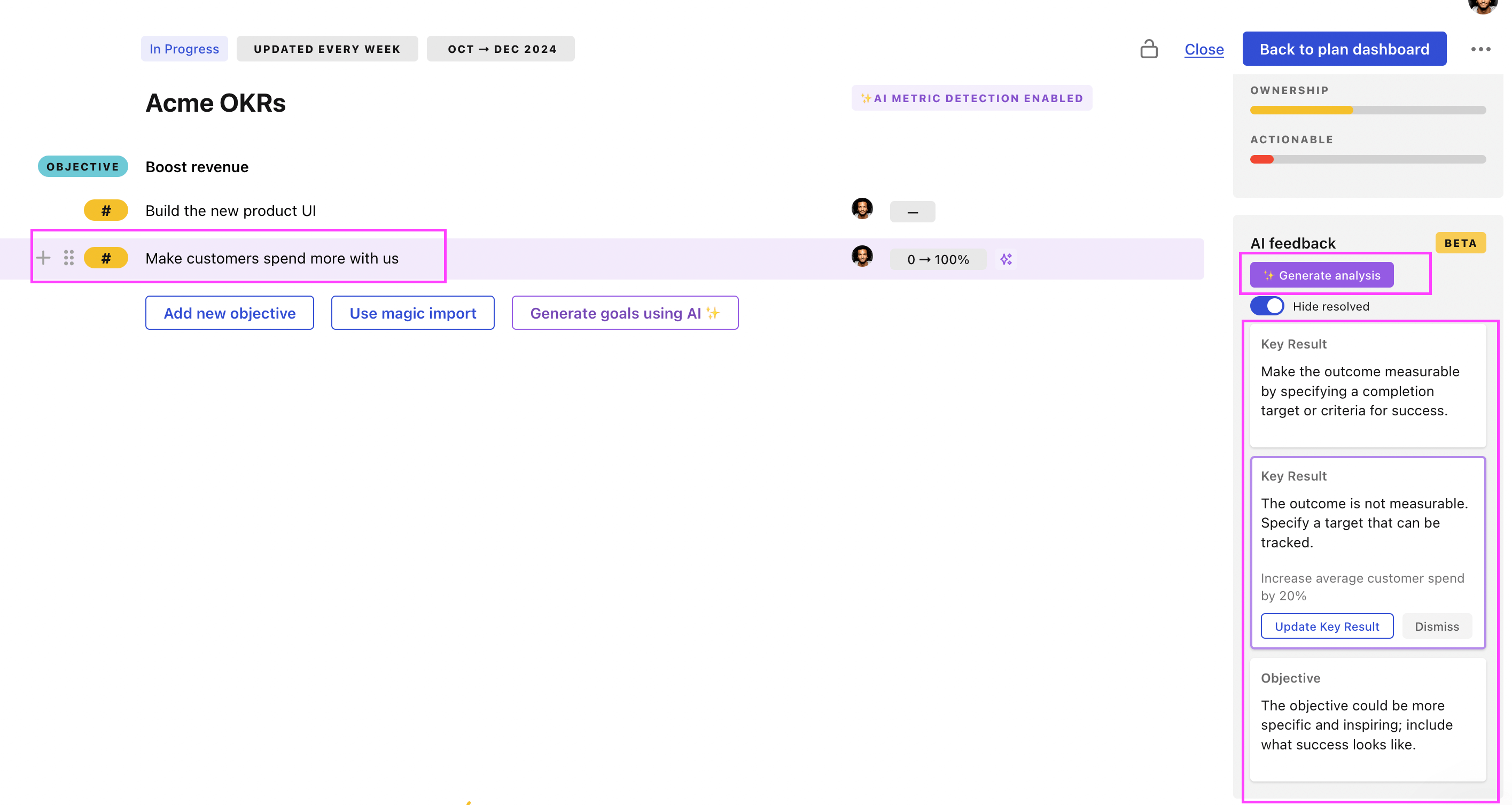
You can also use Tability's AI feedback to improve your OKRs if you already have existing goals. Just import them to the platform and click on the Generate analysis button.
Tability will scan your OKRs and offer different suggestions to improve them. This can range from a small rewrite of a statement to make it clearer to a complete rewrite of the entire OKR.