In short
What is a good ux ui designer OKR?
A good ux ui designer OKR pairs one clear objective with two to four measurable key results the team can score every week. It describes an outcome rather than a list of activities, sets targets that are ambitious but scoreable, and is reviewed weekly so blockers surface before the quarter gets away from the team.
These UX UI Designer OKR templates are meant to help teams move from ideas and projects to measurable business outcomes. Use them as a starting point, then tailor the metrics and initiatives to the reality of your company.
This page shows the top 10 of 12 templates for ux ui designer, with internal links to related categories and guidance for adapting the examples to your team.
Last template update in this category: 2025-04-22What this category is for
- Teams that need a clearer operating rhythm for ux ui designer work.
- Managers who want examples they can adapt into outcome-focused quarterly plans.
- Leaders comparing adjacent categories before choosing the best OKR direction.
Best outcomes to track
- UX UI Designer priorities tied to measurable business outcomes.
- Weekly check-ins that surface blockers before they become delivery issues.
- Better alignment between initiatives and the metrics that matter.
Related categories
Use these linked categories to explore adjacent planning areas and strengthen the internal topic cluster around ux ui designer.
UX UI Designer OKR examples and templates
Start with these top 10 examples from 12 total templates in this category, then adapt the metrics and initiatives to fit your team's constraints and operating cadence.
OKRs to drive significant business growth through innovative design
 ObjectiveDrive significant business growth through innovative design
 KRDecrease customer churn rate by 10% by improving product design
 Monitor and analyze new customer churn rates
- Implement design improvements based on customer feedback
- Identify common complaints about current product design
- KRIncrease our conversion rate by 15% through website UX/UI enhancements
- Conduct comprehensive user testing for website UX/UI
- Update website design based on user feedback
- Implement A/B testing for different design layouts
- KRGenerate 20% more leads through impactful marketing collateral designs
- Test different design variants to identify best-performing
- Consult design experts to enhance current collateral
- Research successful competition for effective design inspiration
OKRs to consolidate all visitor forms into a single accessible location
- ObjectiveConsolidate all visitor forms into a single accessible location
- KRAchieve a 50% increase in visitor form completion after unification
- Implement user-friendly forms with simple, concise instructions
- Develop targeted marketing campaigns motivating form completion
- Analyze existing form data to identify barriers to completion
- KRIdentify and compile all existing separate visitor forms by 15% each week
- Locate all existing separate visitor forms
- Increase compilation rate by 15% weekly
- Compile located visitor forms systematically
- KRDevelop a user-friendly, centralized interface for all forms with 0 errors
- Construct centralized interface integrating all forms
- Conduct thorough UI/UX research for user-friendly interface design
- Implement rigorous testing routines to ensure zero errors
OKRs to enhance user engagement on our app
- ObjectiveEnhance user engagement on our app
- KRImplement 2 new user engagement features
- Beta test features for user feedback and adjustments
- Develop and code the selected features
- Identify potential features to increase user engagement
- KRIncrease daily active user count by 20%
- Implement a referral program to drive user growth
- Develop engaging content to attract and retain users
- Improve the user interface to enhance user experience
- KRReduce app churn rate by 15%
- Conduct regular user feedback surveys and implement suggestions
- Improve app's user interface for better user experience
- Initiate personalized marketing campaigns to retain users
OKRs to increase customer acquisition and boost account productivity
- ObjectiveIncrease customer acquisition and boost account productivity
- KRAchieve 20% rise in new customer sign-ups
- Introduce incentives for new signups
- Improve website interface for easy and quick signups
- Launch social media marketing campaigns
- KRDecrease inactive accounts by 10% through engagement strategies
- Implement personalized email campaigns targeting inactive users
- Offer exclusive incentives to reactivate dormant accounts
- Enhance user experience to encourage re-engagement
- KRImprove the weekly usage rate of active accounts by 15%
- Improve user experience to enhance account engagement
- Introduce compelling weekly content or features
- Incentivize more frequent logins with weekly bonuses or rewards
OKRs to improve mobile user experience for our ecommerce website
- ObjectiveImprove mobile user experience for our ecommerce website
- KRIncrease mobile navigation efficiency by reducing clicks by 20%
- Improve search capabilities for user-friendly results
- Implement quick-access shortcuts for key functions
- Simplify menus to decrease depth and complexity
- KRDecrease mobile page load time by 30%
- Minimize use of heavy code and unnecessary plugins
- Implement effective caching and content delivery network (CDN)
- Optimize images for faster loading
- KRImprove mobile conversion rate by 15%
- Optimize site for mobile usability and readability
- Enhance mobile site speed and overall user experience
- Implement user-friendly mobile checkout process
OKRs to enhance the accessibility and utility of Customer Care Applications
- ObjectiveEnhance the accessibility and utility of Customer Care Applications
- KRDecrease application error reports by 30%
- Establish stronger error tracking and fixing systems
- Train development team on advanced debugging methods
- Implement rigorous software testing before product launch
- KRIncrease app user engagement by adding two new customer-centric features
- Implement and promote the new features within the app
- Identify customer needs through surveys or feedback tools
- Design two new customer-centric features based on the identified needs
- KRImprove app user interface for 25% higher customer satisfaction rate
- Conduct user testing to identify areas for interface improvement
- Implement design changes based on user testing feedback
- Monitor user reviews and satisfaction metrics post-update
OKRs to boost customer acquisition for our Marketplace Reporting App
- ObjectiveBoost customer acquisition for our Marketplace Reporting App
- KRIncrease online advertising conversion rate by 30%
- Increase ad relevance through keywords and SEO
- Implement A/B testing to optimize ad presentations
- Analyze audience data to target high-conversion demographics
- KRBoost website visits by 40% through enhanced SEO practices
- Implement relevant keywords to improve website’s on-page SEO
- Enhance website loading speed and mobile optimization
- Build backlinks through guest posting on related blogs
- KROptimize app onboarding process to improve conversion rate by 25%
- Streamline sign-up process and reduce unnecessary steps
- Implement clear, interactive tutorials for first-time app users
- Regularly test and update onboarding UX/UI for user-friendliness
OKRs to boost customer interaction on the homepage
- ObjectiveBoost customer interaction on the homepage
- KRDecrease bounce rate on homepage by 15%
- Redesign homepage for ease of navigation and aesthetic appeal
- Optimize page load times for better user experience
- Implement engaging, relevant content on the homepage
- KRIncrease the average time users spend on homepage by 25%
- Improve homepage content and visual appeal
- Incorporate interactive features or videos
- Use analytics to identify and address user detractions
- KRAchieve a 20% increase in homepage click-through rate
- Optimize homepage layout for easier navigation
- Create engaging, visually appealing homepage content
- Implement A/B testing to improve user engagement
OKRs to enhance the effectiveness and impact of the company newsletter
- ObjectiveEnhance the effectiveness and impact of the company newsletter
- KRAchieve a 10% click-through rate, reflecting enhanced user interaction
- Optimize website UI/UX for seamless navigation
- Develop engaging content to increase user interest
- Implement A/B testing for effective CTA buttons
- KRIncrease newsletter open rate by 20% through engaging content and subject lines
- Research popular trends to integrate into the newsletter content
- Enhance subject lines with compelling keywords or phrases
- Test various email formats for optimal user engagement
- KRGrow subscriber count by 15% via targeted promotion and referral program
- Implement a beneficial referral program for members
- Design engaging tailored promotions for existing subscribers
- Regularly analyze and optimize campaign effectiveness
OKRs to enhance usability of our product
- ObjectiveEnhance usability of our product
- KRIncrease user activity duration by 10% indicating improved product usability
- Offer tutorials or guides to help users understand product functionality better
- Implement user-friendly features based on customer feedback and suggestions
- Regularly update user interface for easier navigation and accessibility
- KRImprove in-app guidance to achieve 25% reduction in support queries
- Update frequently asked questions within the app
- Implement more comprehensive in-app tutorials
- Simplify app navigation and instructions
- KRReduce user reported usability issues by 15%
- Implement regular user experience testing
- Develop system for feedback collection and resolution
- Train team on best UI/UX practices
How to use UX UI Designer OKRs well
Strong OKRs keep the team focused on measurable outcomes instead of a long task list. That means picking a clear objective, limiting the number of competing priorities, and reviewing progress every week.
Use UX UI Designer OKRs to define what success looks like this quarter, then track them weekly so the team can quickly spot blockers, learn, and adjust execution.
Choosing software to run UX UI Designer OKRs?
Move from ux ui designer examples to execution with sourced comparisons from The OKR Software Benchmark.
- Best OKR software rankingSee the overall verdict and the criteria behind each platform score.
- OKR software pricing comparisonCompare verified prices, minimum commitments, and costs at different team sizes.
- Benchmark methodologyReview the published scoring model, source standards, and conflict-of-interest policy.
Related OKR template categories
If you are building a broader plan, these related categories can help you connect ux ui designer work to adjacent company priorities.
- marketing team OKR templates
- marketing OKR templates
- product manager OKR templates
- leadership OKR templates
- strategic planning OKR templates
- operations OKR templates
More OKR templates to explore
- OKRs to enhance metrics quality and interpretability
- OKRs to establish a comprehensive Design System Foundation
- OKRs to implement unbiased performance evaluations system
- OKRs to uplift personal growth and positivity in every life we encounter
- OKRs to boost social media impact through paid advertising
- OKRs to increase revenue through add-ons and seamless integrations
Not seeing what you need?
Use Tability AI to generate OKRs based on a prompt
Tability allows you to describe your goals in a prompt, and generate a fully editable OKR template in seconds.
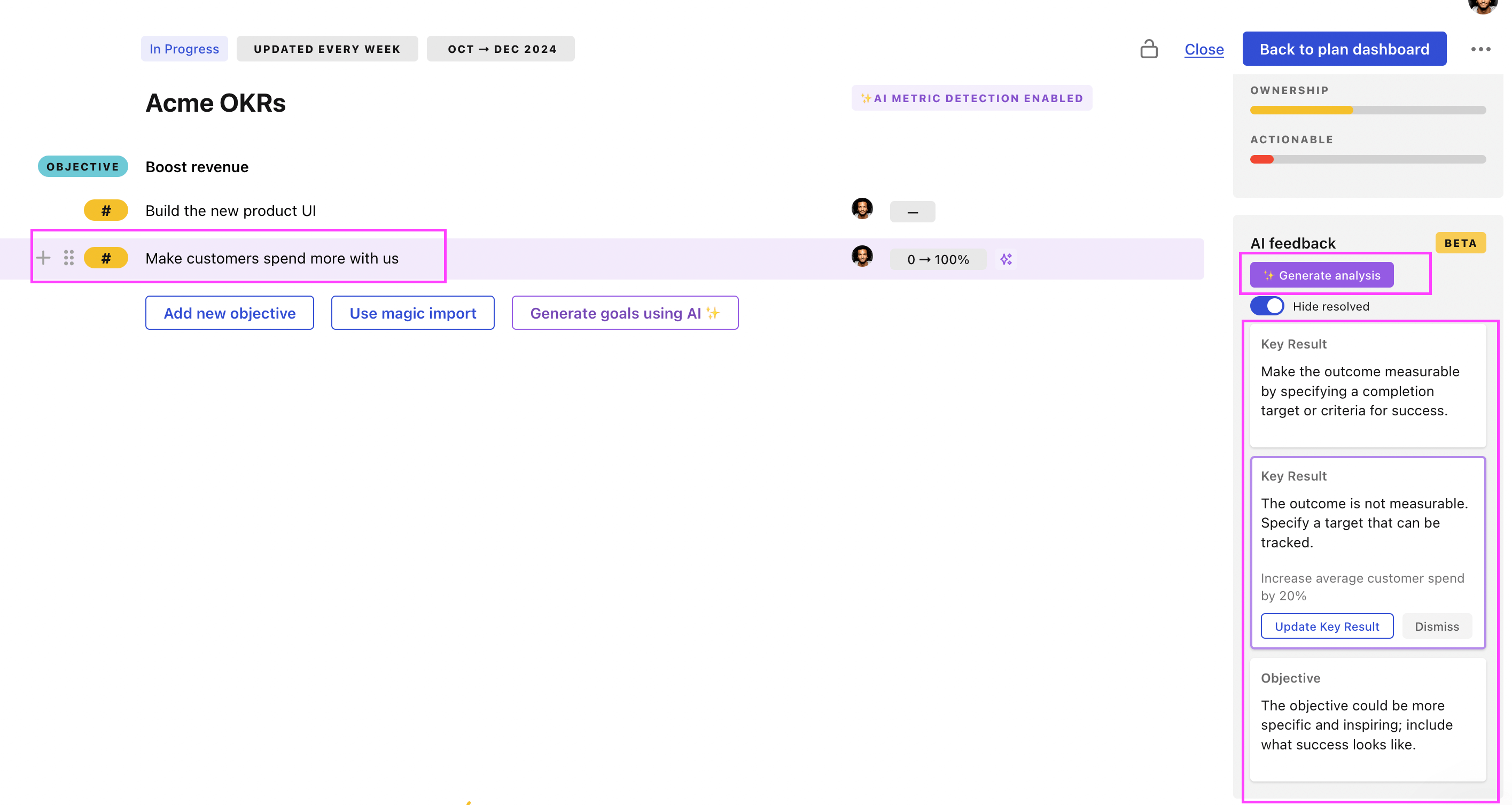
Use Tability feedback to improve existing OKRs
You can also use Tability's AI feedback to improve your OKRs if you already have existing goals. Just import them to the platform and click on the Generate analysis button.
Tability will scan your OKRs and offer different suggestions to improve them. This can range from a small rewrite of a statement to make it clearer to a complete rewrite of the entire OKR.