In short
What is a good data analysis team OKR?
A good data analysis team OKR pairs one clear objective with two to four measurable key results the team can score every week. It describes an outcome rather than a list of activities, sets targets that are ambitious but scoreable, and is reviewed weekly so blockers surface before the quarter gets away from the team.
These Data Analysis Team OKR templates are meant to help teams move from ideas and projects to measurable business outcomes. Use them as a starting point, then tailor the metrics and initiatives to the reality of your company.
This page shows the top 10 of 49 templates for data analysis team, with internal links to related categories and guidance for adapting the examples to your team.
Last template update in this category: 2026-03-06What this category is for
- Teams that need a clearer operating rhythm for data analysis team work.
- Managers who want examples they can adapt into outcome-focused quarterly plans.
- Leaders comparing adjacent categories before choosing the best OKR direction.
Best outcomes to track
- Data Analysis Team priorities tied to measurable business outcomes.
- Weekly check-ins that surface blockers before they become delivery issues.
- Better alignment between initiatives and the metrics that matter.
Related categories
Use these linked categories to explore adjacent planning areas and strengthen the internal topic cluster around data analysis team.
Priority hubs
Data Analysis Team OKR examples and templates
Start with these top 10 examples from 49 total templates in this category, then adapt the metrics and initiatives to fit your team's constraints and operating cadence.
OKRs to enhance agility through actionable insights from feedback
 ObjectiveEnhance agility through actionable insights from feedback
 KRImplement 30% more changes following insights received
 Monitor success rate of implemented changes
- Establish plan to implement identified changes
- Review insights and identify necessary changes
- KRDecrease insight-to-action cycle time by 15%
- Improve action execution procedure efficiency
- Enhance analytic tools for faster insights
- Streamline data collection and processing protocols
- KRIncrease feedback response rate by 20%
- Implement an incentive program to motivate more feedback
- Promote feedback importance through regular communication
- Simplify the feedback process for user convenience
OKRs to enhance efficiency and accuracy using AutoML in our data analysis process
- ObjectiveEnhance efficiency and accuracy using AutoML in our data analysis process
- KRReduce data processing time by 20%
- Reduce duplicate/unwanted data through cleaning
- Implement streamlined data processing algorithms
- Upgrade hardware to increase processing capacity
- KRImplement AutoML in 3 different department projects
- Compile necessary data for AutoML testing
- Identify possible department projects for AutoML application
- Train staff on AutoML basics
- KRIncrease model prediction accuracy by 15%
- Use ensemble methods for model improvement
- Implement feature engineering to enhance predictive signals
- Optimize hyperparameters using rigorous validation
OKRs to enhance data analytics proficiency
- ObjectiveEnhance data analytics proficiency
- KRComplete 40 hours of online data science courses
- Register for desired online data science courses
- Allocate daily time for course completion
- Finish and submit all necessary assignments
- KRSubmit 5 industry-specific data analysis projects
- Compile and submit the completed projects
- Conduct data analysis for each chosen topic
- Identify five industry-specific topics for data analysis projects
- KRPass the 'Certified Data Scientist' exam
- Review relevant textbooks for Certified Data Scientist exam
- Attend online preparation courses for the exam
- Complete practice questions daily until the exam day
OKRs to optimize data-driven automation in customer support
- ObjectiveOptimize data-driven automation in customer support
- KRImplement 2 new data analytics tools by end of quarter
- Train staff on new tools usage
- Purchase and install selected tools
- Research and choose top two data analytics tools
- KRImprove response time by 15% using AI automation
- Monitor and optimize AI performance continually
- Implement AI automation in customer service operations
- Train employees on AI-enhanced tools to speed responses
- KRReduce customer support complaints by 10% through data-focused strategies
- Analyze current customer complaint data
- Implement changes based on data analysis
- Identify frequent complaint areas for improvement
OKRs to maximize data-driven decision making in Customer Support
- ObjectiveMaximize data-driven decision making in Customer Support
- KRImplement 3 new AI-based automations to streamline support systems
- Conduct tests and implement AI automations
- Develop AI-based automation plans for those areas
- Identify areas in support systems needing AI automation improvements
- KRReduce customer complaints by 20% through continuous process improvements
- Identify common issues from existing customer complaints
- Implement training programs to boost service quality
- Regularly review and update customer service processes
- KRIncrease customer query resolution speed by 30% using data analysis
- Implement AI tools for faster data interpretation and response
- Train staff on utilizing data analysis results effectively
- Analyze previous data to identify common query themes
OKRs to enhance the identification of quality assurance agent trends
- ObjectiveEnhance the identification of quality assurance agent trends
- KRAllocate 20% of work time to analyze and draw trend data from tracked metrics
- Dedicate 20% of daily hours to data analysis
- Identify key metrics for regular tracking
- Create visual interpretations of trend data
- KRDeliver a quarterly report detailing identified trends and improvement areas
- Compile and present a detailed quarterly report
- Highlight areas needing improvement
- Analyze data to identify prevalent business trends
- KRDevelop and implement an effective method for tracking agent performance metrics
- Choose suitable performance tracking software/tools
- Identify key performance indicators relevant to agent performance
- Train agents and management on using tracking system
OKRs to consolidate all visitor forms into a single accessible location
- ObjectiveConsolidate all visitor forms into a single accessible location
- KRAchieve a 50% increase in visitor form completion after unification
- Implement user-friendly forms with simple, concise instructions
- Develop targeted marketing campaigns motivating form completion
- Analyze existing form data to identify barriers to completion
- KRIdentify and compile all existing separate visitor forms by 15% each week
- Locate all existing separate visitor forms
- Increase compilation rate by 15% weekly
- Compile located visitor forms systematically
- KRDevelop a user-friendly, centralized interface for all forms with 0 errors
- Construct centralized interface integrating all forms
- Conduct thorough UI/UX research for user-friendly interface design
- Implement rigorous testing routines to ensure zero errors
OKRs to boost customer loyalty and cultivate stronger relationships
- ObjectiveBoost customer loyalty and cultivate stronger relationships
- KRImprove customer satisfaction scores by 20%
- Implement regular customer service training for staff
- Create incentives for positive customer reviews
- Establish efficient complaint resolution procedures
- KRCarry out two new customer engagement initiatives
- Implement the designed customer engagement initiatives
- Evaluate and improve initiatives based on customer feedback
- Develop two new innovative customer engagement strategies
- KRIncrease customer retention rate by 15%
- Personalize communication efforts through customer data analysis
- Implement a loyalty rewards program to incentivize repeat purchases
- Improve customer service responsiveness to handle complaints promptly
OKRs to enhance website monitoring program using historical data analysis
- ObjectiveEnhance website monitoring program using historical data analysis
- KRIdentify three recurring site issues from analyzed data by week 5
- Identify three consistent issues from the analyzed data
- Prepare a detailed report on the findings
- Analyze the site data from the last four weeks
- KRImplement and test process changes that address identified issues by week 10
- Implement defined process changes
- Identify problems and outline needed process changes
- Evaluate and test the implemented changes by week 10
- KRAccumulate and categorize all previous monitoring data by end of week 2
- Group the gathered data into discernible categories
- Compile all existing monitoring data
- Complete data organization by end of week 2
OKRs to enhance email marketing effectiveness to boost customer conversions
- ObjectiveEnhance email marketing effectiveness to boost customer conversions
- KRIncrease email open rate by 20%
- Manage send times to optimize recipient availability
- Redesign email layout to improve visibility and engagement
- Personalize email subjects to pique recipient's interest
- KRImprove click-through rate by 15%
- Enhance ad copy with persuasive, clear messaging
- Optimize email subject lines for better open rates
- Test and refine call-to-action buttons for visibility
- KRBoost conversion rate by 10% from email marketing campaigns
- Segment email list for targeted, personalized content
- Redesign email template to highlight call-to-actions
- A/B test different subject lines to increase open rates
How to use Data Analysis Team OKRs well
Strong OKRs keep the team focused on measurable outcomes instead of a long task list. That means picking a clear objective, limiting the number of competing priorities, and reviewing progress every week.
Use Data Analysis Team OKRs to define what success looks like this quarter, then track them weekly so the team can quickly spot blockers, learn, and adjust execution.
Choosing software to run Data Analysis Team OKRs?
Move from data analysis team examples to execution with sourced comparisons from The OKR Software Benchmark.
- Best OKR software rankingSee the overall verdict and the criteria behind each platform score.
- OKR software pricing comparisonCompare verified prices, minimum commitments, and costs at different team sizes.
- Benchmark methodologyReview the published scoring model, source standards, and conflict-of-interest policy.
Related OKR template categories
If you are building a broader plan, these related categories can help you connect data analysis team work to adjacent company priorities.
- marketing team OKR templates
- project manager OKR templates
- customer service team OKR templates
- leadership OKR templates
- strategic planning OKR templates
- operations OKR templates
More OKR templates to explore
- OKRs to boost app user engagement and increase application downloads
- OKRs to establish robust safety culture in new manufacturing facility
- OKRs to execute Seamless Transition to Cloud Infrastructure
- OKRs to implement Cloud-Ready Applications
- OKRs to boost employees' understanding of corporate culture and core values
- OKRs to enhance the organization's information technology efficiency and security
Not seeing what you need?
Use Tability AI to generate OKRs based on a prompt
Tability allows you to describe your goals in a prompt, and generate a fully editable OKR template in seconds.
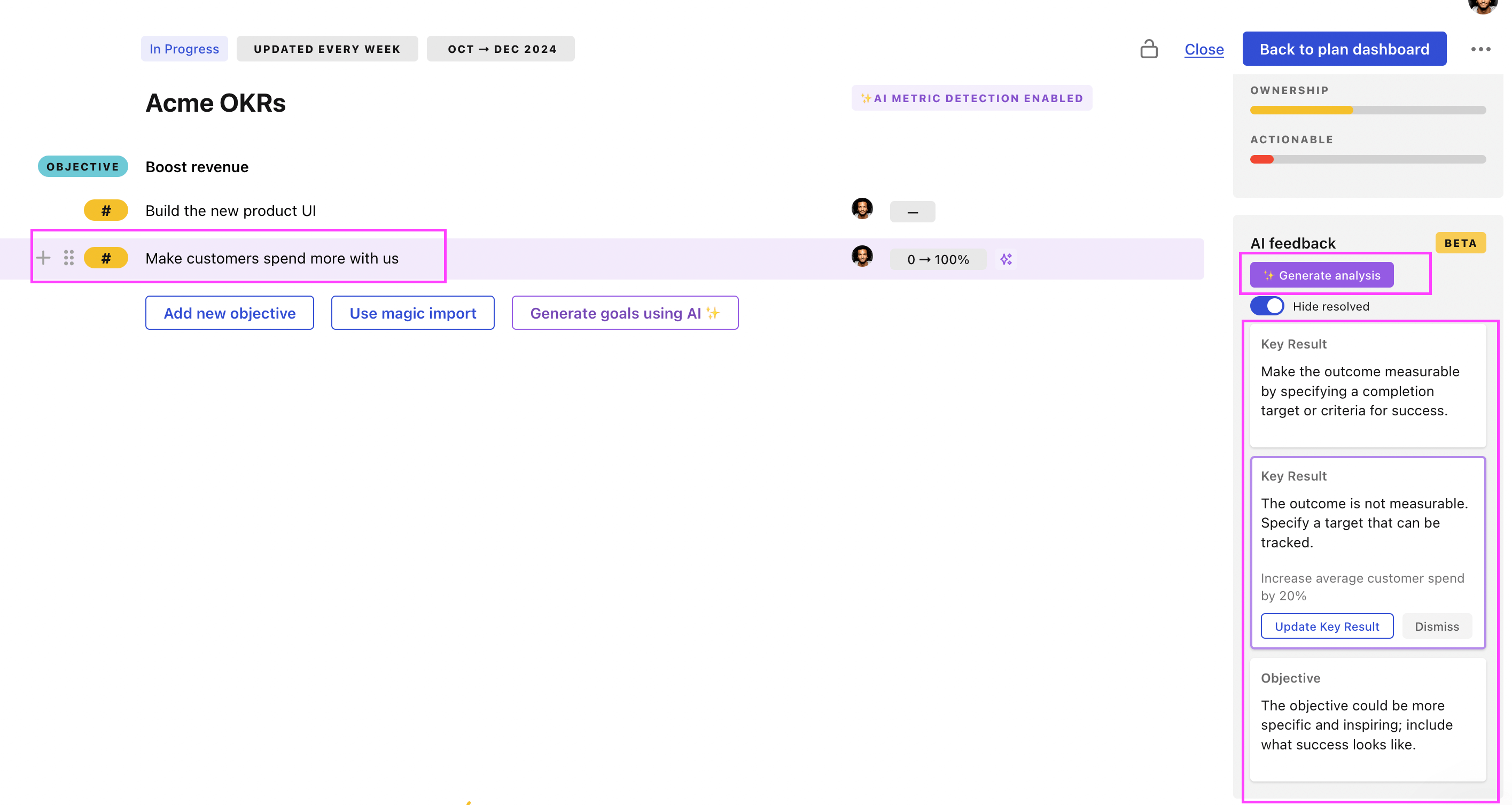
Use Tability feedback to improve existing OKRs
You can also use Tability's AI feedback to improve your OKRs if you already have existing goals. Just import them to the platform and click on the Generate analysis button.
Tability will scan your OKRs and offer different suggestions to improve them. This can range from a small rewrite of a statement to make it clearer to a complete rewrite of the entire OKR.