In short
What is a good user experience team OKR?
A good user experience team OKR pairs one clear objective with two to four measurable key results the team can score every week. It describes an outcome rather than a list of activities, sets targets that are ambitious but scoreable, and is reviewed weekly so blockers surface before the quarter gets away from the team.
These User Experience Team OKR templates are meant to help teams move from ideas and projects to measurable business outcomes. Use them as a starting point, then tailor the metrics and initiatives to the reality of your company.
This page shows the top 10 of 53 templates for user experience team, with internal links to related categories and guidance for adapting the examples to your team.
Last template update in this category: 2025-09-24What this category is for
- Teams that need a clearer operating rhythm for user experience team work.
- Managers who want examples they can adapt into outcome-focused quarterly plans.
- Leaders comparing adjacent categories before choosing the best OKR direction.
Best outcomes to track
- User Experience Team priorities tied to measurable business outcomes.
- Weekly check-ins that surface blockers before they become delivery issues.
- Better alignment between initiatives and the metrics that matter.
Related categories
Use these linked categories to explore adjacent planning areas and strengthen the internal topic cluster around user experience team.
Priority hubs
User Experience Team OKR examples and templates
Start with these top 10 examples from 53 total templates in this category, then adapt the metrics and initiatives to fit your team's constraints and operating cadence.
OKRs to develop a user-centric and efficient OKR software
 ObjectiveDevelop a user-centric and efficient OKR software
 KREnsure 95% defect-free code in all functionalities
 Integrate continuous integration/delivery pipeline
- Adopt comprehensive unit testing in all functionalities
- Implement thorough code reviews before deployment
- KRDesign interactive user interface for 100% usability
- Perform usability testing and modify as needed
- Draft initial interface design concepts
- Research current trends in user interface design
- KRAcquire 100 beta testers for feedback and improvement
- Send invites to targeted user email lists
- Promote the beta version through social media
- Create an attractive beta testing sign-up webpage
OKRs to develop and implement a user-friendly process inventory application
- ObjectiveDevelop and implement a user-friendly process inventory application
- KRDesign a fully functional prototype of the application by end of week 6
- Begin coding the functional elements
- Construct a basic design layout
- Outline essential features for the application
- KREstablish a governance model that 95% of end users find easy to understand
- Implement comprehensive user education
- Survey end users to understand governance comprehension
- Develop a simplified governance model
- KRTest the application with a select group of users, achieving 80% user satisfaction
- Analyze data to confirm 80% user satisfaction
- Implement testing phase with chosen users
- Identify a select group of users for testing
OKRs to enhance proficiency in visual and UX design
- ObjectiveEnhance proficiency in visual and UX design
- KRObtain certified UX design professional assessment
- KRCreate 5 visual design projects
- Finalize and create your visual designs
- Sketch initial concepts for each project
- Compile a list of themes for each visual design project
- KRComplete 3 advanced UX design courses
- Research and select 3 advanced UX design courses
- Finish coursework and assignments diligently
- Enroll in each chosen course
OKRs to redesign paywalls and UX to boost monthly recurring revenue
- ObjectiveRedesign paywalls and UX to boost monthly recurring revenue
- KRImprove UX to achieve 15% positive customer feedback
- Develop customer journey maps to uncover UX issues
- Implement user feedback tools on website and app
- Perform A/B testing to fine-tune UX elements
- KRDecrease paywall related customer complaints by 30%
- Regularly review and improve paywall experience
- Implement clear communication about subscription benefits and costs
- Enhance customer support for paywall issues
- KRIncrease MRR by 20% through redesigned paywall conversions
- Redesign paywall for clearer pricing and plan benefits
- Implement A/B testing to optimize conversions
- Track and analyze conversion data to inform modifications
OKRs to enhance our ecommerce channel to be the primary revenue source
- ObjectiveEnhance our ecommerce channel to be the primary revenue source
- KRReduce ecommerce customer churn rate by 15%
- Optimize user experience on the website
- Introduce a customer loyalty program
- Implement personalized customer retention email campaigns
- KRImprove ecommerce conversion rate by 10%
- Enhance product descriptions and images
- Implement targeted email marketing campaigns
- Revamp website for better UX/UI and faster load times
- KRIncrease average monthly ecommerce sales by 20%
- Add new, competitive products to inventory
- Optimize website for better search engine visibility
- Implement a targeted email marketing campaign
OKRs to to optimize and expand the functionality of the Glean integration app
- ObjectiveTo optimize and expand the functionality of the Glean integration app
- KRIncrease the number of Glean app integrations by 20%
- Develop a strategic marketing plan targeting potential integration partners
- Improve API functionalities to ease integration processes
- Conduct webinars showcasing benefits and features of Glean integrations
- KRAchieve a user satisfaction score of 85% on improved integration features
- Conduct regular training sessions for users
- Prioritize adjustments based on user feedback
- Implement continuous user feedback collection and analysis
- KRImprove app performance to achieve 95% uptime across all integrated platforms
- Implement regular system maintenance across all integrated platforms
- Develop and apply rigorous stress tests to ensure reliability
- Conduct regular optimization of application codebase for enhanced performance
OKRs to enhance overall success in Block Blast
- ObjectiveEnhance overall success in Block Blast
- KRImprove user retention by 15%
- Enhance customer service and support systems
- Develop personalized engagement email campaigns
- Implement a user-friendly loyalty rewards program
- KRIncrease daily active users by 20%
- Launch engaging in-app daily challenges/ quizzes
- Implement a compelling user referral rewards program
- Optimize user onboarding to improve user retention
- KRImprove in-app purchase completion rate by 10%
- Implement user-friendly, simple checkout process
- Test and improve app loading speed
- Offer exclusive in-app purchase discounts
OKRs to boost website's daily active users
- ObjectiveBoost website's daily active users
- KRDevelop and launch a user engagement campaign, resulting in a 15% users increase
- Launch the engagement campaign through chosen platforms
- Identify target audience and customize engagement strategies
- Monitor and adjust campaign based on initial feedback
- KROptimize website design for enhanced user experience, reducing bounce rate by 30%
- Optimize website loading speed and eliminate dead links
- Implement user-friendly navigation and search functionality
- Include clear, engaging calls-to-action on each page
- KRImplement effective SEO strategies to improve organic search traffic by 20%
- Conduct a comprehensive SEO audit to identify weaknesses
- Optimize existing content with targeted keywords
- Implement link-building strategies to boost authority
OKRs to increase customer acquisition and boost account productivity
- ObjectiveIncrease customer acquisition and boost account productivity
- KRAchieve 20% rise in new customer sign-ups
- Introduce incentives for new signups
- Improve website interface for easy and quick signups
- Launch social media marketing campaigns
- KRDecrease inactive accounts by 10% through engagement strategies
- Implement personalized email campaigns targeting inactive users
- Offer exclusive incentives to reactivate dormant accounts
- Enhance user experience to encourage re-engagement
- KRImprove the weekly usage rate of active accounts by 15%
- Improve user experience to enhance account engagement
- Introduce compelling weekly content or features
- Incentivize more frequent logins with weekly bonuses or rewards
OKRs to boost engagement of inactive platform sign-ups
- ObjectiveBoost engagement of inactive platform sign-ups
- KRImprove platform's features usability score by 15%
- Implement user feedback into interface design revisions
- Conduct user testing to identify platform usability issues
- Provide comprehensive training on feature enhancements
- KRIncrease emails sent to inactive users by 20%
- Initiate increased email sending schedule
- Develop engaging content for email outreach
- Identify the inactive users in our database
- KRRaise click-through rates from re-engagement emails by 30%
- Personalize content based on user behavior or preferences
- Implement clear, compelling call-to-actions
- Optimize email subject lines for higher open rates
How to use User Experience Team OKRs well
Strong OKRs keep the team focused on measurable outcomes instead of a long task list. That means picking a clear objective, limiting the number of competing priorities, and reviewing progress every week.
Use User Experience Team OKRs to define what success looks like this quarter, then track them weekly so the team can quickly spot blockers, learn, and adjust execution.
Choosing software to run User Experience Team OKRs?
Move from user experience team examples to execution with sourced comparisons from The OKR Software Benchmark.
- Best OKR software rankingSee the overall verdict and the criteria behind each platform score.
- OKR software pricing comparisonCompare verified prices, minimum commitments, and costs at different team sizes.
- Benchmark methodologyReview the published scoring model, source standards, and conflict-of-interest policy.
Related OKR template categories
If you are building a broader plan, these related categories can help you connect user experience team work to adjacent company priorities.
- marketing team OKR templates
- product manager OKR templates
- customer service team OKR templates
- leadership OKR templates
- strategic planning OKR templates
- operations OKR templates
More OKR templates to explore
- OKRs to successfully design an efficient, impactful pilot program
- OKRs to validate employee experience in a new tool
- OKRs to enhance inter-team collaboration and knowledge transfer
- OKRs to enhance and promote collaboration within the new team
- OKRs to enhance Data Accuracy and Integrity
- OKRs to establish leadership in impactful digital product delivery
Not seeing what you need?
Use Tability AI to generate OKRs based on a prompt
Tability allows you to describe your goals in a prompt, and generate a fully editable OKR template in seconds.
Use Tability feedback to improve existing OKRs
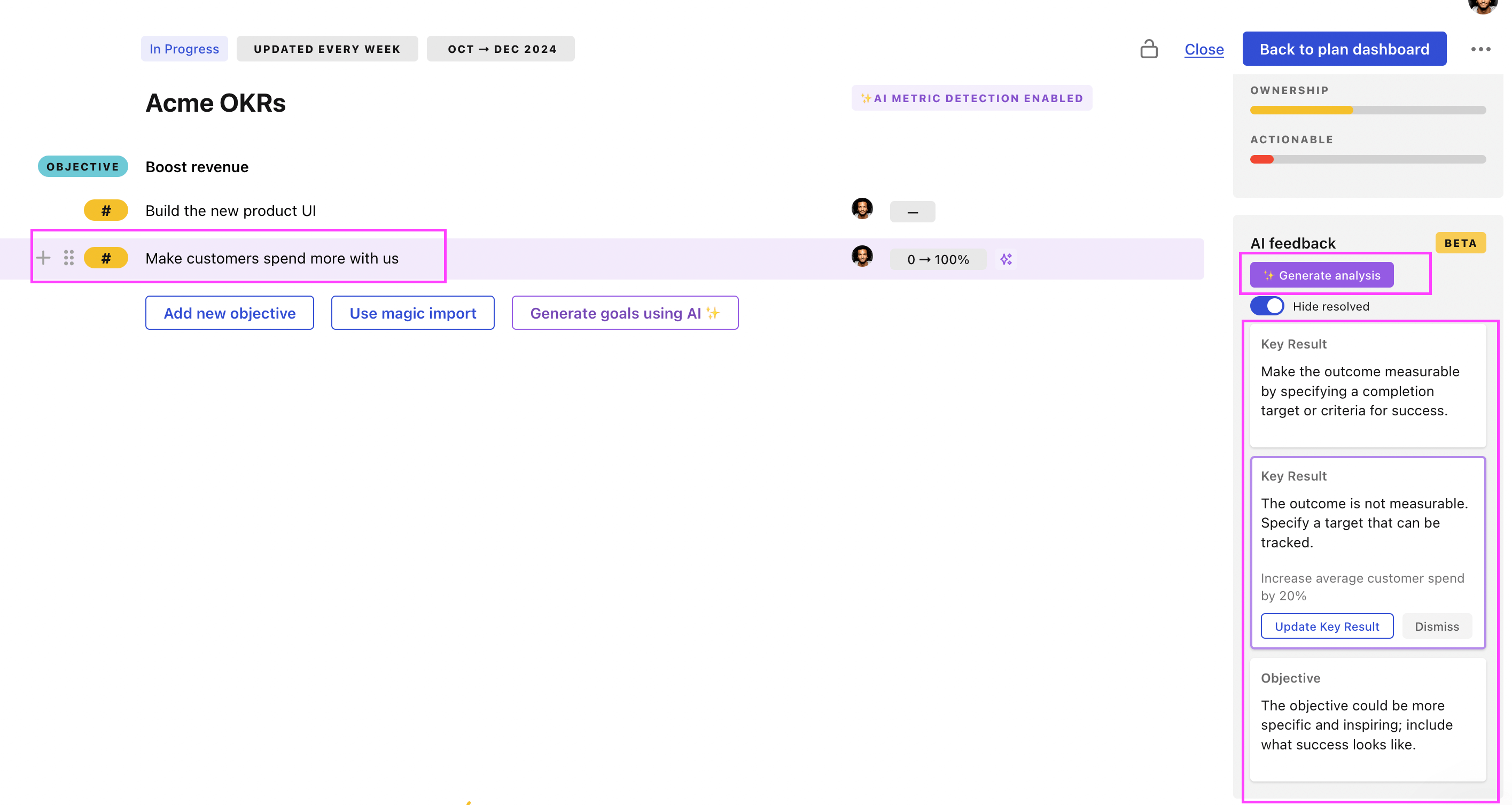
You can also use Tability's AI feedback to improve your OKRs if you already have existing goals. Just import them to the platform and click on the Generate analysis button.
Tability will scan your OKRs and offer different suggestions to improve them. This can range from a small rewrite of a statement to make it clearer to a complete rewrite of the entire OKR.