In short
What is a good qa team OKR?
A good qa team OKR pairs one clear objective with two to four measurable key results the team can score every week. It describes an outcome rather than a list of activities, sets targets that are ambitious but scoreable, and is reviewed weekly so blockers surface before the quarter gets away from the team.
These QA Team OKR templates are meant to help teams move from ideas and projects to measurable business outcomes. Use them as a starting point, then tailor the metrics and initiatives to the reality of your company.
This page shows the top 8 of 8 templates for qa team, with internal links to related categories and guidance for adapting the examples to your team.
Last template update in this category: 2026-01-20What this category is for
- Teams that need a clearer operating rhythm for qa team work.
- Managers who want examples they can adapt into outcome-focused quarterly plans.
- Leaders comparing adjacent categories before choosing the best OKR direction.
Best outcomes to track
- QA Team priorities tied to measurable business outcomes.
- Weekly check-ins that surface blockers before they become delivery issues.
- Better alignment between initiatives and the metrics that matter.
Related categories
Use these linked categories to explore adjacent planning areas and strengthen the internal topic cluster around qa team.
Priority hubs
QA Team OKR examples and templates
Start with these top 8 examples from 8 total templates in this category, then adapt the metrics and initiatives to fit your team's constraints and operating cadence.
OKRs to enhance software development efficiency and quality in the IT company
 ObjectiveEnhance software development efficiency and quality in the IT company
 KRReduce software bugs by 15%
 Increase usage of automated testing tools
- Implement thorough code reviews before finalising
- Enhance staff training on coding standards
- KRImprove unit test coverage to 85%
- Identify areas with low test coverage
- Create additional unit tests for those areas
- Regularly review and update tests
- KRIncrease code review effectiveness by 20%
- Implement mandatory peer review sessions
- Introduce automated code review tools
- Enhance code review guidelines for extra clarity
OKRs to successfully publish an app
- ObjectiveSuccessfully publish an app
- KRComplete app development by ensuring all functions work without glitches
- Run comprehensive functionality tests
- Fix identified issues immediately
- Review and debug code for possible errors
- KRAchieve 95% positive feedback on beta testing of the app
- Implement user-friendly UI/UX design
- Actively encourage and collect user feedback
- Conduct thorough pre-testing to ensure app functionality
- KRSecure app's successful listing on both Google Play and App Store
- Test app rigorously for bugs and compatibility
- Meet all Google Play and App Store submission guidelines
- Prepare and optimize app's promotional material
OKRs to master mobile application testing techniques effectively
- ObjectiveMaster mobile application testing techniques effectively
- KRApply learned skills testing five different mobile applications flawlessly
- KRComplete an accredited mobile application testing course by mid-quarter
- Enroll in chosen course
- Research accredited mobile app testing courses
- Complete and pass the course
- KRReceive positive feedback on implemented testing from at least three professional peers
- Solicit constructive feedback on the testing outcomes from these peers
- Implement specific, relevant testing strategies in ongoing projects
- Share the implemented testing results with three professional peers
OKRs to improve software quality and testing efficiency
- ObjectiveImprove software quality and testing efficiency
- KRImplement automated regression testing on 95% of codebase
- Create and develop automated regression testing scripts
- Implement and regularly run these automated tests on the identified code
- Identify areas of the codebase that can support automated regression testing
- KRIdentify and resolve 90% of bugs before next development phase
- Review code thoroughly for possible bugs
- Establish robust testing procedures for overlooked bugs
- Prioritize and resolve detected bugs efficiently
- KRReduce manual testing time by 60% with increased automation
- Identify repetitive tasks suitable for automation
- Train staff on utilizing automation tools
- Develop and implement automation scripts
OKRs to ensure readiness for GA release of product on Linux
- ObjectiveEnsure readiness for GA release of product on Linux
- KRProvide training for support team on Linux-specific issues and troubleshooting
- Monitor and evaluate the team's progress post-training
- Develop a comprehensive Linux-specific training program
- Schedule training sessions for the support team
- KRUpdate documentation and support resources for Linux users
- Verify and publish all new Linux resources on appropriate platforms
- Review current Linux documentation and support resources for outdated information
- Develop updated Linux user guides, tutorials and FAQs
- KRComplete all necessary testing and bug fixing for Linux compatibility
- Run preliminary tests for software compatibility with Linux
- Identify, document and prioritize detected bugs
- Fix bugs and conduct validation testing
OKRs to achieve 100% test case updation across all modules
- ObjectiveAchieve 100% test case updation across all modules
- KRAccomplish complete updation and quality verification of all modules by quarter end
- Implement robust quality verification checks
- Schedule time weekly for updating each module
- Regularly track and report update progress
- KRUpdate 25% of test cases in each module by week 3
- Identify modules requiring test case updates
- Revise 25% of test cases per module weekly
- Prioritize and schedule updates for each module
- KRConduct a mid-quarter review to check 50% completion
- Analyze data, confirm 50% objective completion
- Schedule and conduct a mid-quarter review meeting
- Compile all project updates and data for review
OKRs to improve efficiency of QA triaging
- ObjectiveImprove efficiency of QA triaging
- KRIncrease accuracy of QA triaging by achieving a 90% reduction in false-positive tickets
- Utilize automated tools and technologies to assist in the identification and reduction of false-positive tickets
- Provide comprehensive training to QA team members on identifying false-positive tickets
- Implement stricter guidelines for ticket classification based on clearly defined criteria
- Regularly analyze and review triaging processes to identify areas for improvement
- KRIntegrate automated QA triaging system with existing bug tracking tools
- Evaluate and select suitable automated QA triaging system for integration
- Train QA team and relevant stakeholders on using the integrated automated QA triaging system
- Design and implement necessary integrations between the automated QA triaging system and bug tracking tools
- Test and validate the integration to ensure seamless data flow between the systems
- KRReduce manual QA triaging time by 50% through automation
- Research and evaluate available automation tools and frameworks suitable for QA triaging
- Train QA team members on the usage and maintenance of the implemented automation solutions
- Analyze existing manual QA triaging processes to identify potential areas for automation
- Develop and implement automated test scripts for frequently occurring triaging scenarios
- KRImplement a machine learning algorithm to categorize and prioritize QA tickets
- Continually evaluate and fine-tune the algorithm using feedback and updated data
- Collect and analyze historical QA tickets for training data
- Develop a prioritization system based on urgency and impact metrics
- Choose and implement a suitable machine learning algorithm for ticket categorization
OKRs to improve QA progress tracking across all projects
- ObjectiveImprove QA progress tracking across all projects
- KRImplement a standardized QA progress tracking system across all projects
- Train all project teams on how to use the new tracking system
- Roll out the standardized QA progress tracking system across all projects
- Regularly monitor and update the tracking system to ensure accuracy and effectiveness
- Develop a comprehensive QA progress tracking template
- KRIncrease the percentage of completed QA tasks by 15% compared to the previous quarter
- Regularly communicate progress and expectations to the QA team for accountability
- Implement a standardized QA checklist to ensure completeness and accuracy
- Implement a peer review process to catch any missed QA tasks
- Provide additional training and resources to enhance QA team's skills
- KRConduct weekly meetings to review and update QA progress and address any bottlenecks
- Identify and resolve bottlenecks in the QA process during each weekly meeting
- Schedule weekly QA progress meetings to review and update project status
- Document meeting discussions and actions taken to keep track of progress
- Assign action items to team members for addressing any identified bottlenecks
- KRReduce the average time taken to complete QA tasks by 10%
How to use QA Team OKRs well
Strong OKRs keep the team focused on measurable outcomes instead of a long task list. That means picking a clear objective, limiting the number of competing priorities, and reviewing progress every week.
Use QA Team OKRs to define what success looks like this quarter, then track them weekly so the team can quickly spot blockers, learn, and adjust execution.
Choosing software to run QA Team OKRs?
Move from qa team examples to execution with sourced comparisons from The OKR Software Benchmark.
- Best OKR software rankingSee the overall verdict and the criteria behind each platform score.
- OKR software pricing comparisonCompare verified prices, minimum commitments, and costs at different team sizes.
- Benchmark methodologyReview the published scoring model, source standards, and conflict-of-interest policy.
Related OKR template categories
If you are building a broader plan, these related categories can help you connect qa team work to adjacent company priorities.
- product manager OKR templates
- project manager OKR templates
- quality assurance OKR templates
- leadership OKR templates
- strategic planning OKR templates
- operations OKR templates
More OKR templates to explore
- OKRs to establish a fully functional over-the-counter (OTC) trading desk
- OKRs to start production of lycopene from tomatoes using innovative technology
- OKRs to enhance motivation levels in construction works traineeship
- OKRs to attain independent management of the project area
- OKRs to become a top-performing, talent-nurturing enterprise
- OKRs to create globally acclaimed cinematic masterpiece
Not seeing what you need?
Use Tability AI to generate OKRs based on a prompt
Tability allows you to describe your goals in a prompt, and generate a fully editable OKR template in seconds.
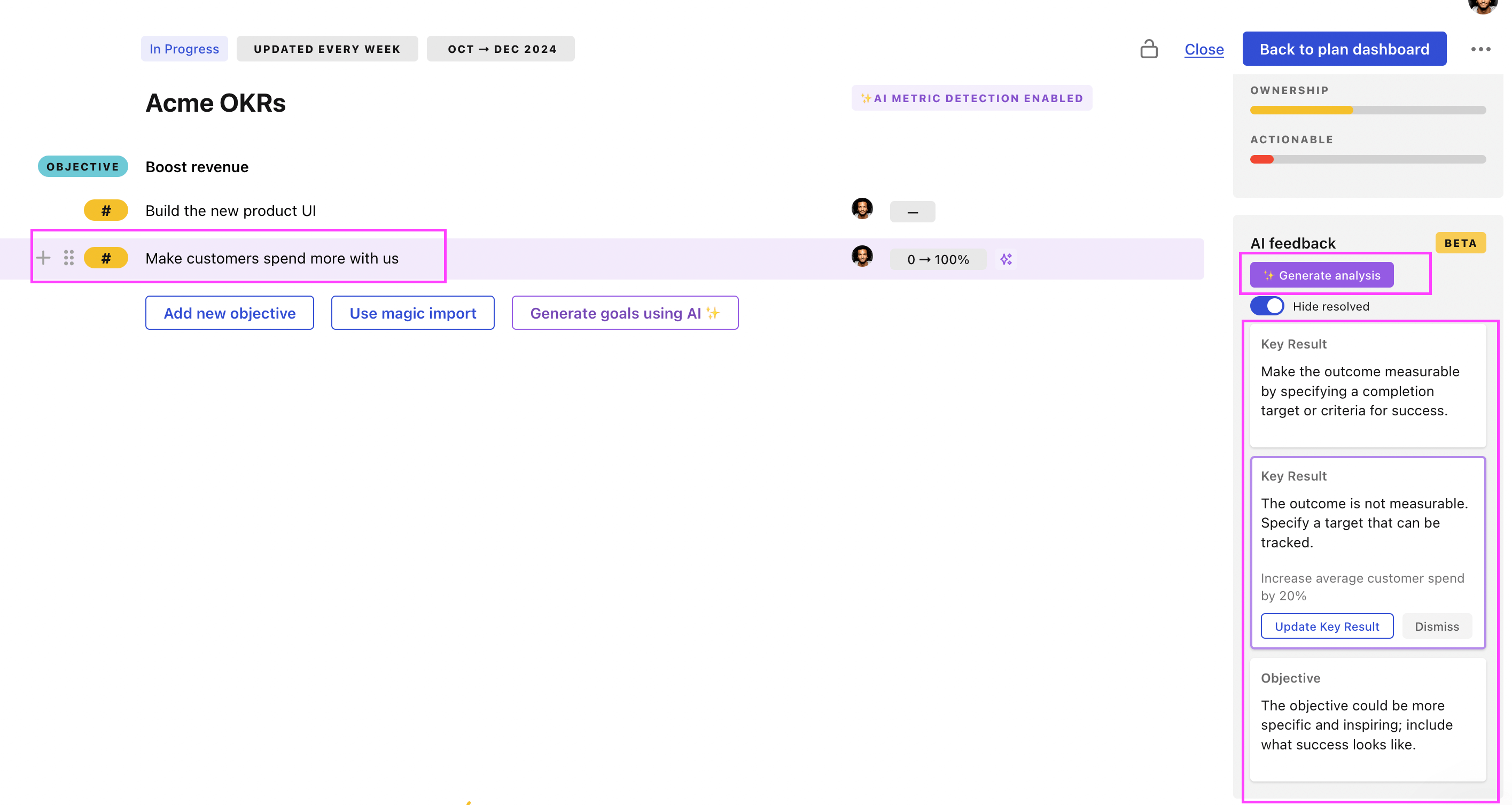
Use Tability feedback to improve existing OKRs
You can also use Tability's AI feedback to improve your OKRs if you already have existing goals. Just import them to the platform and click on the Generate analysis button.
Tability will scan your OKRs and offer different suggestions to improve them. This can range from a small rewrite of a statement to make it clearer to a complete rewrite of the entire OKR.