In short
What is a good training OKR?
A good training OKR pairs one clear objective with two to four measurable key results the team can score every week. It describes an outcome rather than a list of activities, sets targets that are ambitious but scoreable, and is reviewed weekly so blockers surface before the quarter gets away from the team.
These Training OKR templates are meant to help teams move from ideas and projects to measurable business outcomes. Use them as a starting point, then tailor the metrics and initiatives to the reality of your company.
This page shows the top 10 of 42 templates for training, with internal links to related categories and guidance for adapting the examples to your team.
Last template update in this category: 2026-03-25What this category is for
- Teams that need a clearer operating rhythm for training work.
- Managers who want examples they can adapt into outcome-focused quarterly plans.
- Leaders comparing adjacent categories before choosing the best OKR direction.
Best outcomes to track
- Training priorities tied to measurable business outcomes.
- Weekly check-ins that surface blockers before they become delivery issues.
- Better alignment between initiatives and the metrics that matter.
Related categories
Use these linked categories to explore adjacent planning areas and strengthen the internal topic cluster around training.
Priority hubs
Training OKR examples and templates
Start with these top 10 examples from 42 total templates in this category, then adapt the metrics and initiatives to fit your team's constraints and operating cadence.
OKRs to optimize recruiting function from manual to automated
 ObjectiveOptimize recruiting function from manual to automated
 KRImplement a digital HR system to automate 60% of manual processes
 Select a suitable digital HR software that supports automation
- Gradually introduce automation in stages, starting with simpler processes
- Train team members on using the new digital HR system
- KRDecrease the hiring process timeframe by 50% through automation
- Implement automated pre-screening tools for candidate selection
- Integrate automatic reference check systems
- Install smart scheduling software for interviews
- KRTrain 80% of HR staff in using the new systems for efficiency
- Schedule and conduct training sessions for identified staff
- Identify HR staff members requiring training on new systems
- Create comprehensive training materials for software usage
OKRs to implement a robust OKR tracking tool within the organization
- ObjectiveImplement a robust OKR tracking tool within the organization
- KRIdentify and evaluate five potential OKR tracking tools by quantified metrics
- Analyze each tool based on established metrics
- Research and list down five potential OKR tracking tools
- Define quantified metrics for evaluation
- KRAchieve 75% usage of the OKR tracking tool across all departments
- Implement periodical usage reports for each department
- Train all department heads in using the OKR tracking tool
- Incorporate OKR tracking tool in onboarding new employees
- KRTrain 90% of managers in utilizing the chosen tool effectively and efficiently
- Schedule training sessions for 90% of managers
- Monitor managers' progress and provide support
- Identify required training for chosen tool usage
OKRs to enhance QAQC protocols in construction operations
- ObjectiveEnhance QAQC protocols in construction operations
- KRImplement at least two innovative QAQC systems to increase efficiency by 25%
- Identify potential innovative QAQC systems for consideration
- Analyze and select two systems based on efficiency gains
- Implement and train staff on chosen QAQC systems
- KRAchieve a 20% improvement in overall project quality through meticulous QAQC procedures
- Regularly evaluate and revise QAQC processes
- Implement more stringent QAQC procedures
- Train team members on new procedures
- KRReduce non-compliance issues by 30% through enhanced QAQC training
- Conduct regular employee QAQC training sessions
- Develop a comprehensive QAQC training program
- Monitor and evaluate training effectiveness regularly
OKRs to drive a compliance-centric culture throughout our value chain
- ObjectiveDrive a compliance-centric culture throughout our value chain
- KRAchieve 100% review and updates of compliance documentation across the value chain
- Implement regular monitoring and reporting system
- Identify all necessary compliance documentation
- Assign review and update tasks to related teams
- KRSlash compliance-related breaches by 70% across all value chain stages
- KRTrain 85% of value chain partners on compliance standards and policies
- Schedule and conduct training sessions
- Identify all value chain partners requiring training
- Develop a compelling compliance standards course
OKRs to enhance compliance across all organizational levels
- ObjectiveEnhance compliance across all organizational levels
- KRAchieve 25% decrease in compliance-related errors or incidents
- Implement preventive measures based on audit findings
- Regularly audit for compliance-related issues
- Develop a comprehensive compliance training program
- KRTrain 80% of employees on regulatory standards by end of next quarter
- Develop or source appropriate regulatory standards training materials
- Schedule and facilitate training sessions for employees
- Identify the number and roles of employees needing training
- KRImplement upgraded compliance tracking tools in 2 departmental units
- Monitor the implementation and usage of the upgraded tools
- Arrange training sessions for departmental units on new tools
- Identify and procure the upgraded compliance tracking tools
OKRs to boost the library's digital collection
- ObjectiveBoost the library's digital collection
- KRDigitize and upload a minimum of 600 images to the repository
- Digitize images using appropriate scanning equipment
- Compile and categorize 600 images for digitization
- Upload all digitized images to the repository
- KROrganize training sessions for staff on digitization techniques and best practices
- Identify relevant digitization techniques and best practices
- Schedule training sessions with qualified instructors
- Notify staff and provide necessary materials
- KRImplement new scanning process to improve digitization efficiency by 30%
- Train team on new digitization scanning processes
- Research and purchase advanced scanning technology software
- Monitor and measure digitization efficiency improvements
OKRs to enhance customer response efficiency
- ObjectiveEnhance customer response efficiency
- KRTrain customer service team on urgent query handling by the end of month
- Prepare learning materials on urgent query handling
- Supervise and evaluate team's progress post-training
- Organize a comprehensive training schedule for the customer service team
- KRImplement automated response system for FAQs within 2 weeks
- Research and select suitable automated response system software
- Test and deploy the automated response system
- Compile, categorize, and input frequently asked questions
- KRReduce average response time by 30% for all customer inquiries
- Implement a timely system for handling incoming customer queries
- Train employees on effective and quick problem-solving skills
- Optimize customer service software for efficiency
OKRs to successfully understand and utilize "sdfsfs"
- ObjectiveSuccessfully understand and utilize "sdfsfs"
- KRComplete introductory training on "sdfsfs" with at least 90% proficiency
- Score at least 90% on the final evaluation
- Actively participate and study all training materials
- Register for the introductory training on sdfsfs
- KRSuccessfully apply "sdfsfs" to at least 10 different relevant projects
- Start applying sdfsfs to chosen projects
- Learn and comprehend the functionality of sdfsfs
- Identify 10 relevant projects for sdfsfs application
- KRShowcase "sdfsfs" skills improvement through a demonstrative presentation to the team
- Plan to answer questions and provide further clarification on improvements
- Create a comprehensive presentation detailing sdfsfs skills progress
- Schedule a team meeting for the demonstrative presentation
OKRs to enhance accuracy in story estimation by software engineering team
- ObjectiveEnhance accuracy in story estimation by software engineering team
- KRAchieve 90% team satisfaction rate with the improved estimation process
- Implement weekly training sessions for the new estimation process
- Consistently communicate the benefits of the new process
- Collect feedback and make necessary improvements
- KRReduce average estimation error to less than 10% in next 100 tasks
- Implement more accurate estimation tools and techniques
- Review and adjust estimations after each task
- Train team on precision estimation strategies
- KRTrain 100% of the team on advanced estimation techniques and methods
- Follow up on training outcomes and comprehension
- Schedule team members for training sessions
- Identify appropriate advanced estimation training course
OKRs to achieve zero discrepancies in all received applications
- ObjectiveAchieve zero discrepancies in all received applications
- KRTrain 100% of staff on system use and discrepancy identification within 6 weeks
- Schedule mandatory training sessions for all staff
- Develop comprehensive system use and discrepancy training materials
- Monitor and track staff training progress weekly
- KRReduce application discrepancy errors by 70% within the next 3 months
- Conduct frequent discrepancy error training sessions
- Continuously review and update application guidelines
- Implement rigorous application data validation processes
- KRImplement a robust application quality-check system by end of next quarter
- Research and procure new quality check tools or software
- Train staff in new application quality-check system
- Analyze current application testing mechanisms and their effectiveness
How to use Training OKRs well
Strong OKRs keep the team focused on measurable outcomes instead of a long task list. That means picking a clear objective, limiting the number of competing priorities, and reviewing progress every week.
Use Training OKRs to define what success looks like this quarter, then track them weekly so the team can quickly spot blockers, learn, and adjust execution.
Choosing software to run Training OKRs?
Move from training examples to execution with sourced comparisons from The OKR Software Benchmark.
- Best OKR software rankingSee the overall verdict and the criteria behind each platform score.
- OKR software pricing comparisonCompare verified prices, minimum commitments, and costs at different team sizes.
- Benchmark methodologyReview the published scoring model, source standards, and conflict-of-interest policy.
Related OKR template categories
If you are building a broader plan, these related categories can help you connect training work to adjacent company priorities.
- project manager OKR templates
- customer service team OKR templates
- change management OKR templates
- leadership OKR templates
- strategic planning OKR templates
- operations OKR templates
More OKR templates to explore
- OKRs to develop high-performing distribution teams via effective hiring and onboarding
- OKRs to build efficient core distribution teams via strategic recruitment
- OKRs to establish strong core distribution teams through robust recruitment
- OKRs to enhance organisational acceleration with effective performance management system
- OKRs to streamline human resources tasks including payroll and work permits
- OKRs to enhance the efficiency and effectiveness of human resource planning
Not seeing what you need?
Use Tability AI to generate OKRs based on a prompt
Tability allows you to describe your goals in a prompt, and generate a fully editable OKR template in seconds.
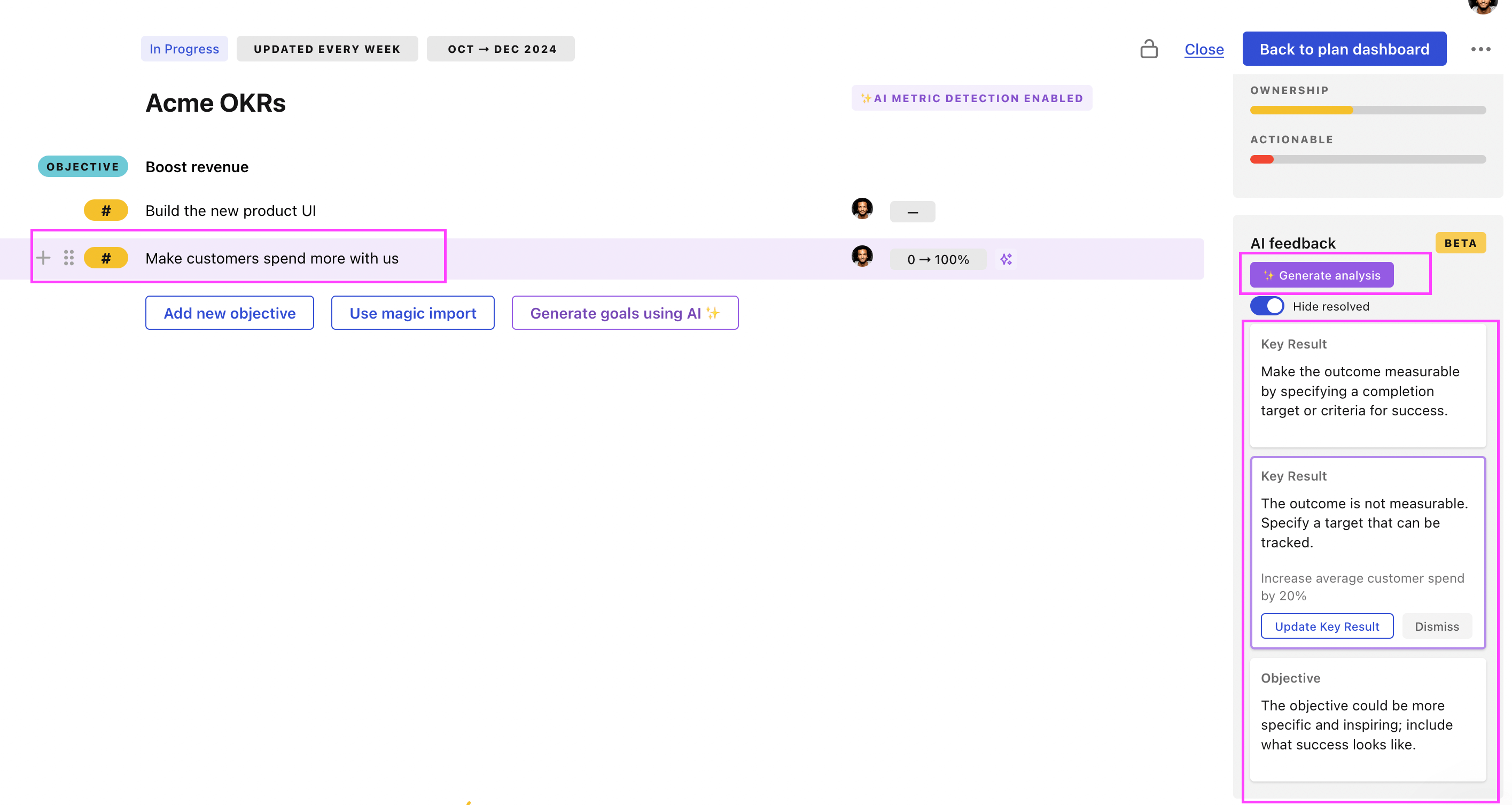
Use Tability feedback to improve existing OKRs
You can also use Tability's AI feedback to improve your OKRs if you already have existing goals. Just import them to the platform and click on the Generate analysis button.
Tability will scan your OKRs and offer different suggestions to improve them. This can range from a small rewrite of a statement to make it clearer to a complete rewrite of the entire OKR.