In short
What is a good product design team OKR?
A good product design team OKR pairs one clear objective with two to four measurable key results the team can score every week. It describes an outcome rather than a list of activities, sets targets that are ambitious but scoreable, and is reviewed weekly so blockers surface before the quarter gets away from the team.
These Product Design Team OKR templates are meant to help teams move from ideas and projects to measurable business outcomes. Use them as a starting point, then tailor the metrics and initiatives to the reality of your company.
This page shows the top 8 of 8 templates for product design team, with internal links to related categories and guidance for adapting the examples to your team.
Last template update in this category: 2025-11-17What this category is for
- Teams that need a clearer operating rhythm for product design team work.
- Managers who want examples they can adapt into outcome-focused quarterly plans.
- Leaders comparing adjacent categories before choosing the best OKR direction.
Best outcomes to track
- Product Design Team priorities tied to measurable business outcomes.
- Weekly check-ins that surface blockers before they become delivery issues.
- Better alignment between initiatives and the metrics that matter.
Related categories
Use these linked categories to explore adjacent planning areas and strengthen the internal topic cluster around product design team.
Product Design Team OKR examples and templates
Start with these top 8 examples from 8 total templates in this category, then adapt the metrics and initiatives to fit your team's constraints and operating cadence.
OKRs to enhance user satisfaction by 10%
 ObjectiveEnhance user satisfaction by 10%
 KRConduct 3 interactive user surveys to identify scope for improvement
 Distribute surveys to a diverse user group
- Analyze survey results for potential improvements
- Design three different user surveys targeting improvement areas
- KRAchieve an average user support response time of under 2 hours
- Train team on prompt and proactive communication
- Implement efficient customer relationship management software
- Hire additional dedicated support staff
- KRImplement customer feedback in product design by next iteration
- Collect and categorize relevant customer feedback on product
- Incorporate changes in the next product iteration
- Discuss feedback in product design meetings
OKRs to validate problem-solution fit for our new mobile application
- ObjectiveValidate problem-solution fit for our new mobile application
- KRAchieve a 15% conversion rate in the app’s test market
- Develop targeted marketing campaigns to attract users
- Improve app’s user interface for enhanced user experience
- Implement A/B testing to optimize conversion methods
- KRReduce major app usability complaints by 30% based on customer reports
- Analyze customer reports to pinpoint main usability issues
- Implement changes and visibly track improvement
- Prioritize fixing identified issues based on frequency
- KRConduct 50 customer interviews to gather direct feedback on app usage
- Prepare comprehensive interview questions
- Identify and select 50 customers using the app
- Schedule and conduct customer interviews
OKRs to maximize audience engagement with the Collection through co-design
- ObjectiveMaximize audience engagement with the Collection through co-design
- KRAchieve a 25% increase in daily engagement rates by the Collection's audience
- Implement interactive features to promote visitor participation
- Increase promotional efforts across multiple channels
- Personalize visitor experiences using data-driven insights
- KRSecure positive feedback from 50% of audience on the new co-designs
- Regularly review and incorporate feedback into designs
- Implement user-friendly feedback form in co-design presentations
- Request audience to fill out feedback form post-event
- KRDevelop and implement 3 new co-designed interactive features for the Collection
- Implement, test, and refine the newly developed interactive features
- Identify possible interactive features through market research and user feedback
- Design and develop 3 new interactive features with user involvement
OKRs to develop an extensive asset library for product and merchandise designs
- ObjectiveDevelop an extensive asset library for product and merchandise designs
- KRCreate 50 inventive and digitally-rendered merchandise design templates
- Sketch these designs into draft templates
- Brainstorm 50 unique ideas for digital merchandise designs
- Digitally render final drafts using graphic design software
- KRObtain and digitize 200 unique high-quality product images for the asset library
- Source high-quality images of the listed products
- Digitize and upload images to asset library
- Identify and compile list of 200 unique products for digitization
- KROrganize and categorize all images and designs efficiently in the asset library
- Create categories based on content, style, or project
- Input items into the asset library under respective categories
- Gather all digital and physical images and designs
OKRs to improve product designs to enhance user-experience and boost engagements
- ObjectiveImprove product designs to enhance user-experience and boost engagements
- KRIncrease average user session time on product by 15%
- Improve site speed and functionality to enhance user experience
- Implement personalized user recommendations and notifications
- Create engaging, original content to retain users
- KRAchieve a satisfaction score of 85% in UX surveys
- Organize UX workshops for staff to enhance user understanding
- Conduct regular UX surveys to measure current satisfaction levels
- Implement user feedback for continual UX improvement
- KRDesign and test 3 new user interface concepts for approval
- Develop three distinct user interface concepts
- Implement prototypes for usability tests
- Conduct testing and gather feedback for approval
OKRs to decrease average product impact across categories annually
- ObjectiveDecrease average product impact across categories annually
- KRIncrease reusability/recyclability of products by 15%
- Implement design for recyclability guidelines
- Develop reusable product line
- Explore partnerships with recycling organizations
- KRImplement 5 eco-friendly modifications in product design and packaging
- Investigate biodegradable or recyclable packaging options
- Research eco-friendly materials for product design improvement
- Organize training on sustainability for product design team
- KRReduce product waste by 10% through improved production processes
- Train staff on lean manufacturing principles
- Implement regular equipment maintenance for optimal efficiency
- Review and improve current production procedures
OKRs to qR code integration
- ObjectiveSuccessfully integrate QR code technology into our product offering
- KRTest and ensure 99% accurate scanning of integrated QR codes
- Develop rigorous testing protocols for QR code accuracy
- Review and analyse test results to identify improvements
- Conduct repeated accuracy tests on integrated QR codes
- KRTrain 100% of our team on QR code product feature updates and functionalities
- Identify required updates and functionalities for QR code product training
- Develop comprehensive training materials for team members
- Schedule and conduct training sessions for all team members
- KRImplement QR code functionality on at least 90% of our products
- Design QR codes for each eligible product
- Research and select a suitable QR code generation system
- Integrate QR codes with product packaging design
OKRs to enhance app experience through the implementation of product design best practices
- ObjectiveEnhance app experience through the implementation of product design best practices
- KRReduce app bounce rate by 15% by optimizing loading speeds and intuitive navigation
- KRIncrease user satisfaction rating by 10% through UI/UX improvements
- Analyze user satisfaction data regularly to identify trends and prioritize future UI/UX enhancements
- Conduct user research to identify pain points and areas for improvement
- Implement user feedback loop to continuously gather insights and address user concerns promptly
- Collaborate with UI/UX designers to enhance visual appeal and streamline navigation
- KRAchieve 20% increase in daily active users by simplifying onboarding and feature accessibility
- KREnhance conversion rate by 10% through A/B testing and iterative design iterations
How to use Product Design Team OKRs well
Strong OKRs keep the team focused on measurable outcomes instead of a long task list. That means picking a clear objective, limiting the number of competing priorities, and reviewing progress every week.
Use Product Design Team OKRs to define what success looks like this quarter, then track them weekly so the team can quickly spot blockers, learn, and adjust execution.
Choosing software to run Product Design Team OKRs?
Move from product design team examples to execution with sourced comparisons from The OKR Software Benchmark.
- Best OKR software rankingSee the overall verdict and the criteria behind each platform score.
- OKR software pricing comparisonCompare verified prices, minimum commitments, and costs at different team sizes.
- Benchmark methodologyReview the published scoring model, source standards, and conflict-of-interest policy.
Related OKR template categories
If you are building a broader plan, these related categories can help you connect product design team work to adjacent company priorities.
- marketing team OKR templates
- product manager OKR templates
- leadership OKR templates
- strategic planning OKR templates
- operations OKR templates
- operations team OKR templates
More OKR templates to explore
- OKRs to ensure water-proof status of all line extenders and taps on cable system
- OKRs to establish uninterrupted power supply for all cable and net nodes during blackouts
- OKRs to evaluate ozonation's effect on biofiltration process
- OKRs to improve knowledge of ozonation process
- OKRs to decrease equipment downtime in the water treatment plant
- OKRs to secure 10 new request for proposals
Not seeing what you need?
Use Tability AI to generate OKRs based on a prompt
Tability allows you to describe your goals in a prompt, and generate a fully editable OKR template in seconds.
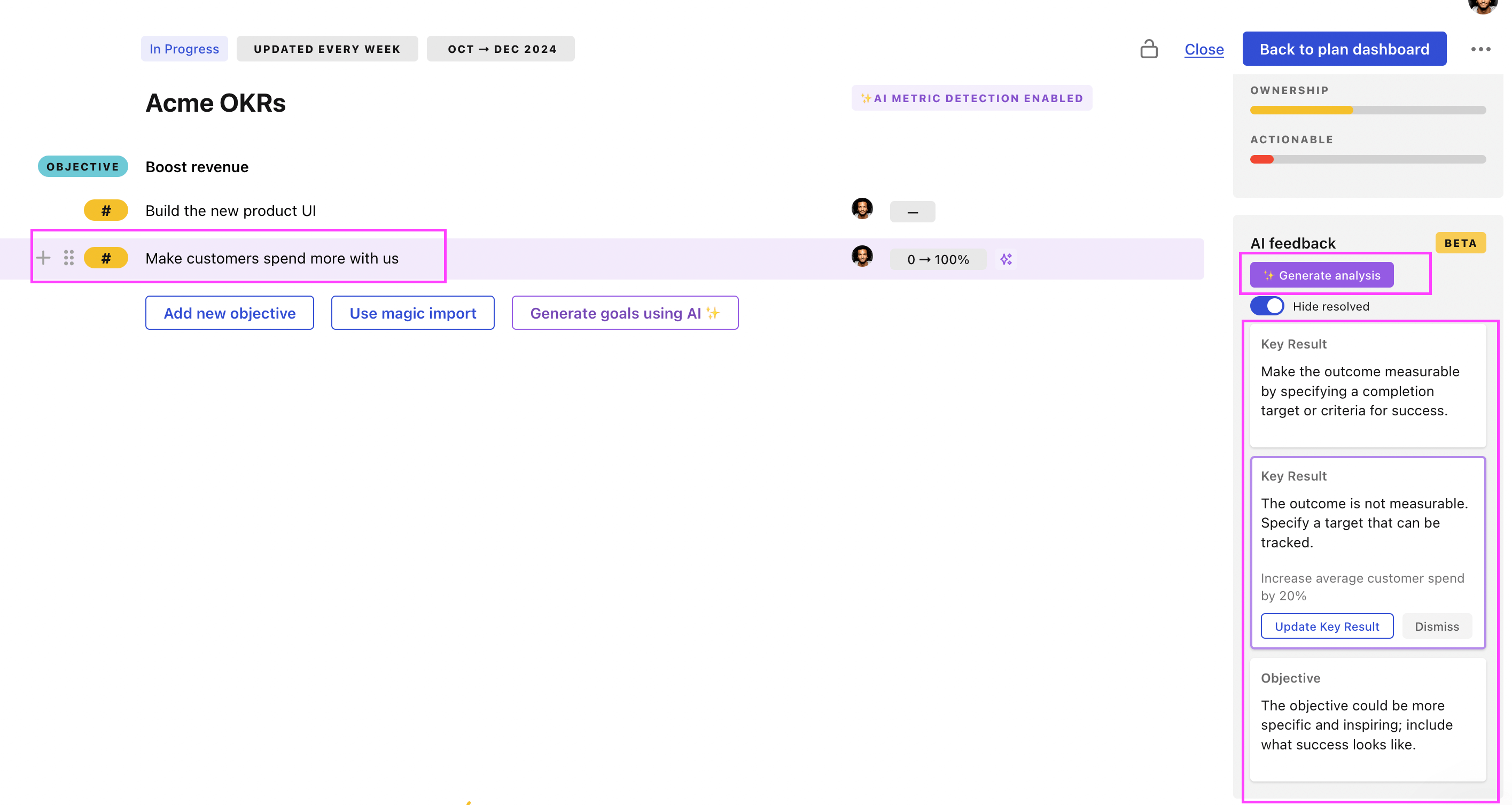
Use Tability feedback to improve existing OKRs
You can also use Tability's AI feedback to improve your OKRs if you already have existing goals. Just import them to the platform and click on the Generate analysis button.
Tability will scan your OKRs and offer different suggestions to improve them. This can range from a small rewrite of a statement to make it clearer to a complete rewrite of the entire OKR.