In short
What is a good it management team OKR?
A good it management team OKR pairs one clear objective with two to four measurable key results the team can score every week. It describes an outcome rather than a list of activities, sets targets that are ambitious but scoreable, and is reviewed weekly so blockers surface before the quarter gets away from the team.
These It Management Team OKR templates are meant to help teams move from ideas and projects to measurable business outcomes. Use them as a starting point, then tailor the metrics and initiatives to the reality of your company.
This page shows the top 6 of 6 templates for it management team, with internal links to related categories and guidance for adapting the examples to your team.
Last template update in this category: 2024-11-20What this category is for
- Teams that need a clearer operating rhythm for it management team work.
- Managers who want examples they can adapt into outcome-focused quarterly plans.
- Leaders comparing adjacent categories before choosing the best OKR direction.
Best outcomes to track
- It Management Team priorities tied to measurable business outcomes.
- Weekly check-ins that surface blockers before they become delivery issues.
- Better alignment between initiatives and the metrics that matter.
Related categories
Use these linked categories to explore adjacent planning areas and strengthen the internal topic cluster around it management team.
Priority hubs
It Management Team OKR examples and templates
Start with these top 6 examples from 6 total templates in this category, then adapt the metrics and initiatives to fit your team's constraints and operating cadence.
OKRs to optimise the recent ERP implementation and rectify outstanding issues
 ObjectiveOptimise the recent ERP implementation and rectify outstanding issues
 KRIdentify and diagnose 100% of current ERP issues within the first month
 Enumerate all existing issues related to the ERP system
- Prioritize issues based on severity and effect
- Develop a valid diagnostic approach for each issue
- KRDevelop a robust action plan addressing all identified issues by week 6
- Create a comprehensive, step-by-step plan for each issue
- Prioritize all identified issues by importance and impact
- Allocate resources and designate responsibilities for execution
- KRAchieve at least 90% resolution rate of identified issues by end of the quarter
- Develop a clear system for tracking and resolving identified issues
- Regularly review and adjust strategies based on resolution progress
- Prioritize, delegate and monitor resolution tasks among employees
OKRs to improve response time to reported outages
- ObjectiveImprove response time to reported outages
- KRImplement an efficient notification system for all outage reports
- Build or procure a suitable notification system
- Define requirements and specifications for the outage notification system
- Conduct testing and training for all staff
- KRReduce average acknowledgement time to less than 5 mins
- Regularly monitor and adjust response times
- Implement automated acknowledgment systems for immediate response
- Train staff on efficient complaint acknowledgement skills
- KRTrain customer service team on quick acknowledgment tactics
- Schedule a workshop focused on quick acknowledgment tactics
- Organize a role-playing exercise for practice
- Share relevant training materials with the team
OKRs to enhance effectiveness and efficiency of IT facility management
- ObjectiveEnhance effectiveness and efficiency of IT facility management
- KRAchieve 10% cost reduction in facility management budget
- Negotiate price reductions or discounts with existing vendors
- Review current expenses to pinpoint areas with potential for reductions
- Implement energy-saving measures to decrease utility bills
- KRReduce outstanding facility-related issues by 35%
- Prioritize issues based on urgency and impact on operations
- Implement effective solutions to address identified high-priority issues
- Conduct a comprehensive review of all existing facility-related issues
- KRImplement a preventive maintenance routine for all IT infrastructure
- Train IT staff on preventive maintenance procedures
- Develop a comprehensive maintenance schedule
- Identify all IT infrastructure requiring regular maintenance
OKRs to ensure efficient transition from SAP ECC to SAP S/4
- ObjectiveEnsure efficient transition from SAP ECC to SAP S/4
- KRFormulate a detailed transition plan involving all stakeholders by end of month two
- Outline steps and targets for the comprehensive transition plan
- Arrange meetings to discuss and finalize the plan
- Identify all relevant stakeholders involved in the transition
- KRComplete an audit of current SAP ECC system and processes by end of month one
- Schedule a comprehensive audit for all SAP ECC processes
- Identify key personnel who will conduct the SAP ECC audit
- Review and consolidate audit findings for final report
- KRStart training all users on SAP S/4 functionalities and differences by end of month three
- Schedule and conduct training sessions
- Develop comprehensive user training materials
- Identify key SAP S/4 functionalities and differences
OKRs to enhance the efficiency and stability of the IT infrastructure
- ObjectiveEnhance the efficiency and stability of the IT infrastructure
- KRImplement two additional failsafe protocols to boost data recovery speed by 15%
- Develop and test two additional failsafe protocols
- Implement the new protocols to enhance data recovery speed
- Identify potential areas for implementing new failsafe protocols
- KREnsure 95% of helpdesk requests are resolved within 24 hours
- Monitor daily reports to assess resolution timelines
- Implement a high-priority response system for urgent requests
- Train helpdesk staff in efficient problem-solving techniques
- KRReduce system downtime by 20% through proactive maintenance and upgrades
- Implement a routine schedule for proactive system maintenance
- Monitor system performance consistently for early issue detection
- Prioritize timely system upgrades and patches
OKRs to enhance productivity and operation efficiency in IT management
- ObjectiveEnhance productivity and operation efficiency in IT management
- KRImprove system uptime to 99.9%
- Establish a comprehensive system monitoring plan
- Regularly conduct preventive maintenance and updates
- Implement redundancy in key system infrastructure components
- KRImplement a new IT project management tool with 90% team adoption
- Identify a suitable IT project management tool for the team
- Conduct tool training sessions to ensure 90% adoption
- Monitor and address any adoption issues regularly
- KRReduce IT incident response time by 30%
- Train IT staff in streamlined incident response processes
- Implement automated alert systems for quicker incident identification
- Regularly review and refine existing response protocols
How to use It Management Team OKRs well
Strong OKRs keep the team focused on measurable outcomes instead of a long task list. That means picking a clear objective, limiting the number of competing priorities, and reviewing progress every week.
Use It Management Team OKRs to define what success looks like this quarter, then track them weekly so the team can quickly spot blockers, learn, and adjust execution.
Choosing software to run It Management Team OKRs?
Move from it management team examples to execution with sourced comparisons from The OKR Software Benchmark.
- Best OKR software rankingSee the overall verdict and the criteria behind each platform score.
- OKR software pricing comparisonCompare verified prices, minimum commitments, and costs at different team sizes.
- Benchmark methodologyReview the published scoring model, source standards, and conflict-of-interest policy.
Related OKR template categories
If you are building a broader plan, these related categories can help you connect it management team work to adjacent company priorities.
- customer service team OKR templates
- leadership OKR templates
- strategic planning OKR templates
- operations OKR templates
- operations team OKR templates
- sales OKR templates
More OKR templates to explore
- OKRs to establish robust connections to the Database via Pgadmin
- OKRs to establish robust security controls for DHS/ATO and NATO contracts
- OKRs to explore doctors' insights in prescribing COVID-19 antivirals
- OKRs to minimize unavoidable equipment downtime next quarter
- OKRs to boost app user engagement and increase application downloads
- OKRs to establish robust safety culture in new manufacturing facility
Not seeing what you need?
Use Tability AI to generate OKRs based on a prompt
Tability allows you to describe your goals in a prompt, and generate a fully editable OKR template in seconds.
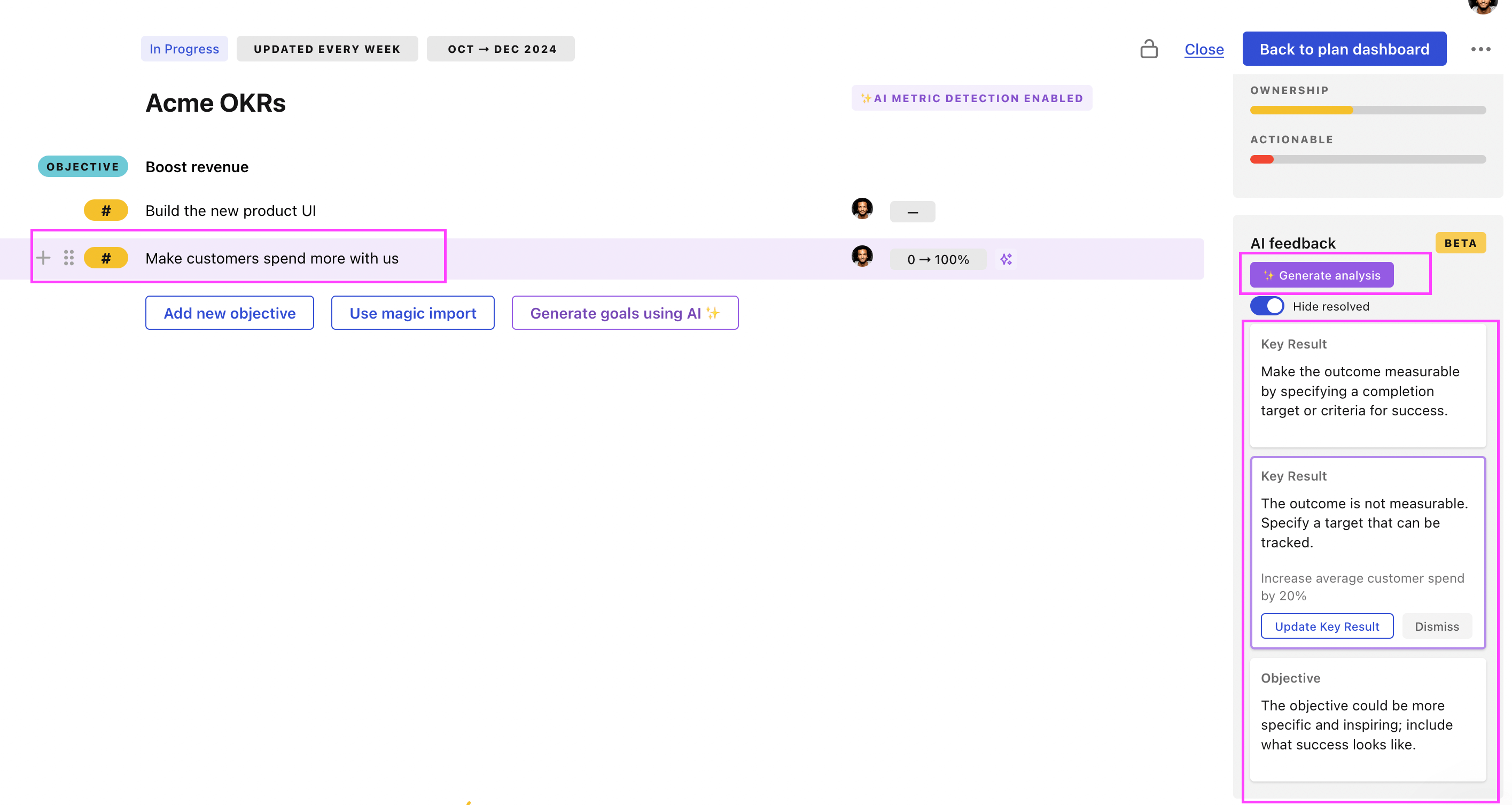
Use Tability feedback to improve existing OKRs
You can also use Tability's AI feedback to improve your OKRs if you already have existing goals. Just import them to the platform and click on the Generate analysis button.
Tability will scan your OKRs and offer different suggestions to improve them. This can range from a small rewrite of a statement to make it clearer to a complete rewrite of the entire OKR.