In short
What is a good customer support manager OKR?
A good customer support manager OKR pairs one clear objective with two to four measurable key results the team can score every week. It describes an outcome rather than a list of activities, sets targets that are ambitious but scoreable, and is reviewed weekly so blockers surface before the quarter gets away from the team.
These Customer Support Manager OKR templates are meant to help teams move from ideas and projects to measurable business outcomes. Use them as a starting point, then tailor the metrics and initiatives to the reality of your company.
This page shows the top 7 of 7 templates for customer support manager, with internal links to related categories and guidance for adapting the examples to your team.
Last template update in this category: 2024-10-23What this category is for
- Teams that need a clearer operating rhythm for customer support manager work.
- Managers who want examples they can adapt into outcome-focused quarterly plans.
- Leaders comparing adjacent categories before choosing the best OKR direction.
Best outcomes to track
- Customer Support Manager priorities tied to measurable business outcomes.
- Weekly check-ins that surface blockers before they become delivery issues.
- Better alignment between initiatives and the metrics that matter.
Related categories
Use these linked categories to explore adjacent planning areas and strengthen the internal topic cluster around customer support manager.
Customer Support Manager OKR examples and templates
Start with these top 7 examples from 7 total templates in this category, then adapt the metrics and initiatives to fit your team's constraints and operating cadence.
OKRs to successfully launch a new payment service product
 ObjectiveSuccessfully launch a new payment service product
 KRSecure 1,000 new registrations for the payment service
 Launch a targeted online marketing campaign to attract new users
- Offer an incentivized referral program for existing customers
- Collaborate with businesses to bundle our service with their products
- KRAchieve 95% positive customer feedback on usability and convenience within three months
- Provide prompt and effective customer support
- Implement regular improvements based on user feedback
- Develop intuitive and user-friendly product interface
- KRIncrease product awareness through a marketing campaign with 5,000 engagements
- Develop a creative marketing strategy centered on product awareness
- Deploy campaign on various digital platforms for broad reach
- Monitor and analyze campaign engagement to improve approach
OKRs to enhance product suite experience for small businesses and accountants
- ObjectiveEnhance product suite experience for small businesses and accountants
- KRImprove user interface navigation by 35% measured by user testing
- Implement interface changes based on feedback
- Conduct user testing to measure improvement
- Survey users for feedback on current navigation difficulties
- KRImplement 2 new features based on users' unique needs surveys feedback
- Test and implement the new features
- Analyze survey feedback to identify two most requested features
- Design and develop these two new features
- KRReduce customer support calls by 30% through enhanced, intuitive design
- Implement intuitive, user-friendly features
- Improve user interface for easier navigation
- Incorporate a comprehensive FAQ section
OKRs to increase usage of D365 Sales Hub in our organization
- ObjectiveIncrease usage of D365 Sales Hub in our organization
- KRAchieve a 20% increase in daily active users within the next quarter
- Implement a user referral incentive program
- Optimize product features to improve user retention
- Launch an engaging marketing campaign to attract new users
- KRConduct 3 interactive workshops on the benefits and features of D365 Sales Hub
- Identify key benefits and features of D365 Sales Hub for workshop content
- Promote and schedule D365 Sales Hub workshops to target audiences
- Plan structure and activities for three interactive workshops
- KRDecrease D365 Sales Hub related support queries by 30%
- Develop a user guide to resolve common issues independently
- Introduce a self-help portal with FAQ
- Implement comprehensive staff training on D365 Sales Hub usage
OKRs to enhance customer satisfaction and net promoter score
- ObjectiveEnhance customer satisfaction and net promoter score
- KRBolster CSAT rating by 10% with enhanced product quality and user-friendliness
- Educate users on product features via online tutorials
- Continually gather client feedback for user-interface enhancements
- Implement a robust quality assurance process for product improvement
- KRDecrease customer complaints by 20% by implementing effective solutions swiftly
- Develop swift response protocols for customer complaints
- Track and analyze complaint trends weekly
- Implement thorough training towards successful problem-solving
- KRIncrease NPS score by 15% through improving customer support responsiveness
- Regularly monitor and evaluate response times
- Implement customer support training on efficient and proactive response
- Integrate faster customer service software/tools
OKRs to launch a viable, user-friendly SaaS product
- ObjectiveLaunch a viable, user-friendly SaaS product
- KRAchieve a customer satisfaction score of above 85%
- Develop a proactive customer communication strategy for problem resolution
- Implement a customer feedback system to identify improvement areas
- Train staff in customer service protocols and problem-solving
- KRDevelop MVP with essential features by involving 10 beta testers
- Gather and integrate feedback to refine MVP features
- Identify the essential features needed for MVP development
- Recruit 10 beta testers for product evaluation
- KRObtain initial sign ups exceeding 50 customers
- Develop enticing advertising campaign targeting potential customers
- Launch sign-up incentive program or promotional offers
- Maximize reach through social media marketing strategies
OKRs to improve sales performance across all product lines
- ObjectiveImprove sales performance across all product lines
- KRRaise customer retention rate by 15%
- Improve customer support and response time
- Implement loyalty programs and reward frequent customers
- Collect feedback to understand and solve customer problems
- KRAchieve a 25% increase in overall unit sales
- Enhance distribution channels to broaden product accessibility
- Implement a marketing campaign to raise product awareness and demand
- Offer customer incentives like discounts or loyalty programs
- KRBoost the average purchase value by 10% per customer
- Introduce premium versions or add-ons of popular products
- Implement strategic up-selling and cross-selling techniques
- Offer discounts or incentives for bulk purchases
OKRs to maximize AI consulting services revenue
- ObjectiveMaximize AI consulting services revenue
- KRAchieve a 20% increase in the conversion rate from leads to paying clients
- Provide personalized follow-up communications to address specific client needs and enhance conversion rates
- Analyze the current lead nurturing process and identify areas for improvement
- Implement targeted email marketing campaigns to engage leads and drive conversions
- Optimize website landing pages to enhance user experience and encourage conversions
- KRReduce customer churn rate by 10% by improving customer satisfaction and retention strategies
- Offer loyalty programs and incentives to encourage customer loyalty and reduce churn rate
- Enhance product/service quality through constant monitoring and prompt resolution of customer feedback
- Implement personalized customer support strategies to enhance engagement and build stronger relationships
- Conduct customer satisfaction surveys to identify pain points and areas for improvement
- KRIncrease the average contract value by 15% through upselling and cross-selling
- Identify top-selling products/services and create bundled packages to increase cross-selling opportunities
- Analyze customer purchase history and behavior to develop personalized upsell/cross-sell recommendations
- Train sales team on effective upselling techniques and provide them with updated product knowledge
- Implement targeted marketing campaigns to educate customers on the benefits of upselling and cross-selling
- KRAcquire 10 new clients by implementing targeted marketing campaigns and referrals
- Encourage existing clients to refer new clients by offering incentives or rewards
- Design and launch a social media ad campaign to attract new clients
- Create a list of potential clients by analyzing the target market demographics
- Develop personalized email campaigns to reach out to potential clients
How to use Customer Support Manager OKRs well
Strong OKRs keep the team focused on measurable outcomes instead of a long task list. That means picking a clear objective, limiting the number of competing priorities, and reviewing progress every week.
Use Customer Support Manager OKRs to define what success looks like this quarter, then track them weekly so the team can quickly spot blockers, learn, and adjust execution.
Choosing software to run Customer Support Manager OKRs?
Move from customer support manager examples to execution with sourced comparisons from The OKR Software Benchmark.
- Best OKR software rankingSee the overall verdict and the criteria behind each platform score.
- OKR software pricing comparisonCompare verified prices, minimum commitments, and costs at different team sizes.
- Benchmark methodologyReview the published scoring model, source standards, and conflict-of-interest policy.
Related OKR template categories
If you are building a broader plan, these related categories can help you connect customer support manager work to adjacent company priorities.
- marketing team OKR templates
- sales manager OKR templates
- sales team OKR templates
- leadership OKR templates
- strategic planning OKR templates
- operations OKR templates
More OKR templates to explore
- OKRs to implement runtime configurability of features
- OKRs to substantially reduce technical debt across all projects
- OKRs to secure $1 million for the pre-seed funding round
- OKRs to achieve optimal resource allocation on funding
- OKRs to elevate operational excellence and customer experience
- OKRs to enhance skillset of 40% of the teams
Not seeing what you need?
Use Tability AI to generate OKRs based on a prompt
Tability allows you to describe your goals in a prompt, and generate a fully editable OKR template in seconds.
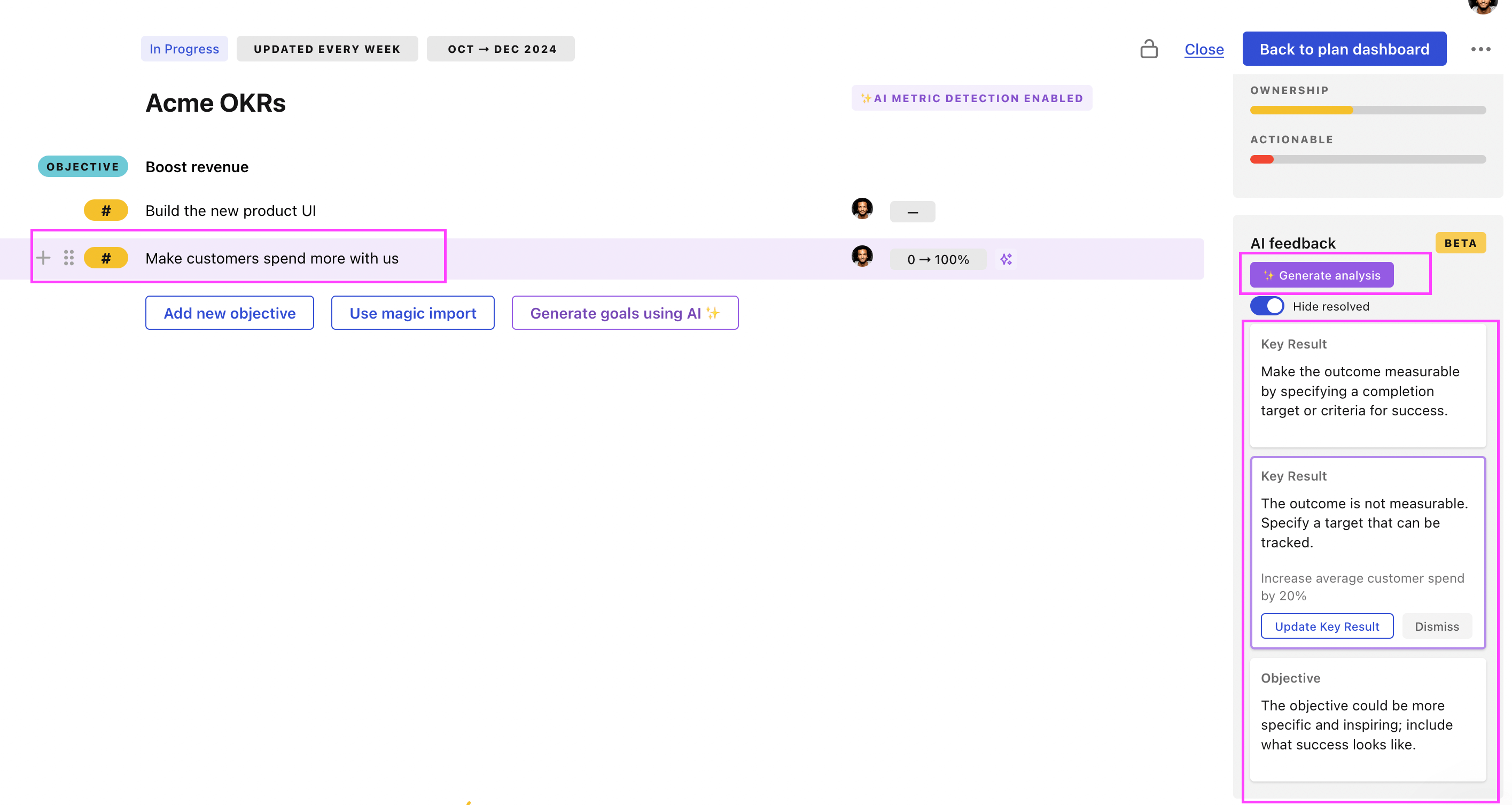
Use Tability feedback to improve existing OKRs
You can also use Tability's AI feedback to improve your OKRs if you already have existing goals. Just import them to the platform and click on the Generate analysis button.
Tability will scan your OKRs and offer different suggestions to improve them. This can range from a small rewrite of a statement to make it clearer to a complete rewrite of the entire OKR.