In short
What is a good risk assessment OKR?
A good risk assessment OKR pairs one clear objective with two to four measurable key results the team can score every week. It describes an outcome rather than a list of activities, sets targets that are ambitious but scoreable, and is reviewed weekly so blockers surface before the quarter gets away from the team.
These Risk Assessment OKR templates are meant to help teams move from ideas and projects to measurable business outcomes. Use them as a starting point, then tailor the metrics and initiatives to the reality of your company.
This page shows the top 3 of 3 templates for risk assessment, with internal links to related categories and guidance for adapting the examples to your team.
Last template update in this category: 2024-08-13What this category is for
- Teams that need a clearer operating rhythm for risk assessment work.
- Managers who want examples they can adapt into outcome-focused quarterly plans.
- Leaders comparing adjacent categories before choosing the best OKR direction.
Best outcomes to track
- Risk Assessment priorities tied to measurable business outcomes.
- Weekly check-ins that surface blockers before they become delivery issues.
- Better alignment between initiatives and the metrics that matter.
Related categories
Use these linked categories to explore adjacent planning areas and strengthen the internal topic cluster around risk assessment.
Priority hubs
Risk Assessment OKR examples and templates
Start with these top 3 examples from 3 total templates in this category, then adapt the metrics and initiatives to fit your team's constraints and operating cadence.
OKRs to enhance and streamline security governance framework
 ObjectiveEnhance and streamline security governance framework
 KRAchieve 100% staff completion of cyber security training program
 Enforce disciplinary measures for non-compliance
- Assign mandatory cybersecurity training program to all staff
- Monitor progress of staff training completion weekly
- KRConduct a comprehensive risk assessment across all departments
- Evaluate and prioritize each potential risk
- Develop a plan to mitigate identified risks
- Identify the potential risks in each department
- KRImplement advanced threat detection system in 90% of the network infrastructure
- Test system coverage across the entire network infrastructure
- Identify current gaps in the network's threat detection system
- Procure and install advanced threat detection software
OKRs to enhance the efficiency of the Cloud Support Team
- ObjectiveEnhance the efficiency of the Cloud Support Team
- KRReduce the average response time to customer queries by 20%
- Implement comprehensive staff training for efficient query solution
- Allocate more resources towards customer service management
- Enhance customer service software for faster responses
- KRImplement three new measures for proactive issue identification and resolution
- Train team members on the new measures
- Identify potential problems through risk assessment analysis
- Develop procedures for efficient issue resolution
- KRIncrease customer satisfaction score for support tickets by 30%
- Implement thorough training for support team on customer service skills
- Regularly solicit feedback to improve support services
- Develop a system for prompt response to support tickets
OKRs to minimize overall business risk
- ObjectiveMinimize overall business risk
- KREstablish a weekly risk assessment process and analyze 10 distinct risk areas
- Design a weekly risk assessment process
- Identify and list 10 distinct risk areas to be assessed
- Conduct and analyze weekly risk assessments consistently
- KRImplement a risk management framework to reduce identified risks by 25%
- Regularly monitor and update risk management framework
- Develop mitigation strategies for each identified risk
- Identify potential risks onsite and categorize by severity
- KRProvide risk management training to 100% of management staff
- Schedule training sessions for all management staff
- Verify and record staff completion of training
- Identify suitable risk management training courses or providers
How to use Risk Assessment OKRs well
Strong OKRs keep the team focused on measurable outcomes instead of a long task list. That means picking a clear objective, limiting the number of competing priorities, and reviewing progress every week.
Use Risk Assessment OKRs to define what success looks like this quarter, then track them weekly so the team can quickly spot blockers, learn, and adjust execution.
Choosing software to run Risk Assessment OKRs?
Move from risk assessment examples to execution with sourced comparisons from The OKR Software Benchmark.
- Best OKR software rankingSee the overall verdict and the criteria behind each platform score.
- OKR software pricing comparisonCompare verified prices, minimum commitments, and costs at different team sizes.
- Benchmark methodologyReview the published scoring model, source standards, and conflict-of-interest policy.
Related OKR template categories
If you are building a broader plan, these related categories can help you connect risk assessment work to adjacent company priorities.
- risk management OKR templates
- leadership OKR templates
- strategic planning OKR templates
- operations OKR templates
- operations team OKR templates
- sales OKR templates
More OKR templates to explore
- OKRs to boost overall employee satisfaction and reduce turnover
- OKRs to boost operational efficiency on SaaS platforms
- OKRs to improve Service Desk's first contact resolution rate
- OKRs to enhance IT operational efficiency through data-driven innovations
- OKRs to transform IT into a driving force for digital evolution
- OKRs to increase sales of coaching services to independent professionals
Not seeing what you need?
Use Tability AI to generate OKRs based on a prompt
Tability allows you to describe your goals in a prompt, and generate a fully editable OKR template in seconds.
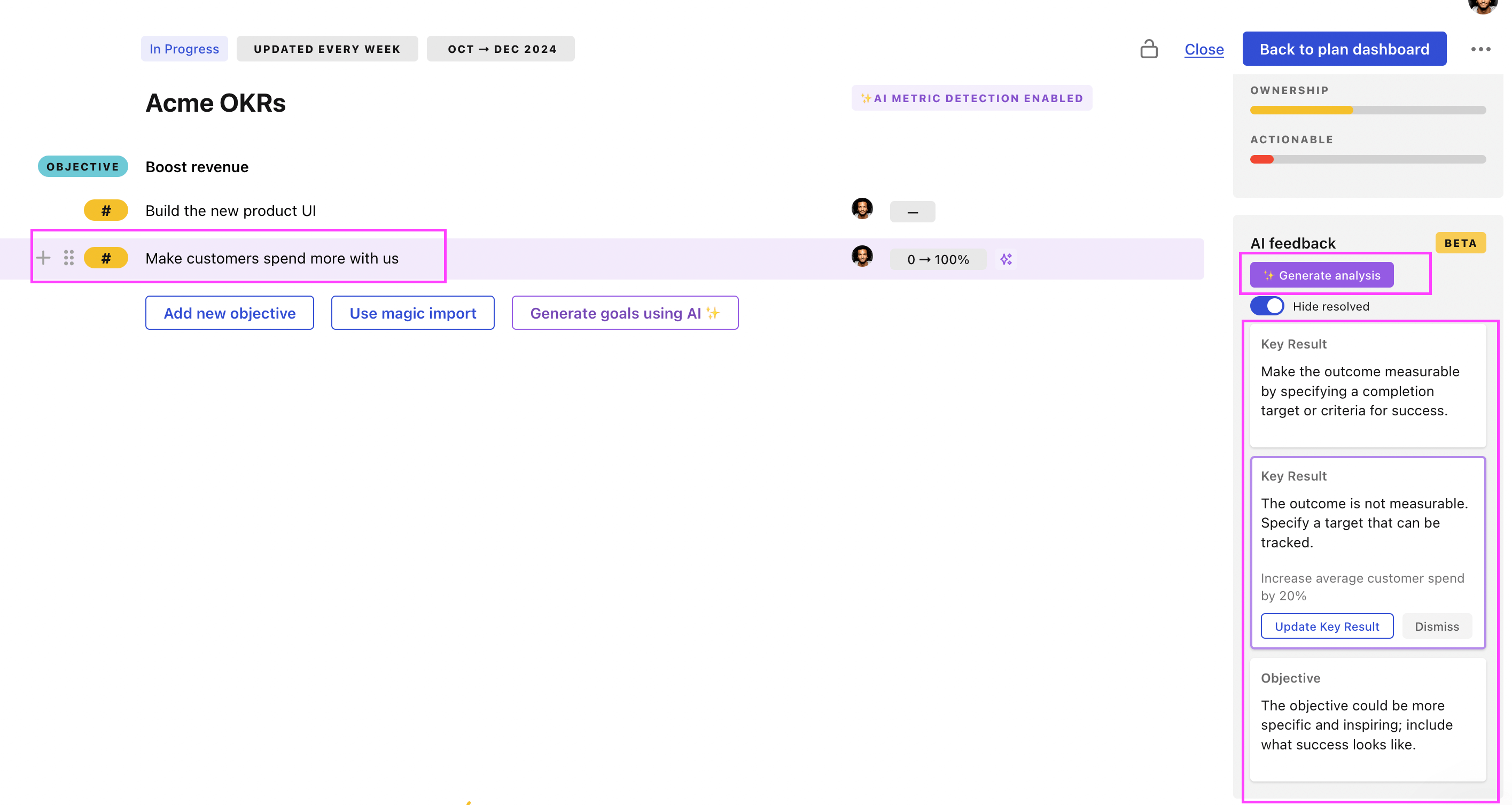
Use Tability feedback to improve existing OKRs
You can also use Tability's AI feedback to improve your OKRs if you already have existing goals. Just import them to the platform and click on the Generate analysis button.
Tability will scan your OKRs and offer different suggestions to improve them. This can range from a small rewrite of a statement to make it clearer to a complete rewrite of the entire OKR.