Tability is a cheatcode for goal-driven teams. Set perfect OKRs with AI, stay focused on the work that matters.
What are Plan Implementation OKRs?
The Objective and Key Results (OKR) framework is a simple goal-setting methodology that was introduced at Intel by Andy Grove in the 70s. It became popular after John Doerr introduced it to Google in the 90s, and it's now used by teams of all sizes to set and track ambitious goals at scale.
Creating impactful OKRs can be a daunting task, especially for newcomers. Shifting your focus from projects to outcomes is key to successful planning.
We've tailored a list of OKRs examples for Plan Implementation to help you. You can look at any of the templates below to get some inspiration for your own goals.
If you want to learn more about the framework, you can read our OKR guide online.
The best tools for writing perfect Plan Implementation OKRs
Here are 2 tools that can help you draft your OKRs in no time.
Tability AI: to generate OKRs based on a prompt
Tability AI allows you to describe your goals in a prompt, and generate a fully editable OKR template in seconds.
- 1. Create a Tability account
- 2. Click on the Generate goals using AI
- 3. Describe your goals in a prompt
- 4. Get your fully editable OKR template
- 5. Publish to start tracking progress and get automated OKR dashboards
Watch the video below to see it in action 👇
Tability Feedback: to improve existing OKRs
You can use Tability's AI feedback to improve your OKRs if you already have existing goals.
- 1. Create your Tability account
- 2. Add your existing OKRs (you can import them from a spreadsheet)
- 3. Click on Generate analysis
- 4. Review the suggestions and decide to accept or dismiss them
- 5. Publish to start tracking progress and get automated OKR dashboards
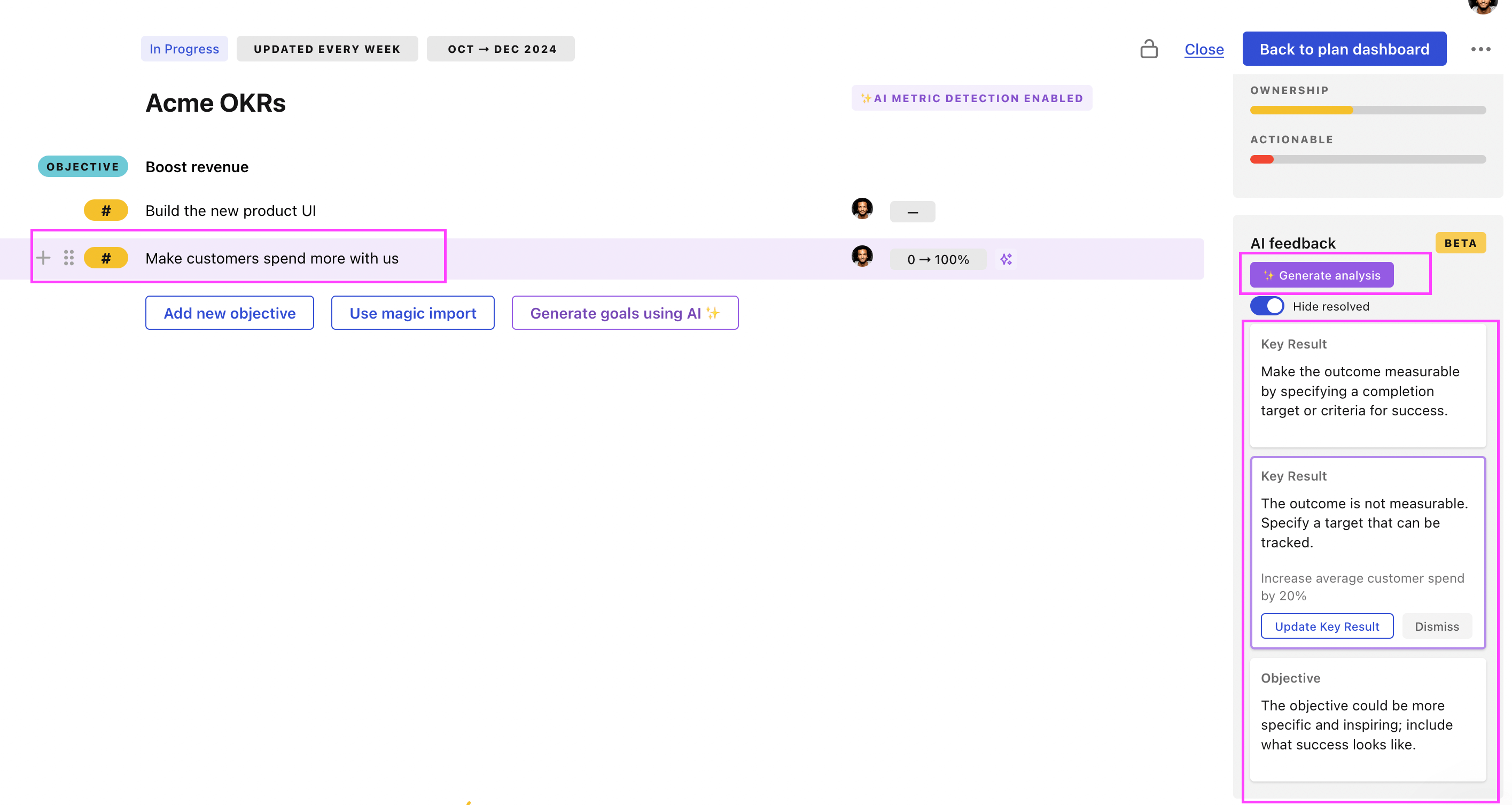
Tability will scan your OKRs and offer different suggestions to improve them. This can range from a small rewrite of a statement to make it clearer to a complete rewrite of the entire OKR.
Plan Implementation OKRs examples
We've added many examples of Plan Implementation Objectives and Key Results, but we did not stop there. Understanding the difference between OKRs and projects is important, so we also added examples of strategic initiatives that relate to the OKRs.
Hope you'll find this helpful!
OKRs to implement OKR methodology across ten departments
 ObjectiveImplement OKR methodology across ten departments
 KRConduct training sessions on OKR methodology for all department heads
- KRDevelop and finalize individualized OKR plans for ten departments
 Revise and finalize individual OKR plans
- Create draft OKR plans for each department
- Obtain department feedback on draft plans
- KRAchieve 90% satisfaction in post-implementation reviews from department heads
- Monitor satisfaction levels post-adjustments
- Implement changes based on department feedback
- Schedule regular feedback sessions with department heads
OKRs to implement new Financial Planning and Analysis Software
- ObjectiveImplement new Financial Planning and Analysis Software
- KRSuccessfully negotiate procurement contract and secure software installation by week 8
- Schedule software installation for week 8
- Negotiate procurement contract by week 6
- Identify and research potential software suppliers
- KREvaluate and select software from 3 different vendor options by week 6
- Research functionalities, cost, and usability of each software option
- Develop criteria for software evaluation and selection
- Compare and choose the suitable software by week 6
- KRTrain 90% of financial team on the new software and ensure usability by week 12
- Schedule software training for the financial team
- Monitor training progress and completion rates
- Conduct usability tests by week 12
OKRs to execute a systematic approach to generate varying okr timelines
- ObjectiveExecute a systematic approach to generate varying okr timelines
- KRDevelop a comprehensive strategy for OKR timeline generation within 1st week
- Solicit feedback on the proposed timeline
- Draft a preliminary OKR timeline
- Identify key objectives and corresponding key results
- KRImplement strategy, yielding at least a 30% increase in efficiency by week 6
- Establish measurable goals oriented towards a 30% increase in efficiency
- Monitor, evaluate, and adjust strategy on a weekly basis
- Create and train team on actionable strategy for efficiency improvement
- KRReview, refine and iterate the strategy by achieving 100% completion by week 12
- Regularly reassess and adjust strategy as needed
- Implement improvements to current strategy
- Evaluate current strategy effectiveness
OKRs to enhance understanding of customer needs and expectations through surveys
- ObjectiveEnhance understanding of customer needs and expectations through surveys
- KRConduct a survey with at least 500 unique customer responses
- Develop a relevant and concise questionnaire for customers
- Identify and select diverse channels to distribute the survey
- Organize and analyze the gathered survey responses
- KRIdentify and categorize top 3 common customer needs and expectations
- Analyze survey data to identify top 3 needs
- Categorize these needs for future reference
- Conduct a survey to identify common customer needs
- KRImplement at least 2 changes in strategy or offering based on the survey insights
- Analyze survey results to identify key insights
- Apply changes to business offering
- Develop a plan to implement strategy changes
OKRs to create a unified promo planning process for all Sales
- ObjectiveCreate a unified promo planning process for all Sales
- KRConduct 3 training sessions to ensure Sales Department understands the new process
- Set up three different training dates
- Follow up for feedback after each session
- Identify key points to cover in training sessions
- KRAchieve 90% positive feedback on the ease and clarity of the new process
- Regularly ask for and analyze feedback
- Conduct training sessions to fully understand new process
- Implement improvements based on feedback received
- KRDefine and document 100% of the necessary steps for successful promo planning
- Compile steps into a comprehensive document guide
- Identify all steps involved in successful promo planning
- Write clear, concise descriptions for each step
Plan Implementation OKR best practices
Generally speaking, your objectives should be ambitious yet achievable, and your key results should be measurable and time-bound (using the SMART framework can be helpful). It is also recommended to list strategic initiatives under your key results, as it'll help you avoid the common mistake of listing projects in your KRs.
Here are a couple of best practices extracted from our OKR implementation guide 👇
Tip #1: Limit the number of key results
Having too many OKRs is the #1 mistake that teams make when adopting the framework. The problem with tracking too many competing goals is that it will be hard for your team to know what really matters.
We recommend having 3-4 objectives, and 3-4 key results per objective. A platform like Tability can run audits on your data to help you identify the plans that have too many goals.
Tip #2: Commit to weekly OKR check-ins
Setting good goals can be challenging, but without regular check-ins, your team will struggle to make progress. We recommend that you track your OKRs weekly to get the full benefits from the framework.
Being able to see trends for your key results will also keep yourself honest.
Tip #3: No more than 2 yellow statuses in a row
Yes, this is another tip for goal-tracking instead of goal-setting (but you'll get plenty of OKR examples above). But, once you have your goals defined, it will be your ability to keep the right sense of urgency that will make the difference.
As a rule of thumb, it's best to avoid having more than 2 yellow/at risk statuses in a row.
Make a call on the 3rd update. You should be either back on track, or off track. This sounds harsh but it's the best way to signal risks early enough to fix things.
Save hours with automated Plan Implementation OKR dashboards
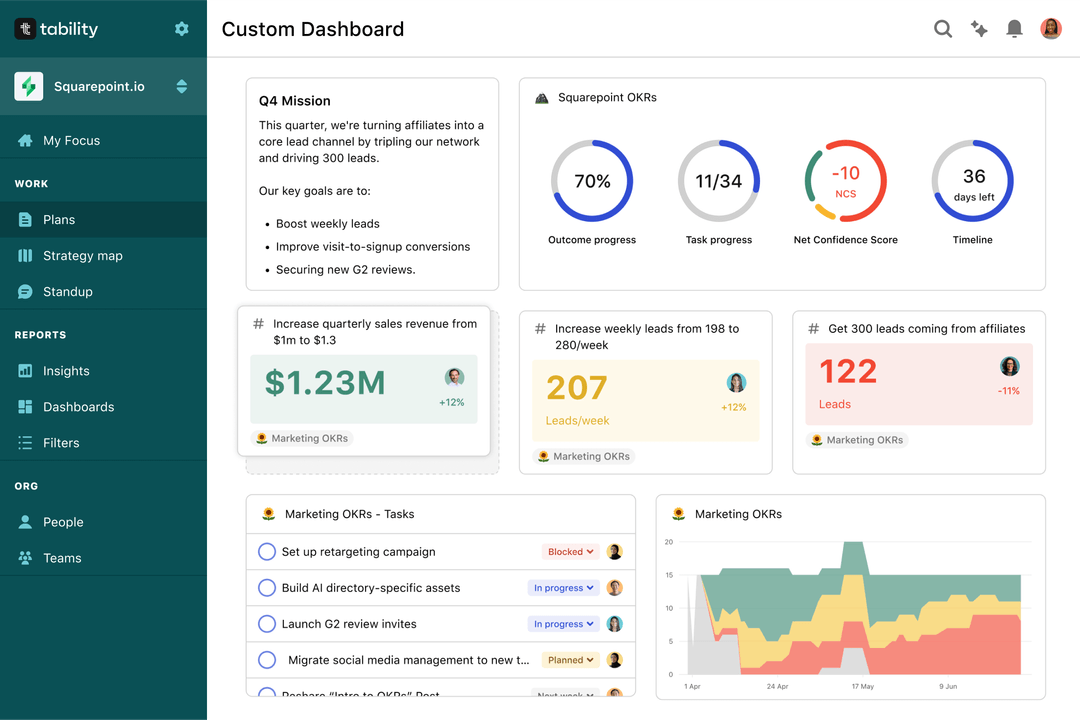
The rules of OKRs are simple. Quarterly OKRs should be tracked weekly, and yearly OKRs should be tracked monthly. Reviewing progress periodically has several advantages:
- It brings the goals back to the top of the mind
- It will highlight poorly set OKRs
- It will surface execution risks
- It improves transparency and accountability
Spreadsheets are enough to get started. Then, once you need to scale you can use Tability to save time with automated OKR dashboards, data connectors, and actionable insights.
How to get Tability dashboards:
- 1. Create a Tability account
- 2. Use the importers to add your OKRs (works with any spreadsheet or doc)
- 3. Publish your OKR plan
That's it! Tability will instantly get access to 10+ dashboards to monitor progress, visualise trends, and identify risks early.
More Plan Implementation OKR templates
We have more templates to help you draft your team goals and OKRs.
- OKRs to maximise utilisation of new sourcing tool for quality RFPs
- OKRs to achieve proficiency in Common Core and the Mono Repo
- OKRs to establish a high-performing social media team
- OKRs to enhance the quality and effectiveness of postgraduate instruction
- OKRs to complete the Financial Statement promptly
- OKRs to achieve proficiency as a middle level java developer