In short
What is a good it specialist OKR?
A good it specialist OKR pairs one clear objective with two to four measurable key results the team can score every week. It describes an outcome rather than a list of activities, sets targets that are ambitious but scoreable, and is reviewed weekly so blockers surface before the quarter gets away from the team.
These It Specialist OKR templates are meant to help teams move from ideas and projects to measurable business outcomes. Use them as a starting point, then tailor the metrics and initiatives to the reality of your company.
This page shows the top 7 of 7 templates for it specialist, with internal links to related categories and guidance for adapting the examples to your team.
Last template update in this category: 2025-03-11What this category is for
- Teams that need a clearer operating rhythm for it specialist work.
- Managers who want examples they can adapt into outcome-focused quarterly plans.
- Leaders comparing adjacent categories before choosing the best OKR direction.
Best outcomes to track
- It Specialist priorities tied to measurable business outcomes.
- Weekly check-ins that surface blockers before they become delivery issues.
- Better alignment between initiatives and the metrics that matter.
Related categories
Use these linked categories to explore adjacent planning areas and strengthen the internal topic cluster around it specialist.
It Specialist OKR examples and templates
Start with these top 7 examples from 7 total templates in this category, then adapt the metrics and initiatives to fit your team's constraints and operating cadence.
OKRs to enhance platform security and reliability for ista24 users
 ObjectiveEnhance platform security and reliability for ista24 users
 KRAchieve a user satisfaction score of 90% or higher on platform reliability
 Implement user feedback for platform upgrades and changes
- Improve server infrastructure to reduce downtime and crashes
- Regularly test and debug software for seamless user experience
- KRImplement two-factor authentication for all user accounts
- Roll out two-factor authentication to all user accounts
- Choose a suitable two-factor authentication tool
- Review current user account security systems and protocols
- KRDecrease system downtime by 30%
- Train staff on efficient troubleshooting techniques
- Update outdated hardware and software components
- Implement predictive maintenance schedules for regular system checks
OKRs to to significantly declutter my email inbox
- ObjectiveTo significantly declutter my email inbox
- KRImplement an efficient system of email categorization to streamline future emails
- Regularly review and adjust categorization rules
- Research and select suitable email categorization software
- Train team on proper email tagging and filing
- KRArchive or delete all emails older than 1 year by mid-quarter
- Decide between archiving or deleting each email
- Complete the process by mid-quarter deadline
- Sort emails by date, targeting those older than a year
- KRReduce email inbox count by 50% using organizing tools by end of the quarter
- Unsubscribe from unwanted mailing lists
- Delete unnecessary emails daily
- Organize important emails using categorizing tools
OKRs to enhance data reporting continuity and accuracy, eliminating bot interactions
- ObjectiveEnhance data reporting continuity and accuracy, eliminating bot interactions
- KRIncrease data reporting accuracy by 25% through automated quality checks
- Monitor and adjust automated checks for optimal accuracy
- Train staff on utilizing automated check systems effectively
- Implement automated quality check systems for data reporting
- KREstablish regular reviews, maintaining 100% continuity in data reporting processes
- Implement checks to ensure 100% data continuity
- Set up routine data reporting process reviews
- Correct inconsistencies found during reviews promptly
- KRImplement a bot detection mechanism, aiming to reduce bot interactions by 50%
- Monitor and adjust the system to maximize efficiency
- Develop and integrate a bot detection system
- Research the latest bot detection technologies and methods
OKRs to successfully implement and optimize Exabeam operations
- ObjectiveSuccessfully implement and optimize Exabeam operations
- KRImplement Exabeam in two distinct environments by meeting all functional requirements
- Install Exabeam in the first environment
- Ensure successful setup in the second environment
- Identify all functional requirements for Exabeam implementation
- KROptimize Exabeam configuration to improve effectiveness by 25% measured by performance indicators
- Review present Exabeam configurations and identify possible areas of improvement
- Implement necessary changes to maximize Exabeam's functionality
- Monitor changes and adjust to meet 25% performance increase goal
- KRConduct 3 Exabeam training sessions for team members to ensure full utilization
- Prepare relevant training materials and agenda
- Follow up on team members' understanding post-sessions
- Schedule 3 Exabeam training sessions for team members
OKRs to successful migration of services from OnPremise to cloud
- ObjectiveSuccessful migration of services from OnPremise to cloud
- KRIdentify and categorize all OnPremise services for migration by end of Week 3
- Compile a list of all OnPremise services currently in use
- Categorize each service based on priority for migration
- Create a detailed migration schedule by end of Week 3
- KRConduct post-migration validation to ensure 100% functionality for all migrated services
- Verify functionality of every migrated service
- Resolve any identified post-migration issues
- Conduct post-migration system checks
- KRAchieve 70% service migration while ensuring zero disruption in client services
- Identify and prioritize critical services for migration
- Develop and execute a detailed migration plan
- Continuously monitor and troubleshoot during migration
OKRs to implement a cost-effective solution for portfolio tracking
- ObjectiveImplement a cost-effective solution for portfolio tracking
- KRSuccessfully integrate chosen solution into current system with 100% functionality by week 12
- Develop an integration plan and timeline to implement the solution
- Test and debug solution for 100% functionality by week 12
- Evaluate suitability and functionality of chosen solution with the current system
- KRTrial selected solutions and choose most efficient by week 10
- Evaluate each solution's efficiency weekly
- Implement chosen solutions for a trial period
- Choose the most productive solution by week 10
- KRResearch and identify 3 cost-effective portfolio tracking solutions by week 6
- Research affordable portfolio tracking services
- Compile and analyze top 3 options
- Outline key features needed in portfolio tracking solutions
OKRs to implement robust data backup and recovery
- ObjectiveEnsure reliable data backup and recovery
- KRImplement offsite backup and test disaster recovery procedures
- KRIncrease backup frequency and reduce recovery time
- KRTrain staff on backup best practices and conduct regular audits
- KRImprove documentation and communication around backup processes
How to use It Specialist OKRs well
Strong OKRs keep the team focused on measurable outcomes instead of a long task list. That means picking a clear objective, limiting the number of competing priorities, and reviewing progress every week.
Use It Specialist OKRs to define what success looks like this quarter, then track them weekly so the team can quickly spot blockers, learn, and adjust execution.
Choosing software to run It Specialist OKRs?
Move from it specialist examples to execution with sourced comparisons from The OKR Software Benchmark.
- Best OKR software rankingSee the overall verdict and the criteria behind each platform score.
- OKR software pricing comparisonCompare verified prices, minimum commitments, and costs at different team sizes.
- Benchmark methodologyReview the published scoring model, source standards, and conflict-of-interest policy.
Related OKR template categories
If you are building a broader plan, these related categories can help you connect it specialist work to adjacent company priorities.
- operations team OKR templates
- project manager OKR templates
- leadership OKR templates
- strategic planning OKR templates
- operations OKR templates
- sales OKR templates
More OKR templates to explore
- OKRs to implement robust data privacy compliance framework
- OKRs to boost event participation and enhance attendee satisfaction
- OKRs to enhance QA analysis of each MCSS in the test repository
- OKRs to increase company revenue and enhance the organizational environment
- OKRs to communicate product support advancements by us and our partners
- OKRs to understand group's shared experiences comprehensively
Not seeing what you need?
Use Tability AI to generate OKRs based on a prompt
Tability allows you to describe your goals in a prompt, and generate a fully editable OKR template in seconds.
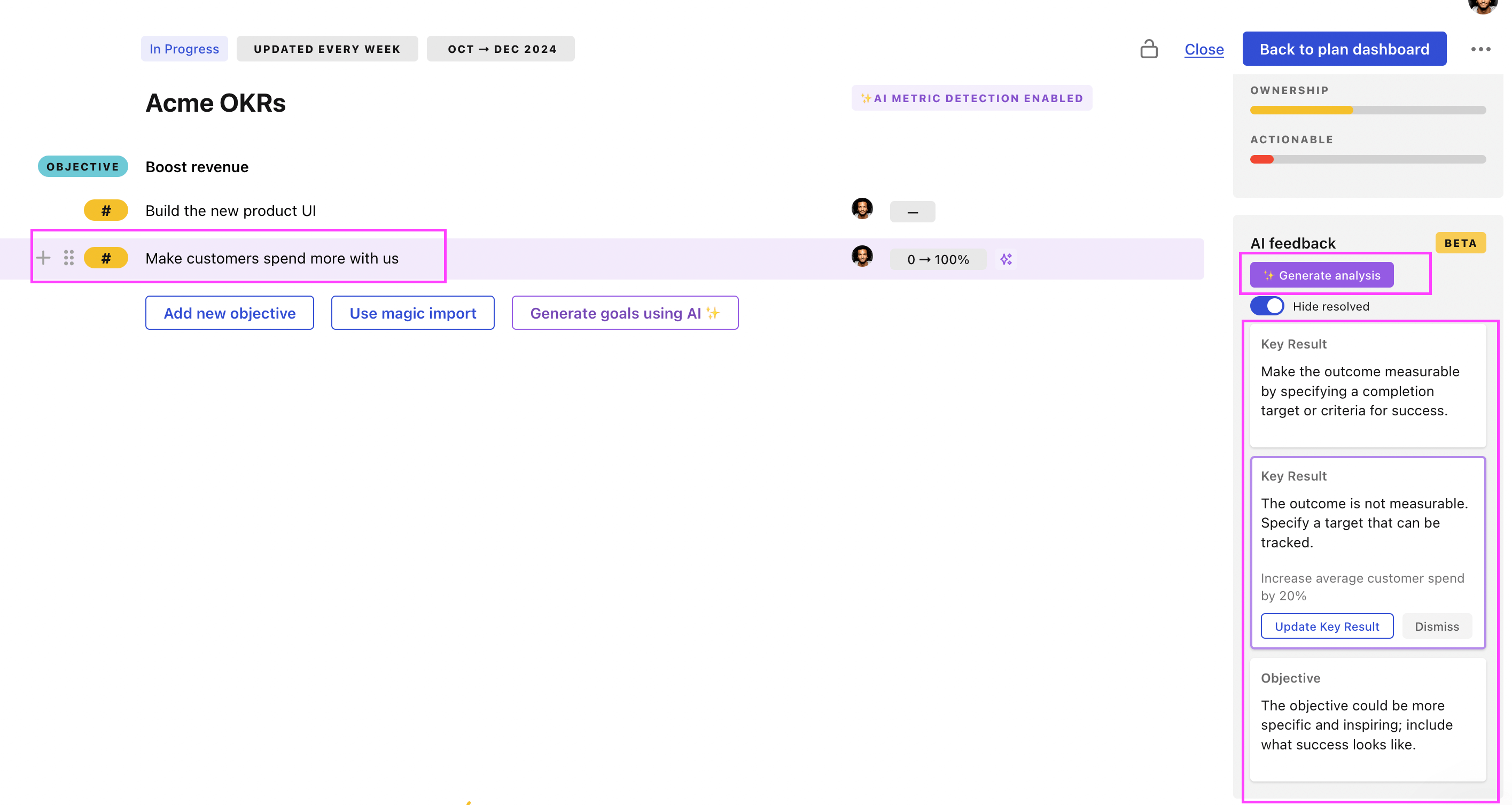
Use Tability feedback to improve existing OKRs
You can also use Tability's AI feedback to improve your OKRs if you already have existing goals. Just import them to the platform and click on the Generate analysis button.
Tability will scan your OKRs and offer different suggestions to improve them. This can range from a small rewrite of a statement to make it clearer to a complete rewrite of the entire OKR.