In short
What is a good ux designer OKR?
A good ux designer OKR pairs one clear objective with two to four measurable key results the team can score every week. It describes an outcome rather than a list of activities, sets targets that are ambitious but scoreable, and is reviewed weekly so blockers surface before the quarter gets away from the team.
These UX Designer OKR templates are meant to help teams move from ideas and projects to measurable business outcomes. Use them as a starting point, then tailor the metrics and initiatives to the reality of your company.
This page shows the top 10 of 31 templates for ux designer, with internal links to related categories and guidance for adapting the examples to your team.
Last template update in this category: 2026-02-11What this category is for
- Teams that need a clearer operating rhythm for ux designer work.
- Managers who want examples they can adapt into outcome-focused quarterly plans.
- Leaders comparing adjacent categories before choosing the best OKR direction.
Best outcomes to track
- UX Designer priorities tied to measurable business outcomes.
- Weekly check-ins that surface blockers before they become delivery issues.
- Better alignment between initiatives and the metrics that matter.
Related categories
Use these linked categories to explore adjacent planning areas and strengthen the internal topic cluster around ux designer.
Priority hubs
UX Designer OKR examples and templates
Start with these top 10 examples from 31 total templates in this category, then adapt the metrics and initiatives to fit your team's constraints and operating cadence.
OKRs to enhance the user experience for our ecommerce site
 ObjectiveEnhance the user experience for our ecommerce site
 KRReduce the cart abandonment rate by 20%
 Send timely, personalized cart abandonment emails
- Implement a simplified, user-friendly checkout process
- Offer incentives like discounts or free shipping
- KRIncrease customer satisfaction scores by 10 points
- Streamline complaint resolution process
- Implement regular customer feedback surveys
- Enhance customer service training programs
- KRDecrease the website's load time by 15%
- Implement a caching solution
- Minify CSS, JavaScript, and HTML files
- Optimize and compress website images
OKRs to redesign paywalls and UX to boost monthly recurring revenue
- ObjectiveRedesign paywalls and UX to boost monthly recurring revenue
- KRImprove UX to achieve 15% positive customer feedback
- Develop customer journey maps to uncover UX issues
- Implement user feedback tools on website and app
- Perform A/B testing to fine-tune UX elements
- KRDecrease paywall related customer complaints by 30%
- Regularly review and improve paywall experience
- Implement clear communication about subscription benefits and costs
- Enhance customer support for paywall issues
- KRIncrease MRR by 20% through redesigned paywall conversions
- Redesign paywall for clearer pricing and plan benefits
- Implement A/B testing to optimize conversions
- Track and analyze conversion data to inform modifications
OKRs to successfully revamp homepage for improved user experience
- ObjectiveSuccessfully revamp homepage for improved user experience
- KRIncrease website visitor-to-lead conversion rate by 20%
- Optimize landing page and call to action buttons for higher engagement
- Revise current content and design to improve user-friendliness and accessibility
- Implement advanced tracking and analytics tools for user behavior
- KRReduce homepage bounce rate by 15%
- Incorporate engaging content relevant to target market
- Redesign homepage for easier navigation and user friendliness
- Optimize load time for improved user experience
- KRAchieve a 10% increase in time users spend on the homepage
- Boost website speed for seamless navigation
- Improve homepage design for better user engagement
- Add interactive content to retain users
OKRs to to create an effective web-based project management dashboard
- ObjectiveTo create an effective web-based project management dashboard
- KRIntegrate with three existing project management tools for versatility
- Implement integration and perform testing
- Develop integration strategies for each tool
- Research capabilities and APIs of three project management tools
- KRAchieve zero crash reports within 30 days of the beta test
- Introduce continuous monitoring during beta testing
- Formulate and implement beta test remediation plans
- Develop comprehensive end-to-end testing procedures
- KRDesign a user-friendly interface tested by 20 potential users for usability
- Conduct usability testing and gather feedback
- Select 20 potential users for testing
- Create a user-friendly interface draft for testing
OKRs to enhance understanding of our users' needs and motivations
- ObjectiveEnhance understanding of our users' needs and motivations
- KRAnalyze and report findings from user interviews in a comprehensive document
- Compile and write comprehensive report document
- Analyze findings and identify key insights
- Review and categorize data from user interviews
- KRDevelop and implement 3 changes based on top user research findings
- Analyze top user research findings for improvement areas
- Draft a development plan for the identified changes
- Implement the changes and gather user feedback
- KRConduct 30 qualitative interviews with diverse user profiles to gather insights
- Schedule and conduct 30 qualitative interviews with diverse users
- Analyze recorded interview data for actionable insights
- Develop interview questions relevant to user experience and needs
OKRs to comply with UX laws and execute an effective audit
- ObjectiveComply with UX laws and execute an effective audit
- KRConduct a meticulous UX audit, identifying and resolving 100% of non-compliance issues
- Identify all existing non-compliance issues
- Review current UX design for compliance with industry standards
- Implement solutions to resolve non-compliance issues
- KRComplete a comprehensive course on UX laws to improve professional development by 50%
- KRImplement a UX optimization strategy, improving user satisfaction scores by 20%
- Regularly monitor and adjust strategy based on feedback
- Develop and implement a targeted UX improvement plan
- Conduct thorough user experience research and analysis
OKRs to enhance product's usability by resolving UX issues
- ObjectiveEnhance product's usability by resolving UX issues
- KRImprove user satisfaction score by 30%
- Revamp user interface for easier navigation
- Implement regular user feedback surveys
- Increase staff training on customer service
- KRReduce user-reported UX issues by 40%
- Develop streamlined solutions for detected UX problems
- Implement regular user feedback sessions to gauge improvements
- Conduct thorough user testing to identify prevalent UX issues
- KRIncrease user session duration by 20%
- Add engaging content that's relevant to user's interests
- Optimize site speed to reduce loading time
- Improve website's user interface for superior navigation and engagement
OKRs to boost engagement and adoption of B2B2C advocacy program
- ObjectiveBoost engagement and adoption of B2B2C advocacy program
- KRRaise frequency of monthly active users by 25%
- Implement engaging, user-friendly updates to improve user interface
- Implement regular user engagement initiatives
- Launch targeted outreach and promotional campaigns
- KRIncrease unique user logins by 30%
- Improve website or app user interface for better usability
- Implement a user referral program to attract new users
- Promote site or app via targeted social media advertising
- KRImprove user retention rate by 20%
- Conduct regular User Experience (UX) testing and improvements
- Optimize customer service responses and interactions
- Implement personalized user experiences to boost engagement
OKRs to improve the UX team's design and technical skills
- ObjectiveImprove the UX team's design and technical skills
- KRIncrease weekly training hours by 25% within the team
- KRAchieve a 15% improvement in project completion time
- Enhance team communication and collaboration
- Streamline processes to remove unnecessary steps
- Implement effective project management tools
- KRImplement two skills-based workshops or seminars per member
- Schedule two workshops/seminars per member
- Develop curriculum customised to member's needs
- Determine skills focus for each workshop or seminar
OKRs to enhance product suite experience for small businesses and accountants
- ObjectiveEnhance product suite experience for small businesses and accountants
- KRImprove user interface navigation by 35% measured by user testing
- Implement interface changes based on feedback
- Conduct user testing to measure improvement
- Survey users for feedback on current navigation difficulties
- KRImplement 2 new features based on users' unique needs surveys feedback
- Test and implement the new features
- Analyze survey feedback to identify two most requested features
- Design and develop these two new features
- KRReduce customer support calls by 30% through enhanced, intuitive design
- Implement intuitive, user-friendly features
- Improve user interface for easier navigation
- Incorporate a comprehensive FAQ section
How to use UX Designer OKRs well
Strong OKRs keep the team focused on measurable outcomes instead of a long task list. That means picking a clear objective, limiting the number of competing priorities, and reviewing progress every week.
Use UX Designer OKRs to define what success looks like this quarter, then track them weekly so the team can quickly spot blockers, learn, and adjust execution.
Choosing software to run UX Designer OKRs?
Move from ux designer examples to execution with sourced comparisons from The OKR Software Benchmark.
- Best OKR software rankingSee the overall verdict and the criteria behind each platform score.
- OKR software pricing comparisonCompare verified prices, minimum commitments, and costs at different team sizes.
- Benchmark methodologyReview the published scoring model, source standards, and conflict-of-interest policy.
Related OKR template categories
If you are building a broader plan, these related categories can help you connect ux designer work to adjacent company priorities.
- product manager OKR templates
- customer service team OKR templates
- marketing team OKR templates
- leadership OKR templates
- strategic planning OKR templates
- operations OKR templates
More OKR templates to explore
- OKRs to enhance digital marketing team's work productivity efficiency
- OKRs to enhance productivity and expertise of our Linux Admin team
- OKRs to enhance employees' alignment with the organization's objectives and culture
- OKRs to implement a comprehensive new HR portal for employees
- OKRs to improve staff retention and increase job satisfaction
- OKRs to increase foot and public transit commutes
Not seeing what you need?
Use Tability AI to generate OKRs based on a prompt
Tability allows you to describe your goals in a prompt, and generate a fully editable OKR template in seconds.
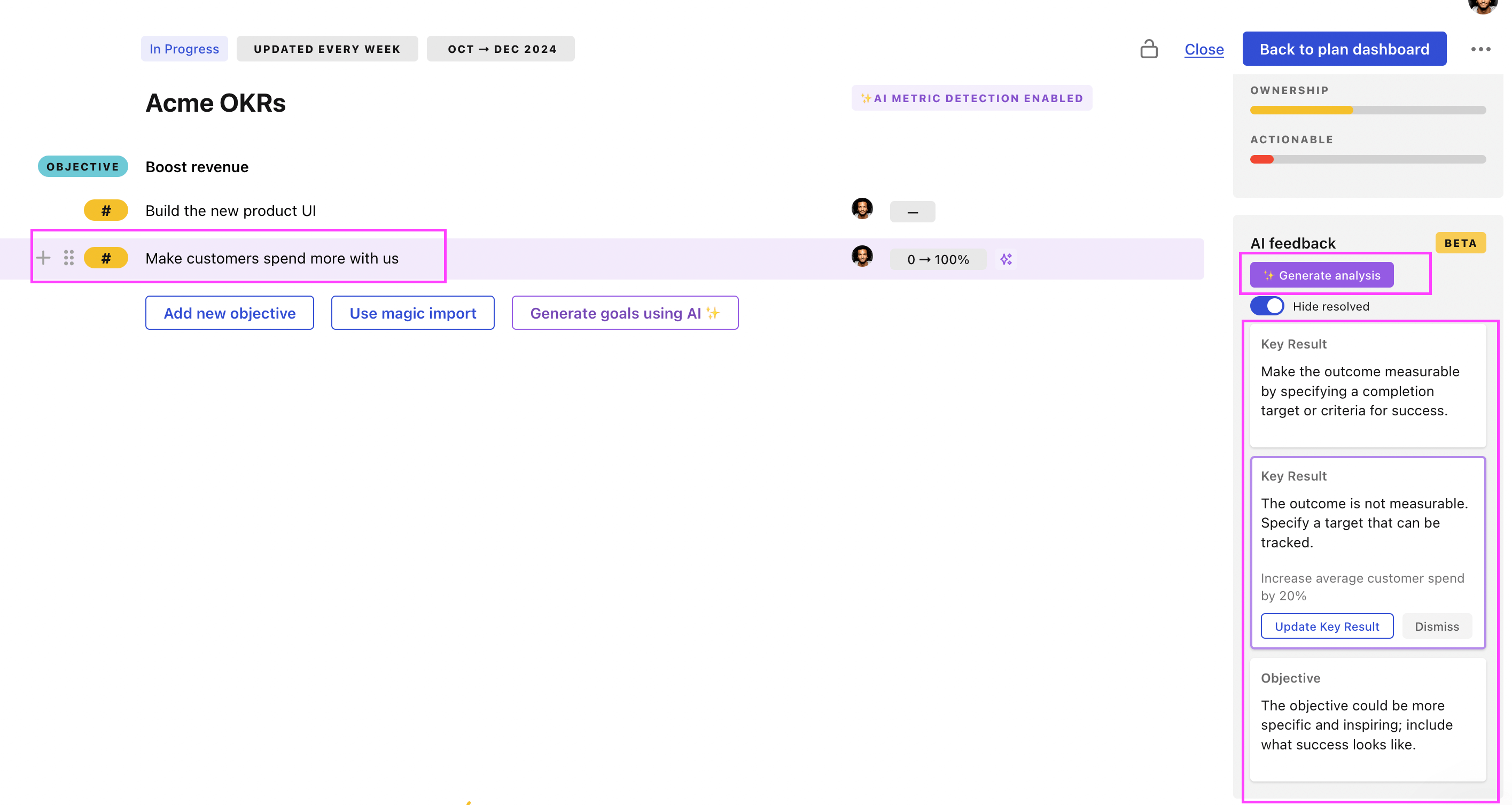
Use Tability feedback to improve existing OKRs
You can also use Tability's AI feedback to improve your OKRs if you already have existing goals. Just import them to the platform and click on the Generate analysis button.
Tability will scan your OKRs and offer different suggestions to improve them. This can range from a small rewrite of a statement to make it clearer to a complete rewrite of the entire OKR.