In short
What is a good ui ux designer OKR?
A good ui ux designer OKR pairs one clear objective with two to four measurable key results the team can score every week. It describes an outcome rather than a list of activities, sets targets that are ambitious but scoreable, and is reviewed weekly so blockers surface before the quarter gets away from the team.
These UI UX Designer OKR templates are meant to help teams move from ideas and projects to measurable business outcomes. Use them as a starting point, then tailor the metrics and initiatives to the reality of your company.
This page shows the top 9 of 9 templates for ui ux designer, with internal links to related categories and guidance for adapting the examples to your team.
Last template update in this category: 2025-10-12What this category is for
- Teams that need a clearer operating rhythm for ui ux designer work.
- Managers who want examples they can adapt into outcome-focused quarterly plans.
- Leaders comparing adjacent categories before choosing the best OKR direction.
Best outcomes to track
- UI UX Designer priorities tied to measurable business outcomes.
- Weekly check-ins that surface blockers before they become delivery issues.
- Better alignment between initiatives and the metrics that matter.
Related categories
Use these linked categories to explore adjacent planning areas and strengthen the internal topic cluster around ui ux designer.
Priority hubs
UI UX Designer OKR examples and templates
Start with these top 9 examples from 9 total templates in this category, then adapt the metrics and initiatives to fit your team's constraints and operating cadence.
OKRs to successfully develop a fully-functional manifestation app
 ObjectiveSuccessfully develop a fully-functional manifestation app
 KRDesign a user-friendly app interface by end of week 4
 Finalize and implement user-friendly design
- Gather user feedback on initial design
- Sketch initial design ideas for app interface
- KRComplete beta version testing with 95% satisfaction rate by week 8
- Implement user feedback loop for satisfaction rate improvement
- Prioritize critical function testing for beta version
- Conduct weekly audit of testing progress till week 8
- KRLaunch the manifestation app with 1,000 downloads in the first week
- Optimize the app for SEO and App Store ranking
- Develop a comprehensive yet concise marketing plan for the app
- Engage social influencers for app promotion
OKRs to gain a comprehensive understanding of UI/UX principles
- ObjectiveGain a comprehensive understanding of UI/UX principles
- KRDesign a basic mockup of a mobile app incorporating learned UI/UX principles
- Sketch initial ideas for app screens, elements, and overall layout
- Incorporate key UI/UX principles into design approach
- Create digital prototype using a design tool
- KRComplete an online introductory course on UI/UX design by quarter end
- Complete course and pass any final assessments
- Select and enroll in an online introductory UI/UX design course
- Consistently progress through course content each week
- KRAnalyze 5 case studies showcasing successful UI/UX implementation in mobile apps
- Investigate each case study's UI/UX design techniques and results
- Compile or summarize findings in a comprehensive report
- Select five case studies illustrating successful UI/UX deployment in mobile apps
OKRs to improve UI/UX of our mobile app for enhanced user satisfaction
- ObjectiveImprove UI/UX of our mobile app for enhanced user satisfaction
- KRIncrease app store rating from 3.8 to 4.5 by improving app usability
- Encourage satisfied users to leave positive ratings
- Enhance user interface based on feedback analysis
- Analyze user feedback to identify common usability issues
- KRReduce app loading time by 50% for a faster user experience
- Remove unnecessary app features or elements
- Optimize code for faster processing and less memory use
- Implement efficient caching and data retrieval methods
- KRIncrease active daily users by 30% via refining in-app navigation
- Implement changes and monitor usage metrics
- Analyze user behavior to identify navigation pain points
- Develop streamlined, intuitive in-app navigation design
OKRs to build a comprehensive and user-friendly HR platform
- ObjectiveBuild a comprehensive and user-friendly HR platform
- KRDesign and develop an intuitive UI/UX for 1000 active users by the end of the quarter
- Implement, test, and improve designed UI/UX
- Analyze user behavior and preferences for UI/UX design
- Create wireframes and prototypes for new design
- KRSuccessfully integrate 5 essential HR modules like recruitment and payroll into the platform
- Test and debug the integrated platform regularly
- Analyze compatibility of essential HR modules with the platform
- Hire professionals for successful module integration
- KRAchieve 95% user satisfaction rate measured through a feedback survey
- Develop a user-friendly, comprehensive customer satisfaction survey
- Initiate efforts to enhance customer service responsiveness
- Implement strategies for improving product based on feedback
OKRs to enhance the user experience across all platforms
- ObjectiveEnhance the user experience across all platforms
- KRDecrease customer complaints about navigation by 30% via implementing user feedback
- Implement changes and track reduction in complaints
- Gather extensive user feedback on current navigation issues
- Develop a plan to address feedback and improve navigation
- KRIncrease user satisfaction rate by 20% through redesigning the user interface
- Conduct user research to identify interface usability issues
- Implement user feedback loops for interface improvements
- Collaborate with designers to redevelop user interface
- KRAchieve a 10% decrease in webpage load times to improve user experience
- Optimize images and graphics for faster loading
- Minify CSS, HTML, and JavaScript codes
- Implement a content delivery network (CDN)
OKRs to launch an engaging, high-converting marketing agency website
- ObjectiveLaunch an engaging, high-converting marketing agency website
- KRAchieve a bounce rate under 40% through UX/UI improvements
- Improve website load speed and responsiveness
- Conduct regular user experience testing and analysis
- Implement intuitive navigation and clear call-to-action buttons
- KRIncrease website traffic by 30% through SEO and content strategies
- Create high-quality, engaging content to retain visitors
- Improve website metadata and keywords for better search engine visibility
- Optimize website loading speed and mobile compatibility
- KRAttain a conversion rate of 5% with effective call-to-actions
- Monitor, analyze, and adjust strategy based on results
- Implement A/B testing to improve call-to-actions
- Develop clear, compelling call-to-action statements
OKRs to successfully develop a functional Figma prototype
- ObjectiveSuccessfully develop a functional Figma prototype
- KRImplement feedback and finalize the prototype by week 12
- Finalize prototype by week 12
- Incorporate received feedback into the prototype
- Conduct final tests on the adjusted prototype
- KRDesign a full user-interface mockup in Figma by week 4
- Finalize mockup with interactive features
- Develop the initial design layout in Figma
- Outline the specific interface components needed
- KRValidate the prototype with 10 user tests by week 8
- Document and analyze user feedback for validation
- Identify and recruit 10 users for prototype testing
- Coordinate and conduct user testing sessions
OKRs to develop creator for third person game creation
- ObjectiveDevelop creator for third person game creation
- KRComplete designing intuitive UI for creator tool by 70%
- Develop a detailed UI design plan for the creator tool
- Implement 70% of planned UI design elements
- Review and test completed UI for intuitive interaction
- KRAccomplish beta testing with 40 user feedbacks for improvement
- Collate and analyze tester feedback for improvements
- Identify and recruit 40 beta testers
- Develop and prepare the beta version for testing
- KRImplement 50% of pre-set game templates for third person games
- Implement selected game templates
- Select 50% of listed templates for implementation
- Identify and list all pre-set game templates for third-person games
OKRs to enhance app experience through the implementation of product design best practices
- ObjectiveEnhance app experience through the implementation of product design best practices
- KRReduce app bounce rate by 15% by optimizing loading speeds and intuitive navigation
- KRIncrease user satisfaction rating by 10% through UI/UX improvements
- Analyze user satisfaction data regularly to identify trends and prioritize future UI/UX enhancements
- Conduct user research to identify pain points and areas for improvement
- Implement user feedback loop to continuously gather insights and address user concerns promptly
- Collaborate with UI/UX designers to enhance visual appeal and streamline navigation
- KRAchieve 20% increase in daily active users by simplifying onboarding and feature accessibility
- KREnhance conversion rate by 10% through A/B testing and iterative design iterations
How to use UI UX Designer OKRs well
Strong OKRs keep the team focused on measurable outcomes instead of a long task list. That means picking a clear objective, limiting the number of competing priorities, and reviewing progress every week.
Use UI UX Designer OKRs to define what success looks like this quarter, then track them weekly so the team can quickly spot blockers, learn, and adjust execution.
Choosing software to run UI UX Designer OKRs?
Move from ui ux designer examples to execution with sourced comparisons from The OKR Software Benchmark.
- Best OKR software rankingSee the overall verdict and the criteria behind each platform score.
- OKR software pricing comparisonCompare verified prices, minimum commitments, and costs at different team sizes.
- Benchmark methodologyReview the published scoring model, source standards, and conflict-of-interest policy.
Related OKR template categories
If you are building a broader plan, these related categories can help you connect ui ux designer work to adjacent company priorities.
- marketing team OKR templates
- leadership OKR templates
- strategic planning OKR templates
- operations OKR templates
- operations team OKR templates
- sales OKR templates
More OKR templates to explore
- OKRs to enhance metrics quality and interpretability
- OKRs to establish a comprehensive Design System Foundation
- OKRs to implement unbiased performance evaluations system
- OKRs to uplift personal growth and positivity in every life we encounter
- OKRs to boost social media impact through paid advertising
- OKRs to increase revenue through add-ons and seamless integrations
Not seeing what you need?
Use Tability AI to generate OKRs based on a prompt
Tability allows you to describe your goals in a prompt, and generate a fully editable OKR template in seconds.
Use Tability feedback to improve existing OKRs
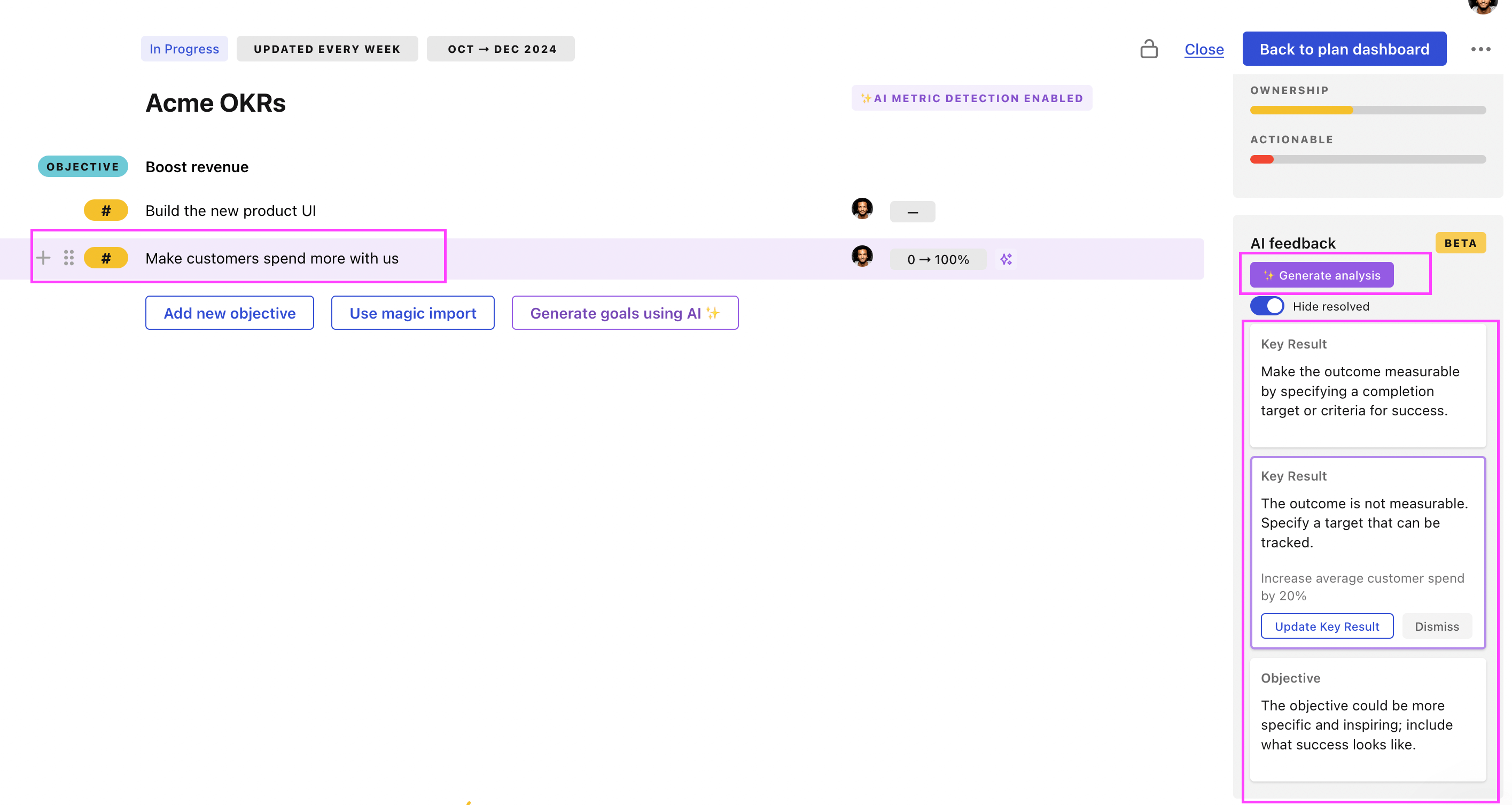
You can also use Tability's AI feedback to improve your OKRs if you already have existing goals. Just import them to the platform and click on the Generate analysis button.
Tability will scan your OKRs and offer different suggestions to improve them. This can range from a small rewrite of a statement to make it clearer to a complete rewrite of the entire OKR.