In short
What is a good testing team OKR?
A good testing team OKR pairs one clear objective with two to four measurable key results the team can score every week. It describes an outcome rather than a list of activities, sets targets that are ambitious but scoreable, and is reviewed weekly so blockers surface before the quarter gets away from the team.
These Testing Team OKR templates are meant to help teams move from ideas and projects to measurable business outcomes. Use them as a starting point, then tailor the metrics and initiatives to the reality of your company.
This page shows the top 10 of 10 templates for testing team, with internal links to related categories and guidance for adapting the examples to your team.
Last template update in this category: 2026-01-29What this category is for
- Teams that need a clearer operating rhythm for testing team work.
- Managers who want examples they can adapt into outcome-focused quarterly plans.
- Leaders comparing adjacent categories before choosing the best OKR direction.
Best outcomes to track
- Testing Team priorities tied to measurable business outcomes.
- Weekly check-ins that surface blockers before they become delivery issues.
- Better alignment between initiatives and the metrics that matter.
Related categories
Use these linked categories to explore adjacent planning areas and strengthen the internal topic cluster around testing team.
Testing Team OKR examples and templates
Start with these top 10 examples from 10 total templates in this category, then adapt the metrics and initiatives to fit your team's constraints and operating cadence.
OKRs to enhance the effectiveness and efficiency of software testing processes
 ObjectiveEnhance the effectiveness and efficiency of software testing processes
 KRReduce software testing time by 15%
 Prioritize essential tests for key functions
- Train staff on efficient testing strategies
- Implement automated testing methods
- KRAchieve 95% test coverage for all software releases
- Implement additional rigorous software tests
- Conduct thorough review of current testing procedures
- Continuously monitor and adjust test strategies
- KRImprove defect detection rate by 20%
- Implement regular training on quality control procedures
- Increase frequency of product inspections
- Employ more advanced defect detection tools
OKRs to enhance the efficiency of our testing processes
- ObjectiveEnhance the efficiency of our testing processes
- KRReduce average testing time per module by 30%
- Train staff in rapid, effective testing techniques
- Implement automated testing methods for efficiency
- Prioritize essential features for focused testing
- KRIncrease automated testing coverage by 25%
- Identify areas lacking sufficient automated testing coverage
- Monitor and adjust tests for optimum coverage
- Implement new automated tests in identified areas
- KRReduce bugs discovered post-release by 15%
- Increase developer training on bug detection and resolution
- Implement stringent pre-release quality checks and tests
- Enhance peer code review process
OKRs to streamline testing process for new features
- ObjectiveStreamline testing process for new features
- KRTrain 100% of the testing team on efficient, newly-introduced testing procedures
- Monitor and evaluate the team’s understanding post-training
- Identify the updated testing procedures for training
- Organise comprehensive training sessions for the team
- KRImplement automated testing for 70% of new features
- Develop automated testing scripts for the features
- Integrate tests into the development process
- Identify new features viable for automated testing
- KRDecrease the average feature testing time by 35%
- Implement automated testing for common test scenarios
- Train team on efficient testing strategies
- Conduct regular code reviews to identify issues early
OKRs to enhance the efficiency and accuracy of our testing procedure
- ObjectiveEnhance the efficiency and accuracy of our testing procedure
- KRImplement training workshops resulting in 100% testers upskilled in advanced testing methods
- Schedule and conduct training workshops for all testers
- Develop comprehensive workshop materials on advanced testing methods
- Evaluate testers' skills post-workshop to ensure progress
- KRAchieve a 15% reduction in testing time through process optimization and procedural changes
- Evaluate current testing process for areas of inefficiency
- Implement automation software to expedite testing
- Train staff in new optimized testing procedures
- KRReduce the testing errors by 25% through improved automation and techniques
OKRs to successfully execute comprehensive testing procedures
- ObjectiveSuccessfully execute comprehensive testing procedures
- KRImprove testing efficiency by 30% through process review and automation
- Implement automation tools to streamline testing procedures
- Identify areas for potential automation in tests
- Conduct comprehensive review of existing testing processes
- KRIdentify and document 100% of test case failures and issues
- Develop and maintain an issue log for tracking
- Document every identified test case failure
- Review test results to identify failures and issues
- KRComplete 15 test cases per week with 95% success rate
- Conduct corrective actions immediately on failed test cases
- Allocate daily time slots to work on at least 3 test cases
- Review all test case results daily to identify errors
OKRs to successfully launch website version 2
- ObjectiveSuccessfully launch website version 2
- KRComplete UX/UI improvements for increased user engagement by 20%
- Develop and implement detailed UX/UI enhancement strategies
- Monitor and assess improvements for desired 20% engagement increase
- Identify and analyze current UX/UI weaknesses and user engagement rates
- KRAttain a user feedback score of 90% post-launch due to improved functionalities
- Implement thorough testing to optimize new functionalities
- Develop and launch a user-friendly feedback system
- Actively encourage users to give their feedback
- KRImplement and test new features/functions with zero bug reports
- Conduct thorough bug testing after implementation
- Develop comprehensive unit tests for each new feature
- Regularly schedule functionality evaluation and debug sessions
OKRs to achieve proficiency in full-stack development with nestjs, React, and dynamodb
- ObjectiveAchieve proficiency in full-stack development with nestjs, React, and dynamodb
- KRComplete a comprehensive course on nestjs with a test score of 85% or above
- Identify and enroll in a comprehensive NestJS course
- Complete all course modules and perform regular revisions
- Practice and prepare thoroughly for the test
- KRDevelop a complex application module using React ensuring no major bugs
- Design a detailed plan for the React application module
- Perform rigorous testing and debugging
- Develop the module thoroughly following outlined plan
- KRSuccessfully implement 2 relevant dynamodb projects with optimal performance and efficiency
- Define project goals, scope and criteria for optimized DynamoDB usage
- Design, develop and debug the DynamoDB projects
- Test, optimize, and launch the projects
OKRs to successfully complete the GPU component
- ObjectiveSuccessfully complete the GPU component
- KRReduce the number of performance issues found during testing by 50%
- Integrate automated testing in the development process
- Implement thorough code reviews before initiating tests
- Increase training sessions on effective coding practices
- KRQuality review passed in all 3 stages of the GPU component lifecycle
- Update GPU component lifecycle quality control procedures
- Discuss the successful review outcome with the team
- Document all observations during GPU component lifecycle stages
- KRAchieve 80% project milestone completions on GPU component development by the period end
- Assign experienced team for GPU component development
- Regularly track and review progress of project completion
- Prioritize daily tasks towards the project's milestones
OKRs to deliver stunning 3D art for the upcoming game
- ObjectiveDeliver stunning 3D art for the upcoming game
- KRObtain favorable feedback from 95% of the testing team on art quality by week 12
- Collect, analyze and implement feedback from initial assessments
- Improve art quality based on feedback received
- Develop detailed questionnaire for testing team about art quality
- KRFinalize concept sketches for all game characters and environments by week 4
- Allocate time daily to develop and finalize sketches
- Complete all sketches by the end of week 4
- Create detailed schedule for character and environment sketches
- KRComplete 3D modeling of at least 90% of game assets by week 8
- Monitor progress and manage modeling revisions
- Assign tasks to 3D modelers for each asset
- Finalize list of required game assets for 3D modeling
OKRs to implement an Automated Patching Process
- ObjectiveImplement an Automated Patching Process
- KRIdentify and document the current patching process by end of week 2
- Update and finalize the patch documentation
- Identify gaps and areas for improvement
- Review the existing patching process documentation
- KRDevelop and test the automated patching system by week 6
- Design the blueprint for the automated patching system
- Conduct thorough testing of the system
- Develop the automated patching system
- KRDeploy the automation system and resolve 95% of patching issues independently by week 8
- Install and configure the automation system
- Develop an autocorrect feature for patching issues
- Independently resolve 95% patch errors
- KREstablish requirements for the automated patching system by week 4
- Determine the system's security requirements
- Define the system compatibility and integration needs
- Identify necessary features for the automated patching system
How to use Testing Team OKRs well
Strong OKRs keep the team focused on measurable outcomes instead of a long task list. That means picking a clear objective, limiting the number of competing priorities, and reviewing progress every week.
Use Testing Team OKRs to define what success looks like this quarter, then track them weekly so the team can quickly spot blockers, learn, and adjust execution.
Choosing software to run Testing Team OKRs?
Move from testing team examples to execution with sourced comparisons from The OKR Software Benchmark.
- Best OKR software rankingSee the overall verdict and the criteria behind each platform score.
- OKR software pricing comparisonCompare verified prices, minimum commitments, and costs at different team sizes.
- Benchmark methodologyReview the published scoring model, source standards, and conflict-of-interest policy.
Related OKR template categories
If you are building a broader plan, these related categories can help you connect testing team work to adjacent company priorities.
- project manager OKR templates
- quality assurance OKR templates
- leadership OKR templates
- strategic planning OKR templates
- operations OKR templates
- operations team OKR templates
More OKR templates to explore
- OKRs to reduce mobilization cost for special project set ups
- OKRs to improve efficiency in design and technical drawing management
- OKRs to enhance Design team's adherence to technical design & construction standards
- OKRs to enhance efficiency in printing production lineup
- OKRs to enhance technical design standards supervision for the team
- OKRs to boost revenue growth through sector-specific initiatives
Not seeing what you need?
Use Tability AI to generate OKRs based on a prompt
Tability allows you to describe your goals in a prompt, and generate a fully editable OKR template in seconds.
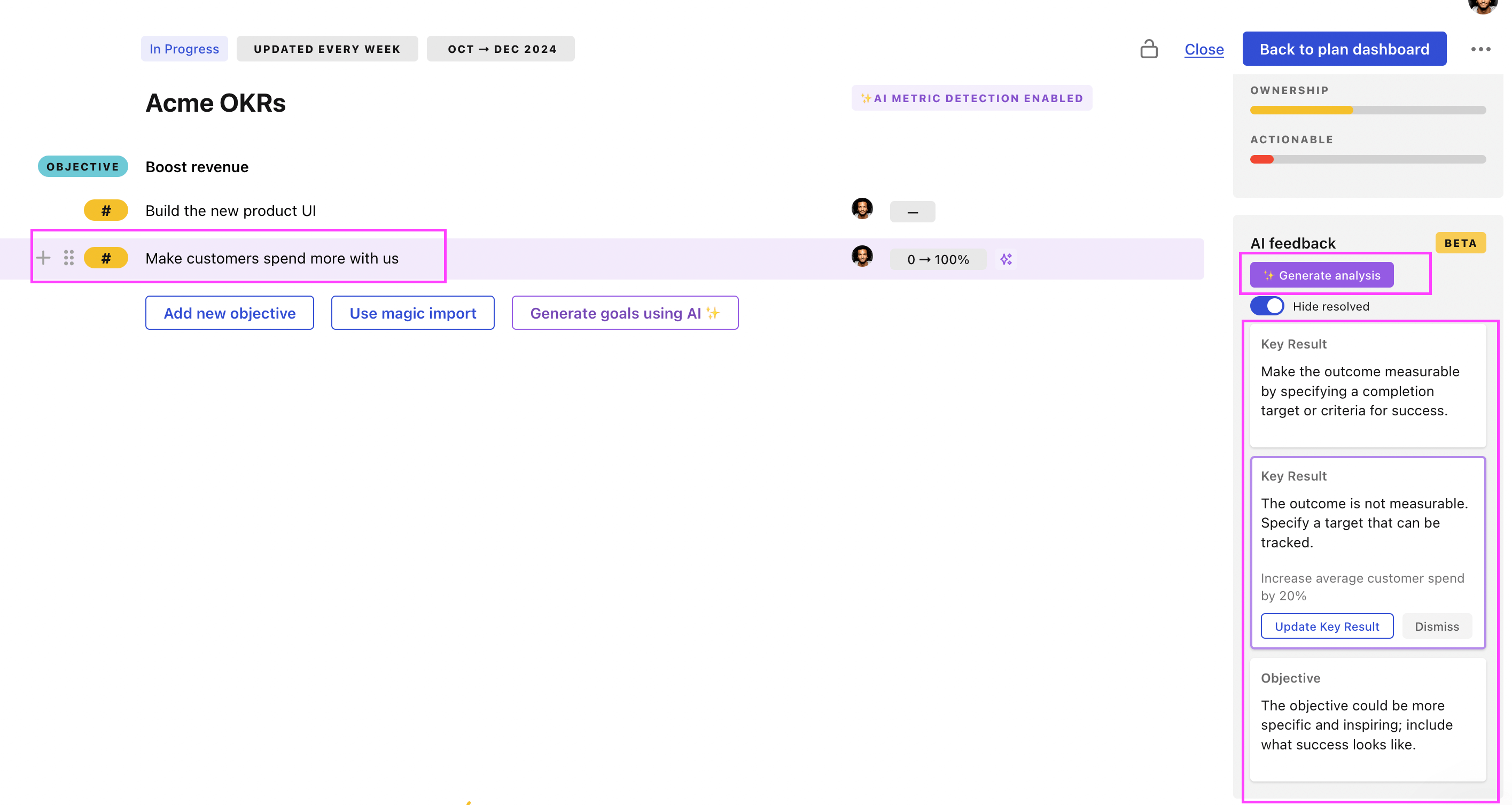
Use Tability feedback to improve existing OKRs
You can also use Tability's AI feedback to improve your OKRs if you already have existing goals. Just import them to the platform and click on the Generate analysis button.
Tability will scan your OKRs and offer different suggestions to improve them. This can range from a small rewrite of a statement to make it clearer to a complete rewrite of the entire OKR.