In short
What is a good ai specialist OKR?
A good ai specialist OKR pairs one clear objective with two to four measurable key results the team can score every week. It describes an outcome rather than a list of activities, sets targets that are ambitious but scoreable, and is reviewed weekly so blockers surface before the quarter gets away from the team.
These AI Specialist OKR templates are meant to help teams move from ideas and projects to measurable business outcomes. Use them as a starting point, then tailor the metrics and initiatives to the reality of your company.
This page shows the top 6 of 6 templates for ai specialist, with internal links to related categories and guidance for adapting the examples to your team.
Last template update in this category: 2026-03-26What this category is for
- Teams that need a clearer operating rhythm for ai specialist work.
- Managers who want examples they can adapt into outcome-focused quarterly plans.
- Leaders comparing adjacent categories before choosing the best OKR direction.
Best outcomes to track
- AI Specialist priorities tied to measurable business outcomes.
- Weekly check-ins that surface blockers before they become delivery issues.
- Better alignment between initiatives and the metrics that matter.
Related categories
Use these linked categories to explore adjacent planning areas and strengthen the internal topic cluster around ai specialist.
Priority hubs
AI Specialist OKR examples and templates
Start with these top 6 examples from 6 total templates in this category, then adapt the metrics and initiatives to fit your team's constraints and operating cadence.
OKRs to drive innovation in healthcare through AI implementation
 ObjectiveDrive innovation in healthcare through AI implementation
 KRLaunch 2 AI-enabled health products to improve patient care
 Identify potential AI technologies for health product development
- Conduct user tests and gather feedback for improvements
- Assemble a dedicated project team for AI product integration
- KRIncrease AI-basedplatform user engagement by 15%
- Incorporate personalized recommendations using AI
- Revamp UI design to improve user experience
- Enhance AI-based interactive features
- KRReduce AI system diagnosis errors by 10%
- Train AI on more diverse datasets
- Implement continuous performance assessment
- Update algorithms to enhance diagnostic accuracy
OKRs to implement AI tools for refining film production processes
- ObjectiveImplement AI tools for refining film production processes
- KRSuccessfully incorporate NLP into script-development systems, improving efficiency by 40%
- Identify NLP tools suitable for script-development systems
- Monitor and measure efficiency improvements regularly
- Incorporate selected NLP tools into our script-development process
- KRTrain staff members on AI usage, achieving 80% employee proficiency by quarter-end
- Provide continuous support for AI-related queries
- Develop a comprehensive AI training program for staff
- Implement regular proficiency tests on AI usage
- KRComplete prototyping of an AI-based imaging system, increasing image quality by 50%
- Evaluate and refine prototype to achieve 50% image quality improvement
- Draft design specifications for an AI-based imaging system
- Develop prototype incorporating AI technologies
OKRs to implement AI to enhance customer service experience
- ObjectiveImplement AI to enhance customer service experience
- KRReduce average customer response time by 50% using AI solutions
- Implement AI-powered chatbots to address customer inquiries promptly
- Regularly assess and optimize AI solution's efficiency in response times
- Identify AI tools tailored for efficient customer service management
- KRTrain our customer service team on AI tool usage for 100% adoption
- Develop a comprehensive training module on AI tool usage
- Schedule training sessions for the customer service team
- Monitor and assess the team's adoption and utilization progress
- KRDeploy an AI-powered chatbot on the website to handle 40% of customer queries
- Customize the chatbot to handle specific customer queries
- Research and select an appropriate AI-powered chatbot service
- Integrate the chatbot into the website's coding
OKRs to to identify AI use cases from 12 different departments
- ObjectiveTo identify AI use cases from 12 different departments
- KRComplete identification and documentation of AI use-cases from remaining 5 departments by week 12
- Document all identified AI use-cases by week 11
- Finalize and organize documentation by week 12
- Identify remaining departments using AI by week 10
- KREngage with another set of 4 departments and secure their AI use cases by week 8
- Finalize and secure their AI use cases
- Identify four departments for potential AI integration
- Schedule meetings with each department's head
- KRCollaborate with 3 departments to identify and document AI applications by week 4
- Document identified AI applications and compile report by week 4
- Identify key contacts in each department for AI application discussions
- Organize cross-departmental brainstorming sessions for week 2
OKRs to implement AI to streamline documentation search and maintenance process
- ObjectiveImplement AI to streamline documentation search and maintenance process
- KRIntegrate an AI-driven documentation search system with 90% accuracy within next quarter
- Procure an AI-driven documentation search system
- Implement and configure the system
- Train, test, and refine AI for 90% accuracy
- KRReduce the time spent on documentation maintenance by 50% adopting AI
- Implement chosen AI tool into the workflow
- Research AI tools specialized in documentation maintenance
- Train staff to use AI software efficiently
- KRTrain 100% of the team on the usage of AI tool for effective documentation access
- Schedule training sessions for all team members
- Follow up to ensure complete understanding
- Select appropriate AI tool for documentation access
OKRs to enhance system architecture efficiency and reliability
- ObjectiveEnhance system architecture efficiency and reliability
- KRAchieve 95% positive feedback on new system deployments from end-users
- Develop clear, user-friendly guides for system usage
- Establish responsive support channels to handle queries
- Implement robust user testing prior to each deployment
- KRDecrease system downtime by 10% using advanced AI and predictive maintenance
- Develop predictive maintenance protocols using AI insights
- Regularly update and refine AI algorithms based on performance data
- Implement advanced AI tools for system monitoring and problem detection
- KRImplement two sustainable, cost-efficient architectural improvements per project
- Incorporate two eco-friendly developments into each project plan
- Research cost-efficient, sustainable options for architectural improvements
- Review designs for sustainability and cost-efficiency
How to use AI Specialist OKRs well
Strong OKRs keep the team focused on measurable outcomes instead of a long task list. That means picking a clear objective, limiting the number of competing priorities, and reviewing progress every week.
Use AI Specialist OKRs to define what success looks like this quarter, then track them weekly so the team can quickly spot blockers, learn, and adjust execution.
Choosing software to run AI Specialist OKRs?
Move from ai specialist examples to execution with sourced comparisons from The OKR Software Benchmark.
- OKR software with AI featuresCompare agents, assistants, smart actions, and AI-supported goal workflows.
- OKR software pricing comparisonCompare verified prices, minimum commitments, and costs at different team sizes.
- Benchmark methodologyReview the published scoring model, source standards, and conflict-of-interest policy.
Related OKR template categories
If you are building a broader plan, these related categories can help you connect ai specialist work to adjacent company priorities.
- customer service team OKR templates
- leadership OKR templates
- strategic planning OKR templates
- operations OKR templates
- operations team OKR templates
- sales OKR templates
More OKR templates to explore
- OKRs to enhance and expand our current AI features
- OKRs to streamline corporate general and administrative expenses
- OKRs to execute practical strategies to recover project delay
- OKRs to achieve zero loss time accidents in the upcoming period
- OKRs to maximize warehouse revenue per square foot
- OKRs to streamline onboarding, supply management, and meeting organization
Not seeing what you need?
Use Tability AI to generate OKRs based on a prompt
Tability allows you to describe your goals in a prompt, and generate a fully editable OKR template in seconds.
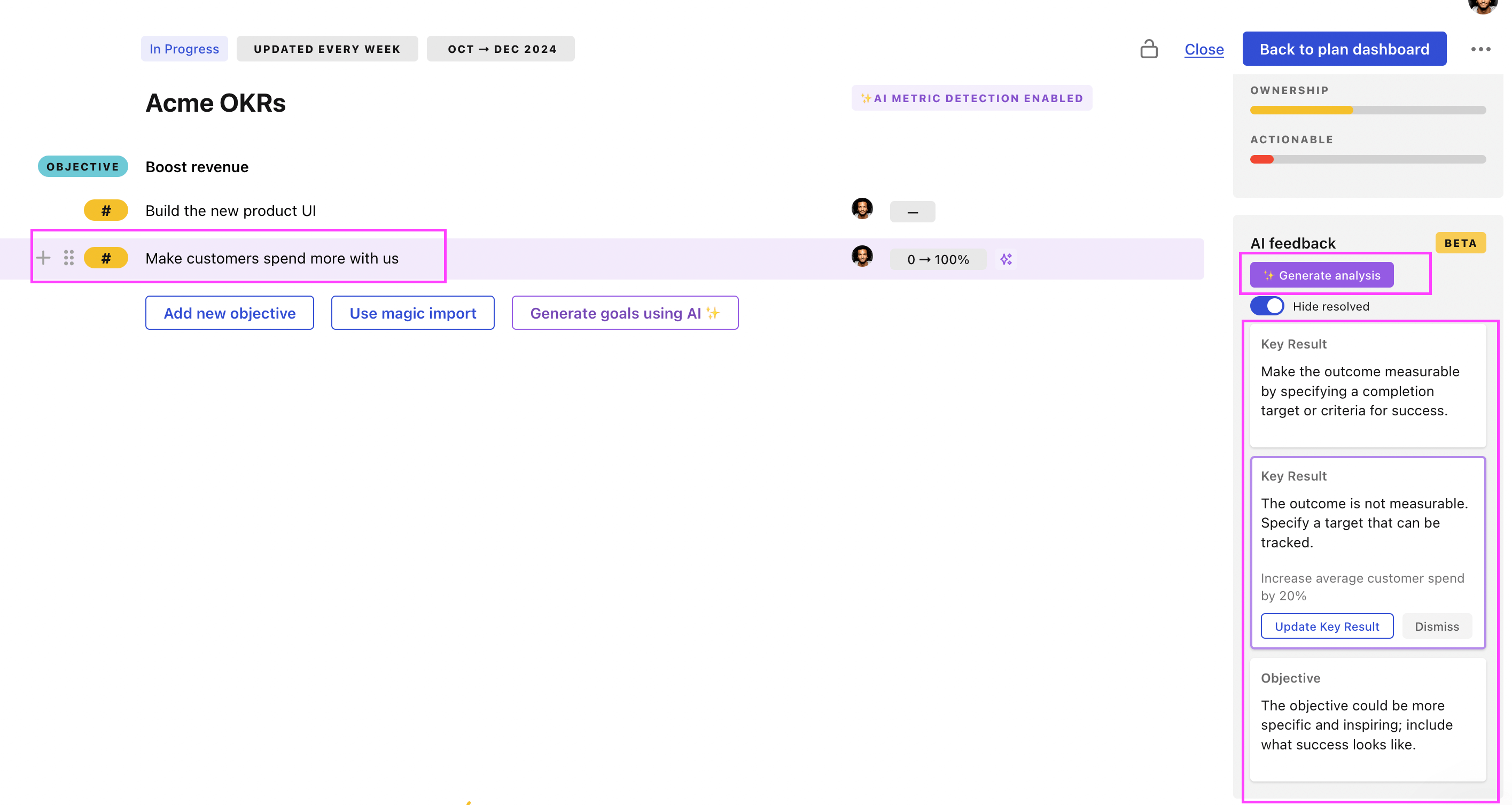
Use Tability feedback to improve existing OKRs
You can also use Tability's AI feedback to improve your OKRs if you already have existing goals. Just import them to the platform and click on the Generate analysis button.
Tability will scan your OKRs and offer different suggestions to improve them. This can range from a small rewrite of a statement to make it clearer to a complete rewrite of the entire OKR.