In short
What is a good systems analyst OKR?
A good systems analyst OKR pairs one clear objective with two to four measurable key results the team can score every week. It describes an outcome rather than a list of activities, sets targets that are ambitious but scoreable, and is reviewed weekly so blockers surface before the quarter gets away from the team.
These Systems Analyst OKR templates are meant to help teams move from ideas and projects to measurable business outcomes. Use them as a starting point, then tailor the metrics and initiatives to the reality of your company.
This page shows the top 6 of 6 templates for systems analyst, with internal links to related categories and guidance for adapting the examples to your team.
Last template update in this category: 2024-10-28What this category is for
- Teams that need a clearer operating rhythm for systems analyst work.
- Managers who want examples they can adapt into outcome-focused quarterly plans.
- Leaders comparing adjacent categories before choosing the best OKR direction.
Best outcomes to track
- Systems Analyst priorities tied to measurable business outcomes.
- Weekly check-ins that surface blockers before they become delivery issues.
- Better alignment between initiatives and the metrics that matter.
Related categories
Use these linked categories to explore adjacent planning areas and strengthen the internal topic cluster around systems analyst.
Systems Analyst OKR examples and templates
Start with these top 6 examples from 6 total templates in this category, then adapt the metrics and initiatives to fit your team's constraints and operating cadence.
OKRs to consolidate all media asset management systems
 ObjectiveConsolidate all media asset management systems
 KRIdentify and document key features of current systems by end of week 2
 Review existing systems to identify key features
- Complete documentation by end of week 2
- Compile feature specifications in a comprehensive document
- KRCreate a unified prototype with essential features of all systems by week 6
- Identify essential features from each system by week 2
- Finalize and test prototype by week 6
- Design unified prototype by week 4
- KRImplement the unified system across all departments, achieving 90% employee adoption by week 12
- Roll out staff-wide system training and education workshops
- Monitor weekly adoption rates and address issues
- Train all department heads on the unified system usage
OKRs to streamline all business processes through automation
- ObjectiveStreamline all business processes through automation
- KRTrain 90% of the team for the transition to automated systems
- Establish and distribute training schedules
- Identify suitable training resources or experts
- Monitor and evaluate training progress
- KRAchieve 30% increased efficiency in automated processes
- Optimize current automated systems for improved efficiency
- Identify processes that can be automated to increase productivity
- Track and measure automation effectiveness consistently
- KRImplement automation in 50% of existing manual systems
- Identify systems suitable for automation through thorough analyses
- Train staff on using the newly implemented automated systems
- Acquire or develop necessary automation software and tools
OKRs to implement an effective smart workplace management system
- ObjectiveImplement an effective smart workplace management system
- KRIdentify and select a suitable smart workplace management system by analyzing 5 potential options
- Make final selection based on analysis and business needs
- Analyze features, reviews, and pricing of each system
- Research and list five potential smart workplace management systems
- KRTrain 100% of workforce to effectively utilize the new management system for daily operations
- Implement strategies for workforce to apply system knowledge daily
- Organize comprehensive training sessions about the new management system
- Provide regular follow-up training for continual workforce development
- KRProcure the selected system and complete installation in 80% of the workplace areas
- Schedule installation in various work zones
- Purchase the selected system for implementation
- Ensure setup in 80% of designated areas
OKRs to externalize authorization models from monolith
- ObjectiveExternalize authorization models from monolith
- KRIdentify and list all authorization models by Week 2
- Finalize and submit the list by Week 2
- Research various types of authorization models
- Catalogue each identified authorization model in a list
- KRSuccessfully migrate at least 90% of authorization models to the external component by Week 10
- Map current authorization models to the external component
- Develop a detailed migration plan
- Execute migration and verify success rate
- KRDesign and develop a separate external component for authorization models by Week 6
- Identify necessary features for authorization component
- Design a prototype of the authorization component
- Develop and test the authorization component
OKRs to build a process orchestration system
- ObjectiveImprove process efficiency and effectiveness through an automated orchestration system
- KRIncrease process scalability by integrating the system with external tools and data sources
- KRAchieve a 90% reduction in manual errors by implementing automated quality checks and validations
- Develop and implement automated quality check systems for error detection and prevention
- Identify and analyze existing manual error-prone processes for automation
- Continuously refine and update automated validation procedures based on feedback and findings
- Conduct regular audits to monitor the effectiveness of automated quality checks
- KRImprove user satisfaction by maintaining an average response time of less than 5 seconds
- KRReduce process execution time by 20% through system optimization and streamlined workflows
- Streamline and automate manual processes to eliminate unnecessary steps and reduce execution time
- Analyze system performance bottlenecks to identify areas for optimization and improvement
- Collaborate with stakeholders to identify and resolve any workflow inefficiencies or bottlenecks
- Prioritize and implement software upgrades or patches to enhance system efficiency and performance
OKRs to develop an accurate and efficient face recognition system
- ObjectiveDevelop an accurate and efficient face recognition system
- KRAchieve a 95% recognition success rate in challenging lighting conditions
- KRIncrease recognition speed by 20% through software and hardware optimizations
- Upgrade hardware components to enhance system performance for faster recognition
- Collaborate with software and hardware experts to identify and implement further optimization techniques
- Conduct regular system maintenance and updates to ensure optimal functionality and speed
- Optimize software algorithms to improve recognition speed by 20%
- KRImprove face detection accuracy by 10% through algorithm optimization and training data augmentation
- Train the updated algorithm using the augmented data to enhance face detection accuracy
- Implement necessary adjustments to optimize the algorithm for improved accuracy
- Conduct a thorough analysis of the existing face detection algorithm
- Augment the training data by increasing diversity, quantity, and quality
- KRReduce false positives and negatives by 15% through continuous model refinement and testing
- Increase training dataset by collecting more diverse and relevant data samples
- Apply advanced anomaly detection techniques to minimize false positives and negatives
- Implement regular model performance evaluation and metrics tracking for refinement
- Conduct frequent A/B testing to optimize model parameters and improve accuracy
How to use Systems Analyst OKRs well
Strong OKRs keep the team focused on measurable outcomes instead of a long task list. That means picking a clear objective, limiting the number of competing priorities, and reviewing progress every week.
Use Systems Analyst OKRs to define what success looks like this quarter, then track them weekly so the team can quickly spot blockers, learn, and adjust execution.
Choosing software to run Systems Analyst OKRs?
Move from systems analyst examples to execution with sourced comparisons from The OKR Software Benchmark.
- Best OKR software rankingSee the overall verdict and the criteria behind each platform score.
- OKR software pricing comparisonCompare verified prices, minimum commitments, and costs at different team sizes.
- Benchmark methodologyReview the published scoring model, source standards, and conflict-of-interest policy.
Related OKR template categories
If you are building a broader plan, these related categories can help you connect systems analyst work to adjacent company priorities.
- leadership OKR templates
- strategic planning OKR templates
- operations OKR templates
- operations team OKR templates
- sales OKR templates
- sales team OKR templates
More OKR templates to explore
- OKRs to enhance the overall quality and operations of the childcare centre
- OKRs to enhance staff satisfaction to boost retention rates
- OKRs to accelerate growth to reach a $33 mln yearly revenue target
- OKRs to increase overall company revenue
- OKRs to elevate Design Through Balanced Innovation and Practicality
- OKRs to establish my unique, impactful role in the organization
Not seeing what you need?
Use Tability AI to generate OKRs based on a prompt
Tability allows you to describe your goals in a prompt, and generate a fully editable OKR template in seconds.
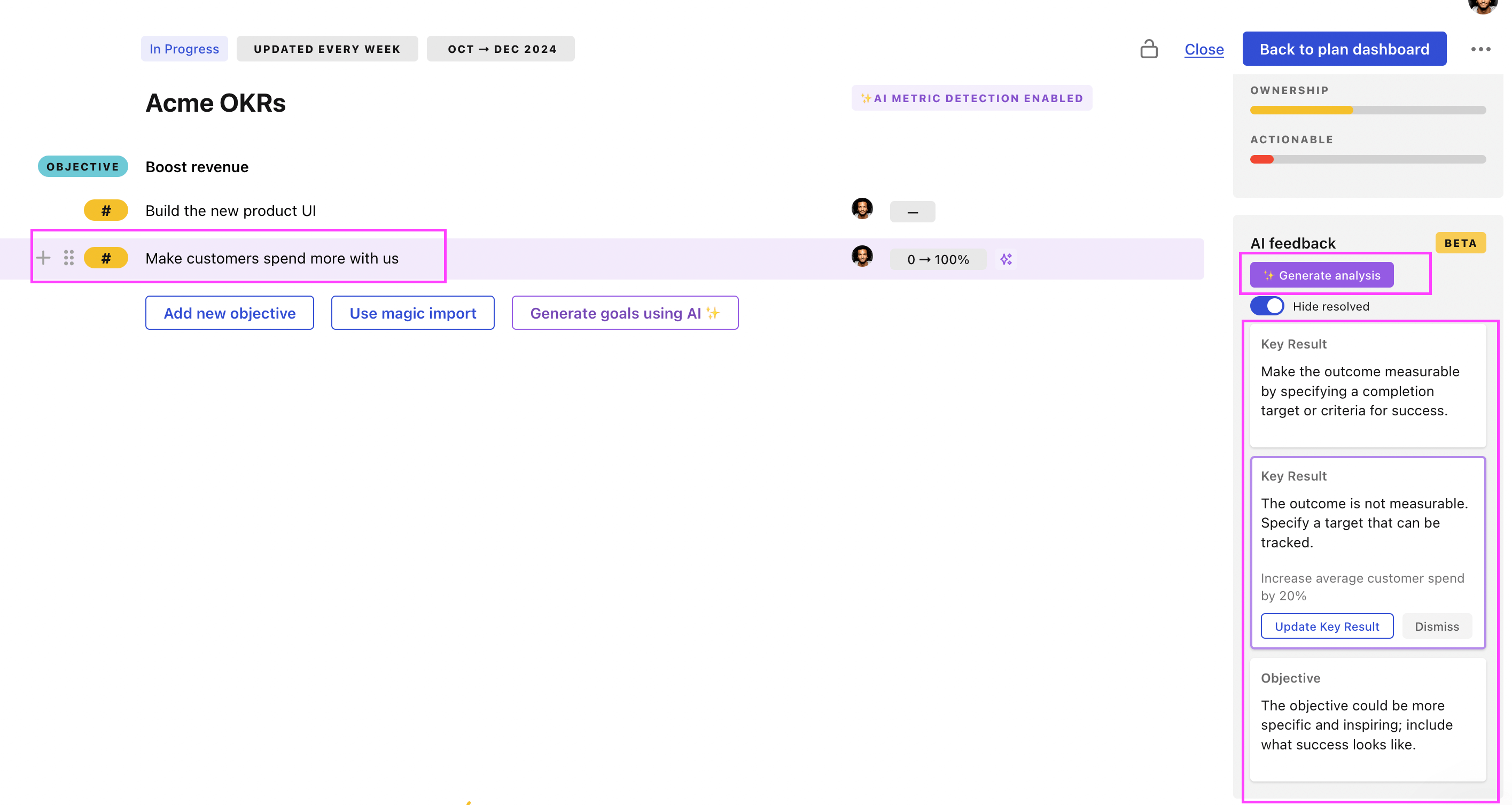
Use Tability feedback to improve existing OKRs
You can also use Tability's AI feedback to improve your OKRs if you already have existing goals. Just import them to the platform and click on the Generate analysis button.
Tability will scan your OKRs and offer different suggestions to improve them. This can range from a small rewrite of a statement to make it clearer to a complete rewrite of the entire OKR.