In short
What is a good global operations team OKR?
A good global operations team OKR pairs one clear objective with two to four measurable key results the team can score every week. It describes an outcome rather than a list of activities, sets targets that are ambitious but scoreable, and is reviewed weekly so blockers surface before the quarter gets away from the team.
These Global Operations Team OKR templates are meant to help teams move from ideas and projects to measurable business outcomes. Use them as a starting point, then tailor the metrics and initiatives to the reality of your company.
This page shows the top 1 of 1 template for global operations team, with internal links to related categories and guidance for adapting the examples to your team.
Last template update in this category: 2024-06-12What this category is for
- Teams that need a clearer operating rhythm for global operations team work.
- Managers who want examples they can adapt into outcome-focused quarterly plans.
- Leaders comparing adjacent categories before choosing the best OKR direction.
Best outcomes to track
- Global Operations Team priorities tied to measurable business outcomes.
- Weekly check-ins that surface blockers before they become delivery issues.
- Better alignment between initiatives and the metrics that matter.
Related categories
Use these linked categories to explore adjacent planning areas and strengthen the internal topic cluster around global operations team.
Global Operations Team OKR examples and templates
Start with these top 1 examples from 1 total template in this category, then adapt the metrics and initiatives to fit your team's constraints and operating cadence.
OKRs to standardize all global processes
 ObjectiveStandardize all global processes
 KRAchieve an 80% consistency score on the execution of standardized processes
 Continuously track and improve your performance
- Regularly practice and execute these processes
- Review and understand the standardized processes thoroughly
- KRImplement standard operating procedures across 70% of global processes
- Identify key processes that require standard operating procedures
- Develop and disseminate standard operating procedures
- Monitor and evaluate implementation success
- KRTrain 90% of global teams on the standardized processes
- Develop comprehensive training material on standardized processes
- Schedule global virtual training sessions
- Monitor and assess staff comprehension and progress
How to use Global Operations Team OKRs well
Strong OKRs keep the team focused on measurable outcomes instead of a long task list. That means picking a clear objective, limiting the number of competing priorities, and reviewing progress every week.
Use Global Operations Team OKRs to define what success looks like this quarter, then track them weekly so the team can quickly spot blockers, learn, and adjust execution.
Choosing software to run Global Operations Team OKRs?
Move from global operations team examples to execution with sourced comparisons from The OKR Software Benchmark.
- Best OKR software rankingSee the overall verdict and the criteria behind each platform score.
- OKR software pricing comparisonCompare verified prices, minimum commitments, and costs at different team sizes.
- Benchmark methodologyReview the published scoring model, source standards, and conflict-of-interest policy.
Related OKR template categories
If you are building a broader plan, these related categories can help you connect global operations team work to adjacent company priorities.
- leadership OKR templates
- strategic planning OKR templates
- operations OKR templates
- operations team OKR templates
- sales OKR templates
- sales team OKR templates
More OKR templates to explore
- OKRs to develop a comprehensive monolingual dictionary for both online and print use
- OKRs to develop a comprehensive monolingual dictionary
- OKRs to achieve operational excellence across all business areas
- OKRs to establish a high-performance Operational Excellence Office
- OKRs to enhance analytical thinking and problem-solving skills
- OKRs to enhance analytical thinking and problem-solving skills
Not seeing what you need?
Use Tability AI to generate OKRs based on a prompt
Tability allows you to describe your goals in a prompt, and generate a fully editable OKR template in seconds.
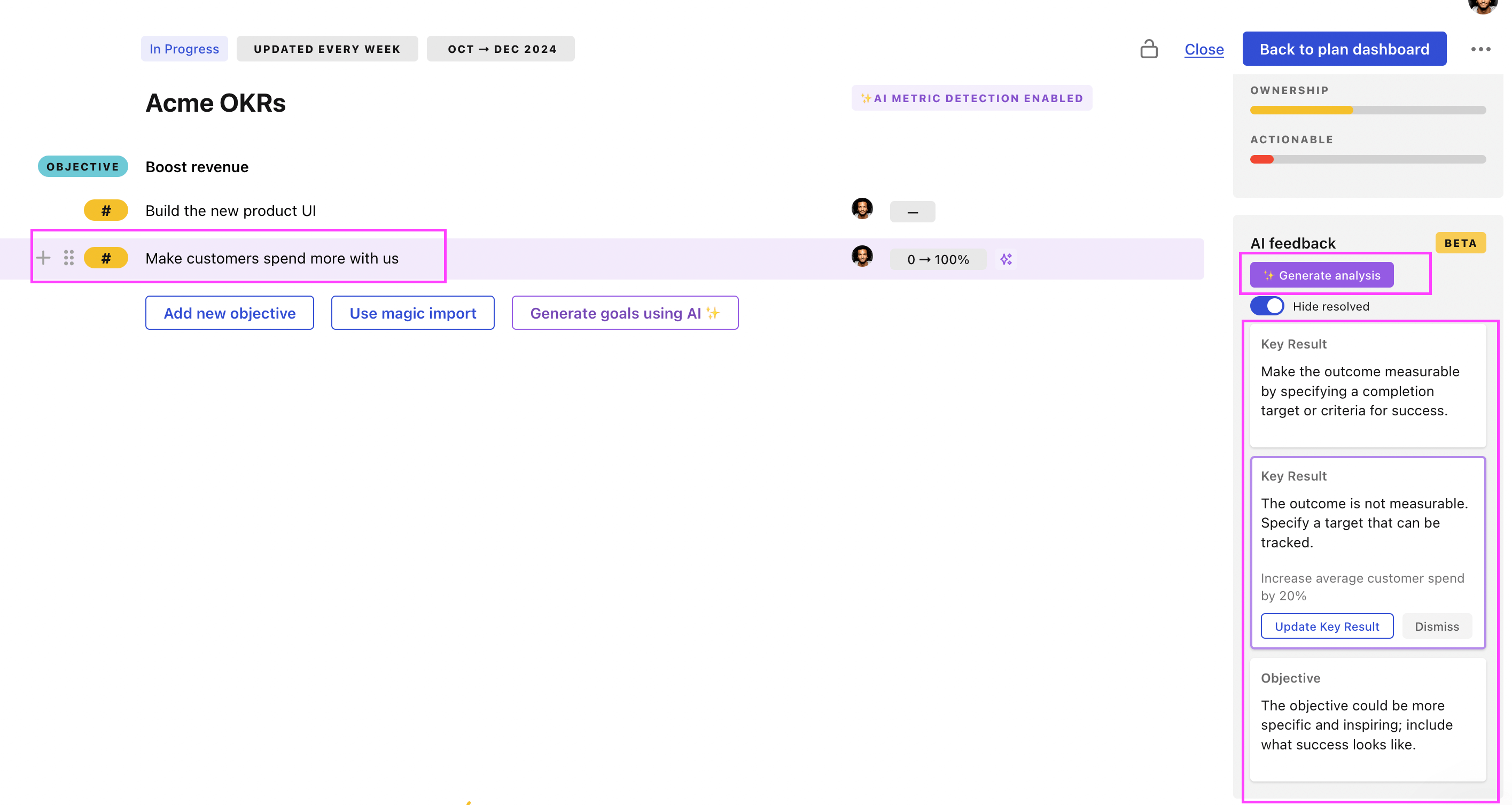
Use Tability feedback to improve existing OKRs
You can also use Tability's AI feedback to improve your OKRs if you already have existing goals. Just import them to the platform and click on the Generate analysis button.
Tability will scan your OKRs and offer different suggestions to improve them. This can range from a small rewrite of a statement to make it clearer to a complete rewrite of the entire OKR.